
AI Voice Dictation That Works in Any App on Mac
Wispr Flow (wispr.ai) is a Mac dictation application that turns voice input into polished, context-aware text across every application on your computer. It launched on Product Hunt in early 2026 and became one of the most upvoted AI tools of the year, reaching over 1,900 upvotes in its launch window.
What Is Wispr Flow?
Wispr Flow works at the operating system level — it captures your voice in any Mac application without you switching context. Press and hold the Fn key, speak, release, and your words appear as clean edited text wherever your cursor is. It works in Gmail, Notion, Slack, ChatGPT, VS Code, Cursor, and any other Mac application without requiring integration or setup per app.
The technical differentiator is what Wispr calls zero-edit messages. Most dictation tools transcribe what you say word-for-word. Wispr Flow applies AI editing in real time — if you say you want to meet at 5pm but change your mind to 6pm, it writes the corrected version. It also learns your writing style across applications.
Who Makes Wispr Flow?
Wispr Flow is developed by Wispr AI, co-founded by Tanay Kothari (CEO) and Sahaj Garg (CTO). The company is based in San Francisco.
Key Features
- System-level dictation — Works in every Mac application without app-specific setup. Press Fn to speak anywhere your cursor is active
- Auto-edit mode — Intelligently edits verbal corrections and filler words in real time. Outputs clean text rather than raw transcription
- Tone match — Learns your writing style per application. Slack messages, emails, and documents each get the appropriate register automatically
- Command mode — Select text and speak a command: make this more concise, translate to Spanish, or summarize this
- Whispering mode — Use Flow quietly in shared spaces. Accuracy is maintained even at low volume
- 100+ language support — Dictate in your native language in any application
- Privacy by design — Recordings stored locally by default. Data sharing for model improvement is opt-in and disabled by default
Pricing
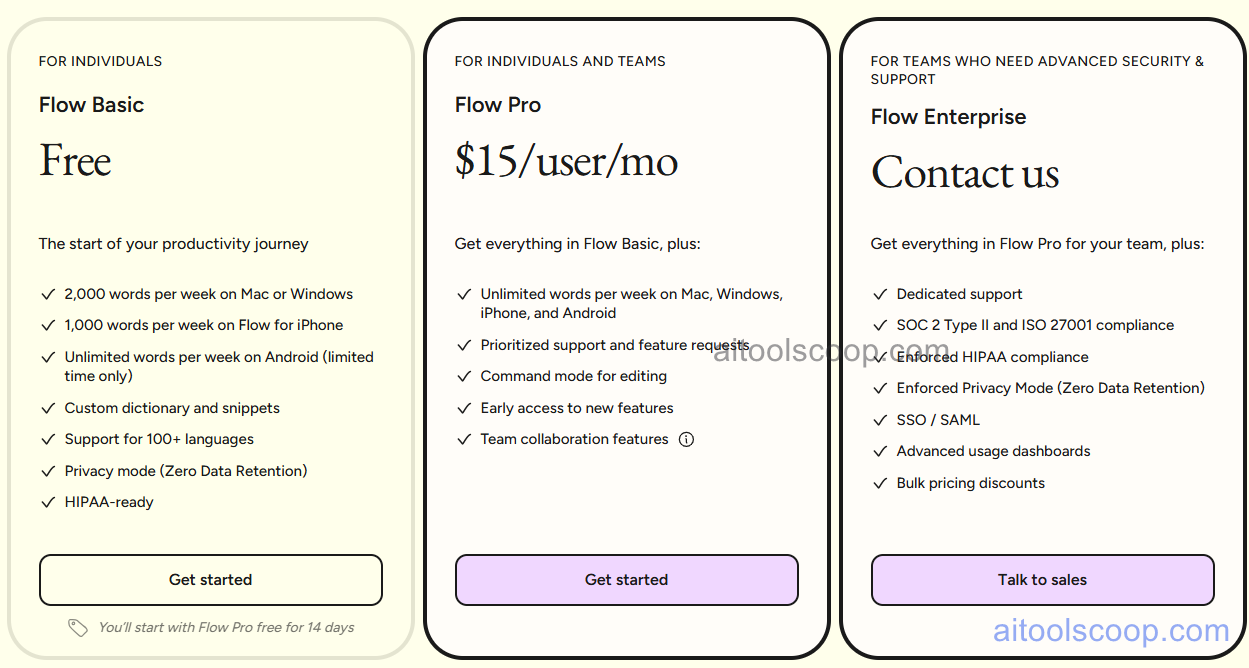
Pricing is subject to change. Always check the latest rates on the official website. For more AI tool reviews, visit aitoolscoop.com.
-
Basic — $0/month — 2,000 words/week (Mac/Windows), 1,000 words/week (iPhone), unlimited (Android), custom dictionary, 100+ languages, privacy mode, HIPAA-ready
- Pro — $15/user/month — Unlimited words on all devices, prioritized support, command mode, early access, team collaboration
- Enterprise — Custom pricing — Dedicated support, SOC 2 Type II & ISO 27001, HIPAA compliant, enforced privacy mode, SSO/SAML, usage dashboards, bulk discounts
Wispr Flow vs Competitors
Against Apple Dictation (built into macOS), Wispr Flow adds AI editing, tone matching, command mode, and style learning that the native Mac tool completely lacks. Against Otter.ai and Fireflies, those tools are meeting-focused transcription services — Wispr Flow is a general-purpose typing replacement. For AI-native Mac users who work heavily in ChatGPT, Claude, or Cursor, Wispr Flow has no direct equivalent.
Pros & Cons
Pros:
- Works in every Mac app without per-app setup — truly system-level
- Auto-edit produces clean output — not raw transcription with filler words
- Tone matching per app means your voice sounds right everywhere
- Privacy-first design — local storage by default
- Deep integration with ChatGPT, Claude, and Cursor for AI-heavy workflows
Cons:
- Mac-only — no Windows or Linux support as of March 2026
- Tone match quality improves over time — early use may feel generic
- Background noise can affect accuracy
- Free plan minutes may be insufficient for power users
Bottom Line
Wispr Flow is the best AI dictation tool for Mac users in 2026. The combination of system-level coverage, AI-powered auto-editing, tone matching, and AI tool integrations makes it genuinely different from both the built-in Mac dictation and traditional transcription services.