

Is It Still the Best Online Whiteboard for Teams
Miro (miro.com) is the world's leading online collaborative whiteboard platform, used by millions of teams to brainstorm, plan, and visualize work together in real time or asynchronously. Miro's infinite canvas supports sticky notes, diagrams, flowcharts, mind maps, wireframes, Kanban boards, and presentations — all in a single shared space that remote and hybrid teams can access simultaneously from any device. With deep integrations into tools like Jira, Slack, Zoom, and Figma, and an AI assistant that helps generate diagrams and summarize boards, Miro has become the visual collaboration standard for product, design, engineering, and strategy teams at companies of all sizes worldwide.
How Miro Works
Create a free Miro account and open a new Board — the infinite canvas that serves as your collaborative workspace. Add content using the rich toolbar: place sticky notes for brainstorming, draw shapes and connectors for flowcharts, drop in images and files, embed live data, or use one of Miro's hundreds of built-in templates for retrospectives, sprint planning, journey mapping, and more. Invite teammates to join the board — everyone sees each other's cursors moving in real time. Use the AI assistant to auto-generate mind maps from a prompt, summarize board content, or create diagrams by describing what you need in plain language. Organize multiple boards in Projects and share them with stakeholders as interactive presentations or view-only links.
Key Features
- Infinite canvas — unlimited whiteboard space for any size team or project scope
- Real-time collaboration — see all team members' cursors and edits live on the same board
- 750+ templates — pre-built layouts for agile ceremonies, workshops, strategy sessions, and more
- Miro AI — generate diagrams, summarize boards, and create content with natural language prompts
- Diagramming tools — flowcharts, mind maps, UML, and ERD diagrams with auto-connect features
- Wireframing kit — UI component library for product and UX design wireframes
- Sticky notes and voting — capture and prioritize ideas with facilitation tools for workshops
- Presentation mode — turn boards into guided walkthroughs for stakeholder presentations
- 130+ integrations — connect with Jira, Confluence, Slack, Zoom, Figma, Google Workspace, and more
- Video and audio — built-in talk track and video calling to collaborate without switching tools
Miro Pricing
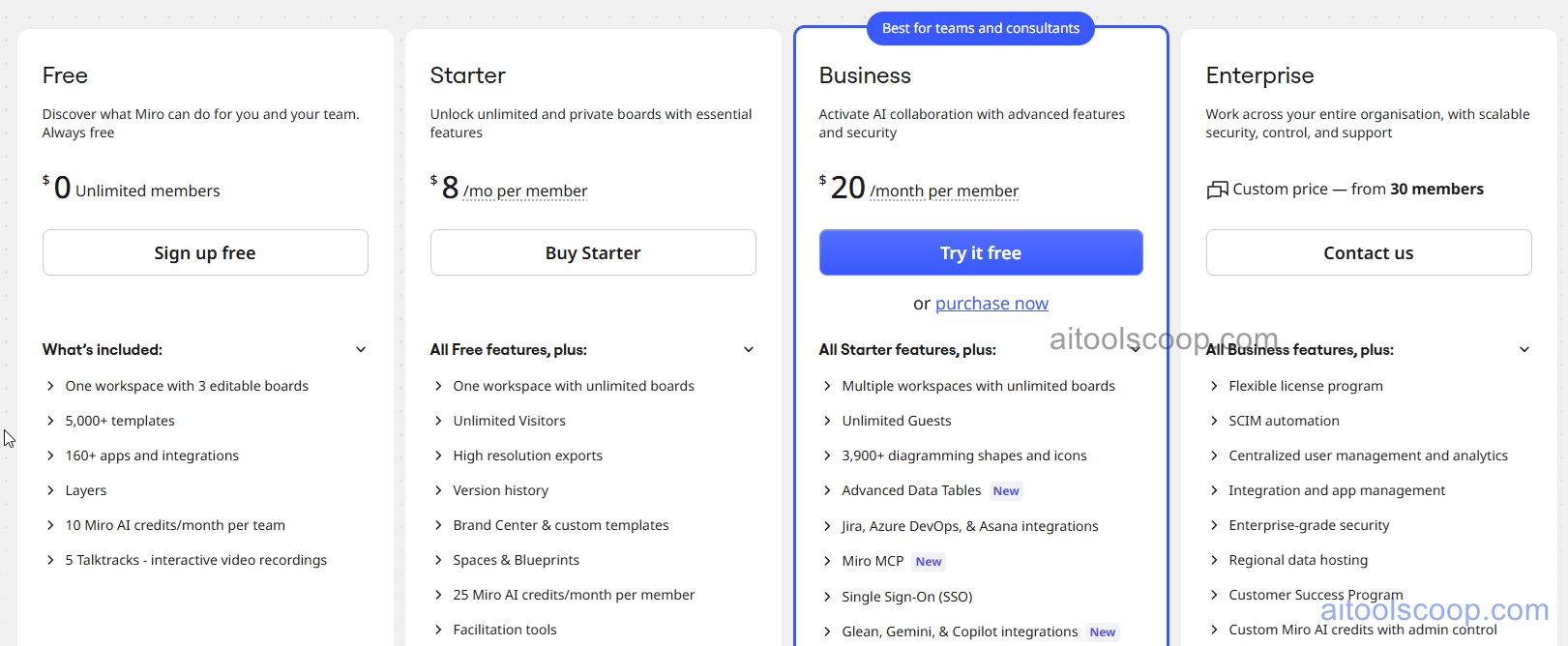
| Plan | Monthly | Key Inclusions |
|---|---|---|
| Free | $0 | 3 editable boards, unlimited team members, core tools, 750+ templates |
| Starter | $8/mo | Unlimited boards, Miro AI, private boards, custom templates, integrations, priority support |
| Business | $20/mo | All Starter features, advanced collaboration, admin controls, SSO, analytics, guest access |
| Enterprise | Custom | All Business features, enterprise security, dedicated support, SLA, custom integrations |
Always check the latest rates on the official website. For more AI tool reviews, visit aitoolscoop.com.
Who Should Use Miro?
Miro is the go-to choice for product and design teams running agile ceremonies, retrospectives, and sprint planning sessions remotely, UX researchers conducting visual user research synthesis and journey mapping, strategy teams facilitating executive workshops and OKR planning, engineering teams diagramming system architectures and technical workflows, and any organization that needs a shared visual workspace for distributed collaboration. The Free plan suits small teams exploring visual collaboration, the Starter plan fits active teams needing unlimited boards and AI, the Business plan serves organizations requiring admin controls and SSO, and Enterprise covers large companies with advanced security needs.