Home/ AI Tools /AI Productivity Tools /Craft
Craft Freemium
🤖 AI Productivity Tools
#5 in AI Productivity Tools

Craft

Craft is a beautifully designed document and note-taking app for individuals and teams with powerful AI writing assistance built in. Free plan available; paid plans from $10/month or $8/month billed annually.

4.6 / 5 Freemium From $10/mo
Quick Info
💰 Pricing$10/mo
⭐ Rating4.6 / 5
🆓 Free Plan✅ Yes
🌐 WebsiteVisit ↗
🕐 Last UpdatedApr 17, 2026
🔀 Alternatives40 tools
Verified Data Updated Apr 17, 2026
Independently Reviewed No paid placements
Detailed Analysis Hands-on testing
Key Features
  • Native Apple apps purpose-built for Mac, iPhone, and iPad with full offline support
  • Block-based editor with rich document creation including headings, tables, callouts, and media
  • Craft AI assistant for writing, rewriting, summarizing, and translating content in the editor
  • Linked documents and backlinks connecting notes to build an interconnected knowledge base
  • Shared Spaces providing team workspaces for collaborative document creation and sharing
  • Beautiful public sharing publishing documents as polished, branded web pages
  • Multi-format export to PDF, Markdown, Word DOCX, and HTML
  • Offline-first sync with full functionality offline and instant cloud sync when connected
  • Document nesting organizing content in hierarchical folders and sub-document structures
  • Built-in and community templates for meetings, projects, and personal planning workflows
4.6
Overall Rating
Ease of Use
4.8
Features
4.6
Value
4.3
Performance
4.7
Support
4.5
Pros & Cons
👍 Pros
  • Best-in-class design quality sets Craft apart from every competing notes and docs app
  • Native Apple performance far superior to Electron-based alternatives like Notion
  • Offline-first architecture ensures reliable access regardless of internet connectivity
  • Craft AI deeply integrated into the writing flow without disrupting the editing experience
  • Annual Personal plan at $8/month strong value for individuals needing unlimited docs and AI
  • Public sharing produces genuinely beautiful pages without additional design effort
  • Block-based editor intuitive enough for new users while powerful for advanced document structures
👎 Cons
  • Apple-focused design means Windows and Android users get an inferior web-only experience
  • Database and spreadsheet functionality absent compared to Notion or Coda for structured data
  • Business plan at $60/month significantly high for small teams needing enterprise features
  • Free plan document limits frustrate users who want to evaluate the full writing experience
  • AI features require Personal plan upgrade removing them from the free tier entirely
  • No native Kanban, Gantt, or project management views limiting operational workflow use cases
  • Less extensive third-party integration library compared to Notion or Coda ecosystems
📖

About Craft

Craft (craft.do) is a premium document creation and note-taking application renowned for its exceptional design quality and smooth native performance across Mac, iPhone, iPad, and the web. Craft combines the structure of a document editor with the flexibility of a linked notes system, allowing users to build beautiful documents, wikis, and knowledge bases that are a pleasure to write and read. With Craft AI integrated throughout the writing experience, users can draft, rewrite, summarize, and transform content using natural language commands. Craft has become the productivity app of choice for designers, writers, founders, and teams who refuse to compromise on the quality of their writing environment.

How Craft Works

Download Craft on Mac, iOS, or access it via the web app and create your first document or space. Write using a clean block-based editor with rich formatting support — headings, tables, code blocks, checklists, callouts, and media embeds all work intuitively. Link documents together to build an interconnected knowledge base with bidirectional references. Use Craft AI to generate outlines, rewrite paragraphs for clarity, summarize long documents, or translate content — all without leaving the editor. Share documents as beautiful read-only public pages, collaborate with teammates in shared Spaces, or export to PDF, Markdown, and Word. The native apps are optimized for Apple Silicon and sync instantly across all devices via iCloud or Craft Cloud.

Key Features

  • Native Apple apps — purpose-built for Mac, iPhone, and iPad with full offline support
  • Block-based editor — rich document creation with headings, tables, callouts, and media
  • Craft AI assistant — built-in AI for writing, rewriting, summarizing, and translating content
  • Linked documents and backlinks — connect notes and documents to build an interconnected knowledge base
  • Shared Spaces — team workspaces for collaborative document creation and sharing
  • Beautiful public sharing — publish documents as polished, branded web pages
  • Multi-format export — export to PDF, Markdown, Word DOCX, HTML, and more
  • Offline-first sync — full functionality without internet, with instant cloud sync when connected
  • Document nesting — organize content in hierarchical folders and sub-documents
  • Templates — built-in and community templates for meetings, projects, and personal planning

Craft Pricing
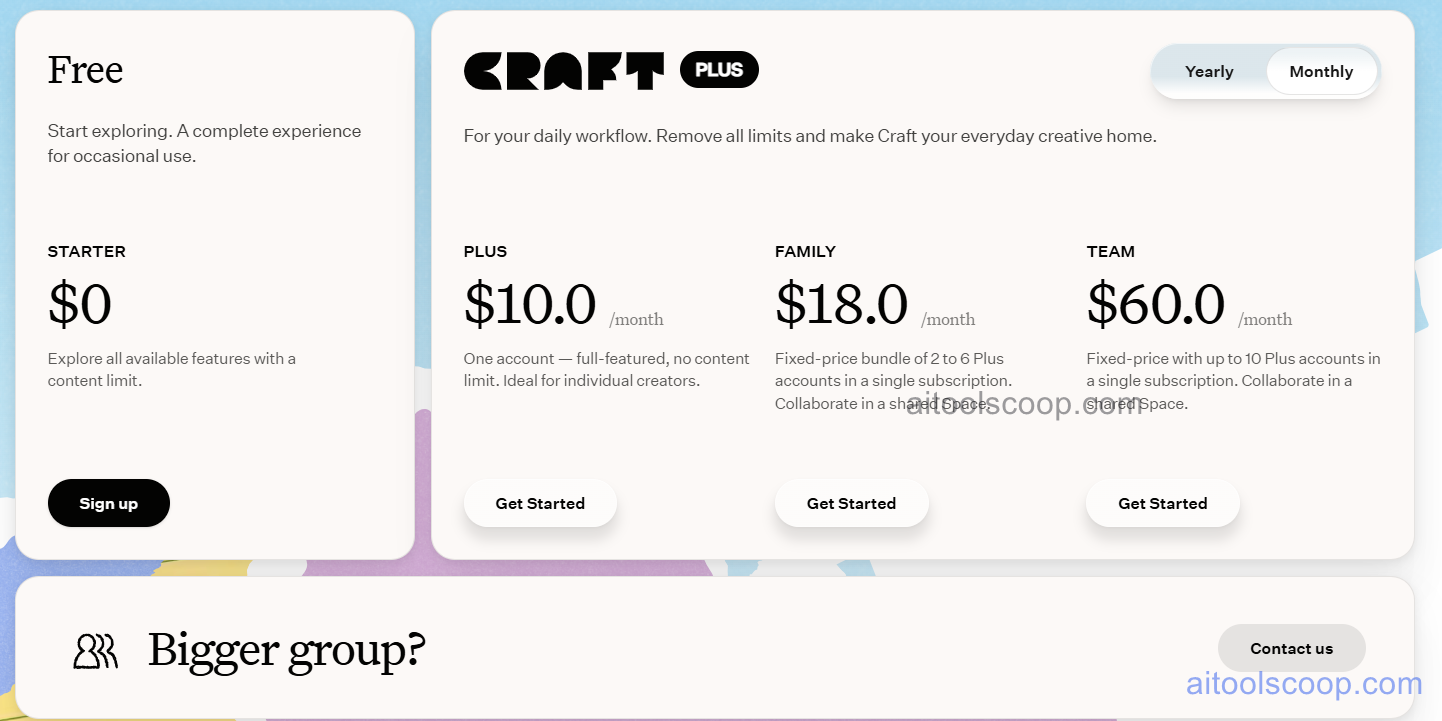
Craft pricing plans
Craft pricing — screenshot from craft.do
Plan Monthly Annually Key Inclusions
Free $0 $0 Limited documents and spaces, core editor, offline access, personal use
Personal $10/mo $8/mo Unlimited documents, Craft AI, all export formats, public sharing, priority sync
Team $18/mo $15/mo All Personal features, shared Spaces, team collaboration, admin controls, priority support
Business $60/mo $50/mo All Team features, SSO, advanced permissions, audit logs, dedicated support

Always check the latest rates on the official website. For more AI tool reviews, visit aitoolscoop.com.

Who Should Use Craft?

Craft is the ideal workspace for Apple ecosystem users who want a premium, design-forward document app that outperforms both Notion and Apple Notes, writers and content creators producing polished long-form documents that need to be shared beautifully, designers and creative professionals who value aesthetic quality in their working environment, startup founders building company wikis and team documentation, and individuals managing personal knowledge bases on Mac and iOS. The Free plan suits casual users, the Personal plan fits power users needing AI and unlimited content, and the Team and Business plans serve collaborative organizations.
💰

Pricing Plans

Plan Price Includes
Pro $10/mo Full access + priority support
Check Current Pricing →
Affiliate Disclosure: This page contains affiliate links. If you click and make a purchase, we may earn a small commission at no extra cost to you. We only recommend tools we genuinely believe in.

🎯 Explore More

Discover other curated resources from our platform

🛠️ AI Tools View All →
Gemini
Gemini
★ 4.6
Resemble
Resemble
★ 4.2
Kapwing
Kapwing
★ 4.4
⚔️ VS Comparisons View All →
ChatGPT vs Kimi: 2026 Comparison — Pricing, Features & Verdict
ChatGPT vs Kimi: 2026 Comparison —…
ChatGPT vs Kimi
ChatGPT vs Gemini: 2026 Comparison — Pricing, Features & Verdict
ChatGPT vs Gemini: 2026 Comparison —…
ChatGPT vs Gemini
⚔️
ChatGPT vs DeepSeek: Which AI Is…
ChatGPT GPT-4o vs DeepSeek R1
💡 Free Prompts View All →
💡
Stop Poor Video Script Structure: Gemini…
🔥 7.2K uses
💡
Claude for Startup Live Streaming Managers:…
🔥 7.8K uses
💡
Stop Duplicate Content From Cannibalizing Rankings…
🔥 4.2K uses
💡 Free Prompts