
Paperpile (paperpile.com) is a cloud-based reference management tool designed for researchers and academics who live in Google Workspace. Launched in 2012 and built with a focus on simplicity and speed, Paperpile stores all references and PDFs in Google Drive, making files instantly accessible across devices and shareable via Google Drive's standard sharing mechanisms. Its native Google Docs add-on is widely regarded as one of the smoothest citation-insertion experiences available, and a Microsoft Word add-in extends the same workflow to Office users.
Paperpile has incorporated AI features including AI-assisted paper search that surfaces related literature, automated metadata extraction and deduplication, and PDF summarisation tools to help researchers assess papers faster. The platform supports importing references from PubMed, Google Scholar, arXiv, CrossRef, and all major academic databases, and exports to BibTeX, RIS, and other standard formats for compatibility with LaTeX and other writing environments.
How Paperpile Works
Researchers sign up with their Google account and install the Paperpile Chrome extension and Google Docs add-on. Papers can be added by searching within Paperpile, importing via DOI or PMID, dragging in PDF files, or using the browser extension to save papers from any webpage or database. All PDFs are stored in Google Drive under a Paperpile folder, so files are accessible in Google Drive, the Paperpile web app, and the iOS and Android mobile apps. When writing in Google Docs, the Paperpile add-on opens a search panel where researchers find and insert formatted references; bibliographies are generated and updated automatically. The same workflow is available in Microsoft Word via a separate add-in.
Key Features
- AI paper search and recommendations — AI-assisted discovery of related literature based on existing library and current document context
- Google Drive PDF storage — all PDFs stored in Google Drive for seamless access, backup, and sharing without separate cloud storage
- Google Docs add-on — inline citation insertion and automatic bibliography generation with one-click style switching
- Microsoft Word add-in — full citation and bibliography workflow within Word for Windows and Mac
- PDF annotation — highlight, underline, and annotate PDFs with notes, accessible across web and mobile apps
- Smart search and filtering — full-text search across all papers and annotations, with labels, stars, and folder organisation
- BibTeX and RIS export — export references for use with LaTeX, Overleaf, and other academic writing tools
- Shared libraries — share reference collections with collaborators for team-based research projects
- Automatic metadata retrieval — DOI, PMID, arXiv ID, and URL import with auto-populated author, title, journal, and abstract fields
- Mobile apps — iOS and Android apps for reading and annotating papers on the go with offline access
Paperpile Pricing
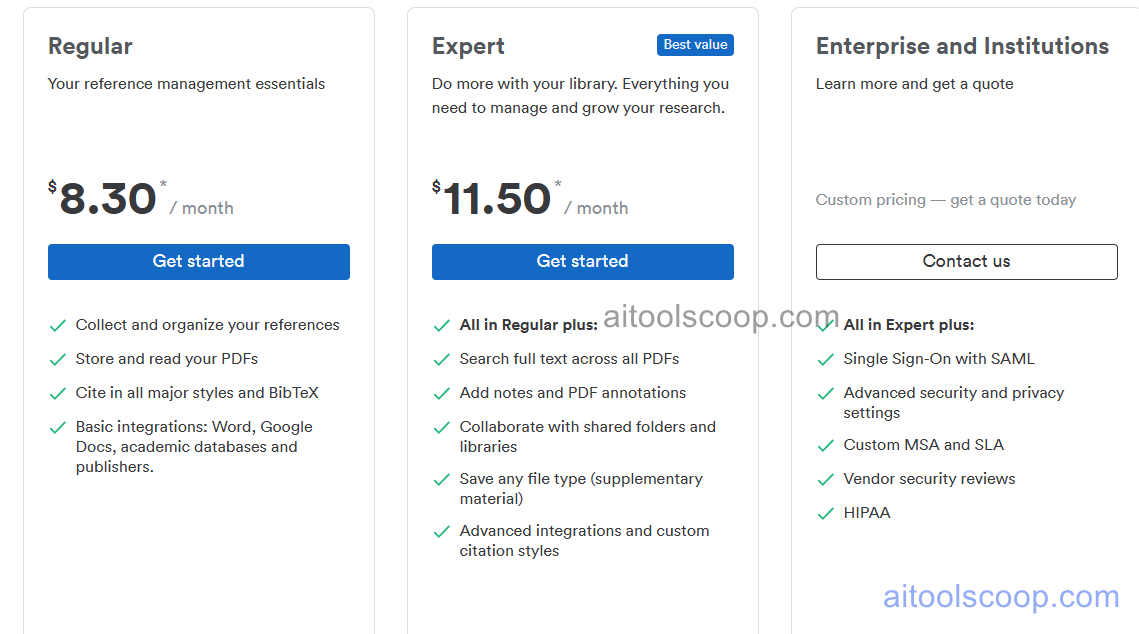
Paperpile offers two main subscription plans. There is no permanent free plan, but a 30-day free trial is available.
- Personal — $8.30/month (billed annually) — unlimited references and PDF storage in Google Drive, Google Docs and Word add-ins, PDF annotation, mobile apps, BibTeX/RIS export, and all core reference management features.
- Student/Academic — $11.50/month (billed annually) — everything in Personal plus shared library collaboration, priority support, and enhanced team features suited to lab groups and academic institutions.
A 30-day free trial is available with no credit card required. Always verify current rates at paperpile.com/pricing.
Who Should Use Paperpile?
Paperpile is an excellent fit for researchers and academics who are already deeply embedded in Google Workspace — particularly those who write primarily in Google Docs. Its tight Google Drive integration means zero friction for PDF storage and sharing, and the Google Docs add-on is exceptionally smooth. It also suits LaTeX users who need reliable BibTeX export for Overleaf. The student and academic plan's shared libraries make it a solid choice for research groups and lab teams. Paperpile is less suited to researchers who need a free long-term option (it has no free plan beyond the trial), those using institutional repositories outside Google Drive, or writers working primarily in Word who may find Sciwheel or Zotero better integrated. Users heavily invested in Microsoft 365 rather than Google Workspace may also find alternatives more natural.
Frequently Asked Questions
Does Paperpile have a free plan?
Paperpile does not have a permanent free plan. It offers a 30-day free trial that gives full access to all features with no credit card required. After the trial, a paid subscription is required to continue using the service. Researchers looking for a permanently free reference manager may want to consider Zotero or Sciwheel's free tier as alternatives.
How much does Paperpile cost?
Paperpile's Personal plan is $8.30 per month (billed annually), and the Student/Academic plan is $11.50 per month (billed annually). Both plans include unlimited references and PDF storage, Google Docs and Word integration, PDF annotation, and mobile apps. The Student/Academic plan additionally includes shared library collaboration and priority support.
How does Paperpile store PDFs?
Paperpile stores all PDFs directly in your personal Google Drive, inside a folder named Paperpile. This means your papers count against your Google Drive storage quota, but they are instantly accessible from Google Drive, the Paperpile web app, and the iOS and Android apps. Files can be shared using standard Google Drive sharing, and they are backed up as part of Google's infrastructure — no separate cloud storage account is needed.
Does Paperpile work with LaTeX and Overleaf?
Yes. Paperpile supports BibTeX and RIS export, making it compatible with LaTeX editors and Overleaf. Researchers can export their entire library or a selected set of references as a .bib file and upload it to Overleaf for use in LaTeX manuscripts. Paperpile does not have a direct Overleaf integration like some other tools, but the BibTeX export workflow is straightforward and widely used.
What is the difference between Paperpile and Mendeley?
Paperpile and Mendeley are both reference managers but take different approaches. Paperpile is a paid, Google-centric tool with a clean interface and tight Google Docs integration — it stores PDFs in Google Drive and has no ads. Mendeley is free (with storage limits) and Elsevier-owned, with a desktop app and its own cloud storage. Mendeley has a larger user community and a social/networking layer. Paperpile is generally preferred by researchers who value a cleaner UX and Google Workspace integration; Mendeley suits those wanting a free option or a desktop-first workflow.