

AI Calendar Defending Time for Priorities
Reclaim (reclaim.ai) is an AI-powered calendar assistant that automatically schedules and defends time for tasks, habits, meetings, and breaks. Unlike simple task managers, Reclaim integrates directly with Google Calendar to find and protect optimal time slots for your priorities, automatically rescheduling as conflicts arise. The platform emphasizes work-life balance by scheduling personal habits (exercise, lunch, focus time) alongside work commitments, ensuring they actually happen rather than getting deprioritized. With features including smart meeting scheduling, team coordination, and calendar sync for tasks from project management tools, Reclaim serves professionals seeking to reclaim control of their calendars and protect time for what matters most.
How Reclaim Works
Connect Reclaim to your Google Calendar. Add recurring habits you want to protect (exercise, lunch breaks, focus time) with flexible scheduling preferences. Create tasks with deadlines and priorities — Reclaim automatically finds optimal time slots and adds them to your calendar. As new meetings get scheduled, Reclaim moves your tasks and habits to new available slots automatically. Use smart scheduling links to send availability to others, with Reclaim accounting for your priorities and preferences. For teams, Reclaim coordinates schedules to find optimal meeting times when all attendees are available and fresh. Integrate with project management tools (Asana, ClickUp, Jira) to automatically sync tasks to your calendar. Review analytics showing how time is allocated across categories and whether you're hitting habit goals.
Key Features
- Habit scheduling — automatically schedules and defends time for recurring priorities
- Smart task scheduling — finds optimal time slots based on deadlines and energy levels
- Auto-rescheduling — moves tasks and habits automatically as conflicts arise
- Meeting optimization — suggests best times when all attendees are available and alert
- Calendar sync — integrates with Asana, ClickUp, Todoist, and Jira for task auto-scheduling
- Smart scheduling links — availability sharing that accounts for priorities and preferences
- Buffer time — automatically adds breaks between meetings
- Team coordination — finds meeting times optimized across team schedules
- Analytics dashboard — insights on time allocation and habit adherence
- Google Calendar integration — works seamlessly with existing calendar workflows
Reclaim Pricing
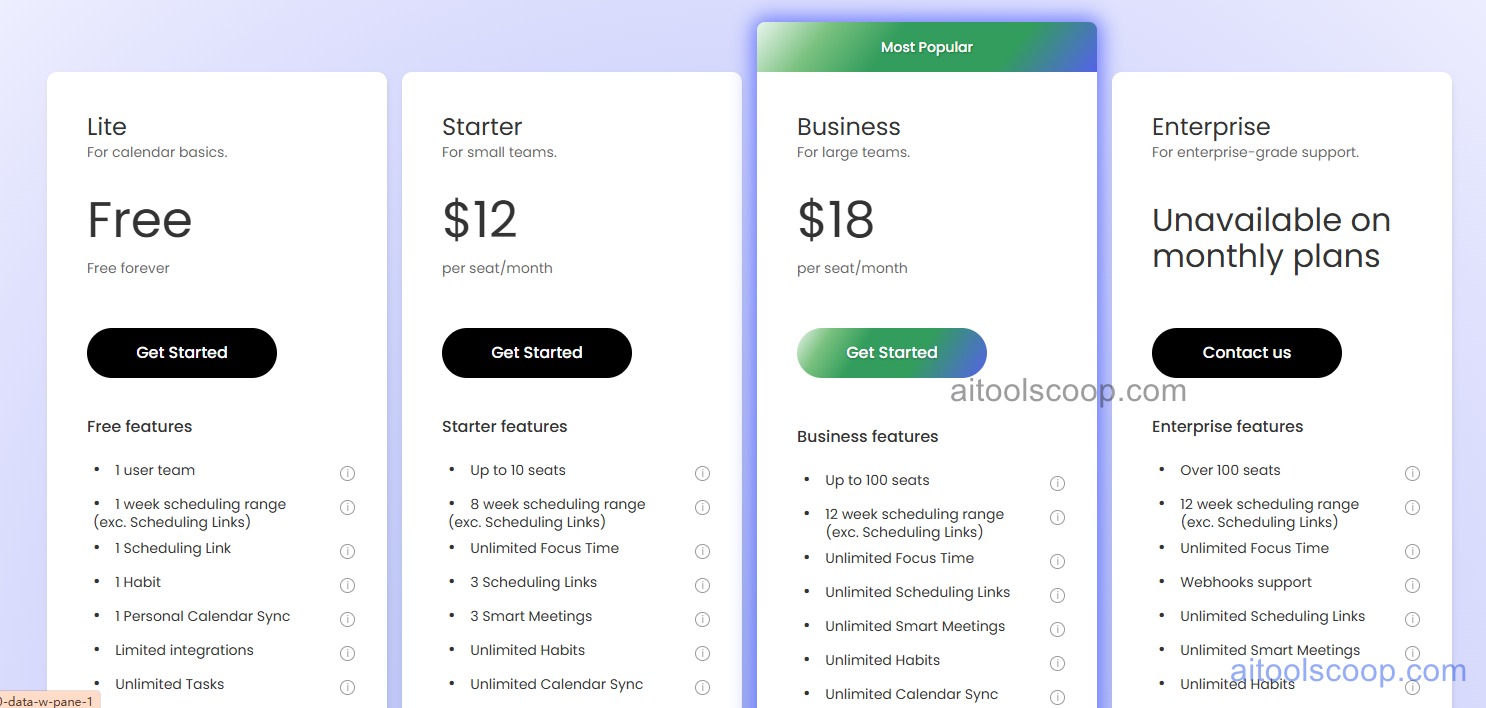
| Plan | Monthly | Annually | Key Features |
|---|---|---|---|
| Free | $0 | $0 | Unlimited habits, basic task scheduling, smart scheduling links, buffer time |
| Starter | $12 | $10 | Advanced task features, calendar sync integrations, priority support |
| Business | $18 | $15 | Team scheduling, no-meeting days, workload balancing, analytics dashboard |
| Enterprise | $22 | $22 | SSO, admin controls, advanced security, dedicated support, custom integrations |
Always check the latest rates on the official website. For more AI tool reviews, visit aitoolscoop.com.
Who Should Use Reclaim?
Reclaim is ideal for busy professionals struggling to find time for personal priorities alongside work commitments, remote workers needing structure and boundaries for work-life balance, managers coordinating team calendars and protecting team focus time, individuals with ADHD or executive function challenges requiring automated scheduling support, habit-conscious users committed to regular exercise, meditation, or learning, and teams seeking to reduce meeting overload and optimize collaboration time. The generous free plan suits individual users, while paid plans serve power users and teams.