Build a Second Brain With Linked Notes
Obsidian (obsidian.md) is a local-first knowledge management and note-taking application built on plain Markdown files stored directly on your device. Unlike cloud-first notes apps, Obsidian treats your notes as a personal knowledge base — called a Vault — where every note can link to every other note, creating a web of interconnected ideas visualized in a dynamic Graph View. With a thriving plugin ecosystem of over a thousand community-built extensions, Obsidian can be configured as a writing tool, research database, task manager, journaling system, or second brain tailored precisely to any personal workflow. Privacy-conscious knowledge workers, academics, writers, and developers have adopted Obsidian as their primary thinking and documentation environment.
How Obsidian Works
Download Obsidian and open or create a Vault — a folder of Markdown files on your local device. Write notes in plain Markdown with Obsidian's enhanced editor, which renders formatting in real time. Create links between notes using double-bracket syntax to connect related ideas, people, projects, and references. The Graph View renders all your linked notes as a visual network, revealing connections between ideas that would be invisible in a traditional folder structure. Extend functionality with community plugins — add tasks, calendars, flashcard systems, dataview queries, and canvas boards. Sync your Vault across devices using Obsidian Sync or your own cloud solution. Obsidian Publish creates a public website directly from your Vault for sharing your knowledge base.
Key Features
- Local Markdown files — all notes stored as plain text files on your device, owned entirely by you
- Bidirectional linking — connect notes with double-bracket links and see all backlinks automatically
- Graph View — visual network diagram of all connected notes across your entire Vault
- Plugin ecosystem — 1,000+ community plugins extending functionality for any workflow
- Canvas — infinite whiteboard for spatially arranging and connecting notes and media
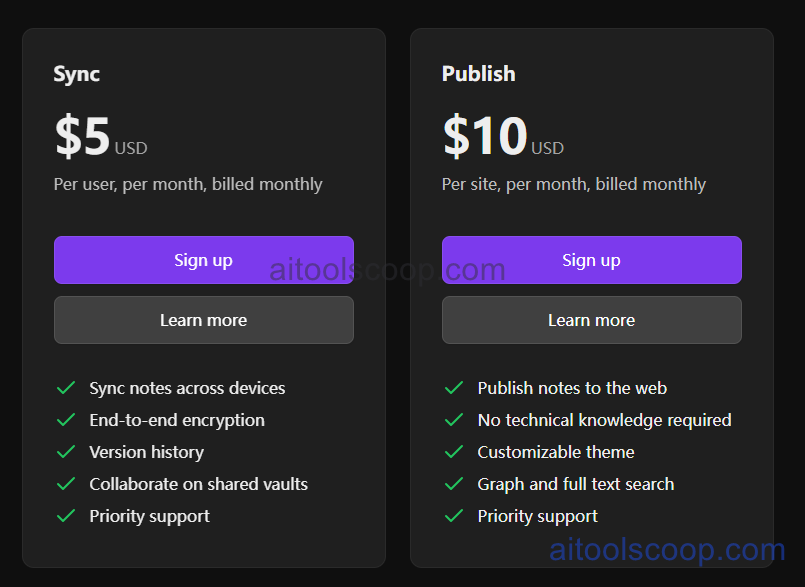
- Obsidian Sync — end-to-end encrypted sync across devices with version history
- Obsidian Publish — create and host a public website from your Vault notes
- Themes and customization — extensive visual customization via community and custom CSS themes
- Offline-first — full functionality with no internet required, ever
- Privacy-focused — no account required for personal use; your data never leaves your device
Obsidian Pricing
| Service | Monthly | Annually | Key Inclusions |
|---|---|---|---|
| Personal Use | Free | Free | Full app, unlimited notes, all core features, plugins, themes, personal use |
| Obsidian Sync | $5/mo | $4/mo | End-to-end encrypted sync across unlimited devices, 1-year version history |
| Obsidian Publish | $10/mo | $8/mo | Publish Vault notes as a custom public website with a custom domain |
Note: The Obsidian app itself is free for personal use. Sync and Publish are optional paid add-on services. Always check the latest rates on the official website. For more AI tool reviews, visit aitoolscoop.com.
Who Should Use Obsidian?
Obsidian is ideal for researchers, academics, and writers who need a long-term personal knowledge base that connects ideas across years of work, software developers managing technical notes and documentation locally, privacy-conscious professionals unwilling to store personal knowledge in third-party clouds, students practicing linked note-taking methodologies like Zettelkasten or Building a Second Brain, and power users who want unlimited customizability through a plugin ecosystem. The core app is completely free for personal use, making Obsidian accessible to anyone willing to invest time in learning its approach to knowledge management.