

Tableau (tableau.com) is one of the world's leading data visualisation and business intelligence platforms, now part of Salesforce. Trusted by tens of thousands of organisations globally — from Fortune 500 enterprises to government agencies and academic institutions — Tableau enables analysts, business users, and data teams to connect to virtually any data source, build rich interactive dashboards, and share insights across the organisation. Its drag-and-drop visual authoring model is designed to make data exploration accessible to non-technical users, while its deep connection library, calculation engine, and performance at scale keep data engineers and analysts productive on complex enterprise workloads.
In 2026, Tableau has accelerated its AI capabilities through the Salesforce AI integration layer. Tableau Pulse delivers AI-powered, personalised data insights surfaced proactively in Slack and email — summarising metric changes, detecting anomalies, and answering natural-language follow-up questions without the user needing to open a dashboard. The Tableau Agent (available via the Tableau+ tier) allows users to query data and build analyses through conversational natural language. Tableau's deployment model supports both Tableau Cloud (fully hosted by Salesforce) and Tableau Server (self-managed on-premises or in private cloud), with a role-based per-seat licensing model covering three user types: Creator, Explorer, and Viewer.
How Tableau Works
Data analysts connect Tableau to their data sources — cloud warehouses (Snowflake, BigQuery, Redshift, Databricks), databases, flat files, or Salesforce CRM data — using Tableau's native connectors. In Tableau Desktop or the web authoring environment, they build visualisations using a drag-and-drop interface, applying filters, calculations, table calculations, and level-of-detail expressions without writing SQL. Completed workbooks are published to Tableau Cloud or Tableau Server, where Viewer and Explorer users can interact with dashboards, apply filters, drill down into data, and download reports. Tableau Prep Builder handles data cleaning and transformation, outputting structured data flows for analysis. Tableau Pulse delivers AI-generated summaries and anomaly alerts directly to stakeholders in Slack and email, closing the loop between data teams and business users.
Key Features
- Drag-and-drop visual authoring — intuitive dashboard and report building for analysts and business users without requiring SQL or code
- Tableau Pulse — AI-powered proactive insights delivered to stakeholders in Slack and email, with anomaly detection, metric summaries, and natural-language Q&A
- Tableau Agent — conversational natural-language interface for querying data and building analyses, available on the Tableau+ tier
- Tableau Prep Builder — visual data cleaning and transformation tool included with Creator licences for building structured data pipelines
- Native cloud warehouse connectors — live and extract connections to Snowflake, BigQuery, Redshift, Databricks, Salesforce Data Cloud, and 100+ other sources
- Cloud and Server deployment — fully hosted Tableau Cloud (Salesforce-managed) or self-managed Tableau Server on-premises or private cloud
- Level-of-detail (LOD) expressions — advanced calculations that allow data aggregation at any granularity independently of the view level
- Row-level security — fine-grained data access controls ensuring users only see data appropriate to their role (Enterprise tier)
- Embedded analytics — embed interactive Tableau dashboards into external applications and portals via the Tableau Embedding API
- Slack and Salesforce integration — native integration with Slack (via Tableau Pulse) and the full Salesforce ecosystem including Data Cloud and Agentforce
Tableau Pricing
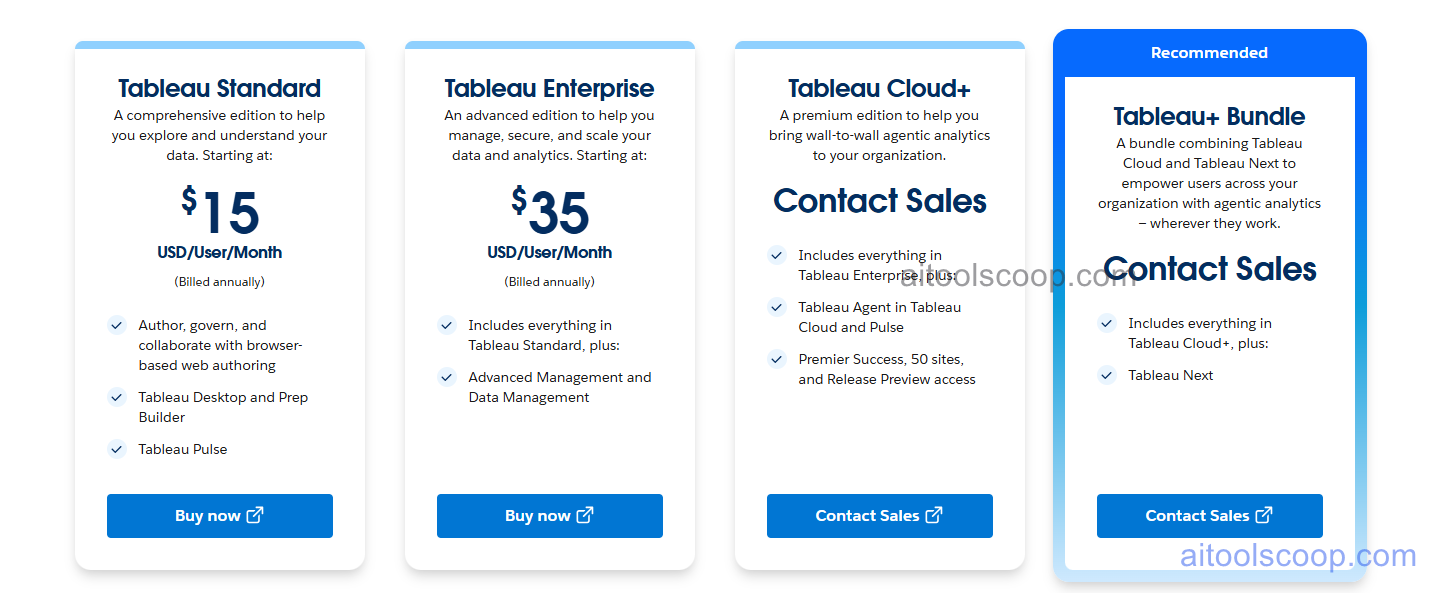
- Tableau Viewer — from $15/user/month (billed annually) — View and interact with published dashboards, apply filters, and download data. Cannot create or edit workbooks. Entry-level licence for stakeholders and business consumers of data.
- Tableau Explorer — from $35/user/month (billed annually) — Edit existing workbooks, create new analyses from published data sources, and publish to Tableau Cloud or Server. Cannot connect to new raw data sources or use Tableau Desktop.
Creator licences (required for full authoring, Tableau Desktop, and Tableau Prep) are priced above the Explorer tier and require annual commitment. Enterprise editions (Standard and Enterprise Cloud) add Advanced Management, enhanced governance, row-level security at scale, and Tableau Pulse premium features at higher per-user rates. Tableau+ adds Tableau Agent and Tableau Next capabilities and is available via sales. All standard plans require annual commitment; month-to-month billing is available at significantly higher rates. Tableau Public (a free version) is available but all dashboards are publicly visible, making it unsuitable for confidential data.
Pricing shown is for Tableau Cloud Standard and varies by edition, deployment, and user volume. Volume discounts and multi-year contract pricing are common. Always verify current rates at tableau.com/pricing.
Who Should Use Tableau?
Tableau is best suited to mid-to-large organisations with established data teams that need enterprise-grade visualisation, governance, and embedded analytics capabilities at scale. Its drag-and-drop authoring model makes it accessible to non-technical analysts, while its performance on large datasets and deep integration with the Salesforce ecosystem makes it a strong fit for Salesforce-heavy organisations. Small teams and individual analysts often find the annual-only, per-seat licensing model difficult to justify given the cost; tools like Hex, Metabase, or Power BI offer more accessible pricing for smaller organisations. The absence of a permanent free tier (beyond Tableau Public with public-only dashboards) is a meaningful constraint for teams that need to evaluate before committing.
Frequently Asked Questions
What is Tableau?
Tableau is an enterprise data visualisation and business intelligence platform owned by Salesforce. It enables analysts and business users to connect to data sources, build interactive dashboards through a drag-and-drop interface, and share insights across organisations via Tableau Cloud or Tableau Server. In 2026, Tableau has expanded its AI capabilities through Tableau Pulse (proactive AI-driven insights) and Tableau Agent (natural-language data querying).
Does Tableau have a free plan?
Tableau does not offer a permanent free plan for private data. Tableau Public is a free version, but all dashboards created with it are publicly visible and it cannot be used for confidential or business data. A 14-day free trial is available for Tableau Desktop and Creator licences without requiring a credit card. Paid plans are billed annually.
What is Tableau Pulse?
Tableau Pulse is an AI-powered analytics layer that proactively surfaces personalised data insights to stakeholders in Slack and email. It monitors defined metrics, detects anomalies and significant changes, generates natural-language summaries, and allows users to ask follow-up questions in plain language — without requiring them to open a Tableau dashboard. Tableau Pulse is included in standard plans; premium Pulse features are part of the Tableau+ and Enterprise tiers.
What is the difference between Tableau Cloud and Tableau Server?
Tableau Cloud is a fully managed SaaS deployment hosted and maintained by Salesforce, with no infrastructure overhead for the customer. Tableau Server is a self-hosted deployment that organisations install and manage on their own infrastructure (on-premises or private cloud), giving more control over data residency and security but requiring dedicated IT resources and infrastructure investment. Both support the same three user licence types: Creator, Explorer, and Viewer.
What is the difference between Tableau Creator, Explorer, and Viewer?
Creator licences provide full authoring capabilities including Tableau Desktop, Tableau Prep Builder, and the ability to connect to new raw data sources. Explorer licences allow editing existing workbooks and creating new analyses from published data sources but cannot connect to new raw sources or use Desktop. Viewer licences are for stakeholders who only need to view, filter, and interact with published dashboards. Each licence type is priced differently, with Creator being the highest-cost role.