Still the Best All-in-One Workspace for Teams and Creators
Notion is the most versatile productivity and knowledge management tool available in 2026. It combines notes, wikis, databases, project boards, and AI writing assistance in a single workspace — replacing Evernote, Confluence, Trello, and Google Docs for millions of teams worldwide.
What Is Notion?
Notion is a block-based workspace where everything — text, images, tables, calendars, kanban boards, code blocks — exists as modular blocks you can arrange freely. This flexibility makes it work equally well as a personal note-taking app, a team wiki, a project management system, or a CRM.
Notion AI, launched in 2023 and significantly upgraded since, is now built into every page. It can summarize documents, draft content, extract action items from meeting notes, translate text, and answer questions about your workspace content.
Key Features
- Flexible Block System — Text, databases, embeds, code, media — all drag-and-drop in one canvas
- Databases — Table, board, calendar, gallery, list, and timeline views of the same data
- Notion AI — Built-in AI for writing, summarizing, translating, and Q&A across your workspace
- Templates — Thousands of community and official templates for any workflow
- Team Wikis — Company knowledge base with permissions, versioning, and search
- Notion Calendar — Integrated calendar that syncs with Google Calendar
- API & Integrations — Connect with Slack, GitHub, Jira, Zapier, and hundreds more
Pricing
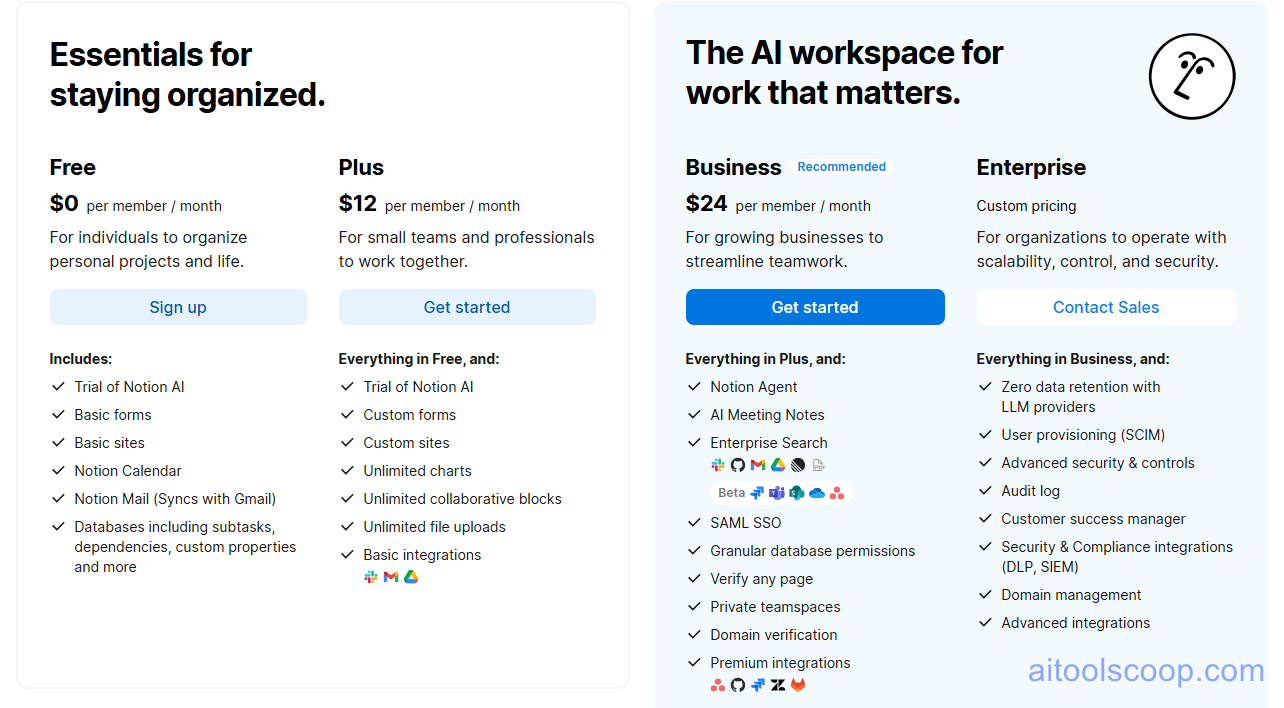
- Free — Unlimited pages and blocks, 10 guests, 7-day page history, basic AI access
- Plus — $12/month — Unlimited guests, 30-day history, unlimited file uploads
- Business — $24/month — 90-day history, advanced permissions, SAML SSO
- Enterprise — Custom — Unlimited history, advanced security, dedicated support
Notion AI is an add-on at $8/member/month on any plan, or included in some annual plans. Annual billing saves approximately 20%. Pricing is subject to change. Always check the latest rates on the official website. For more AI tool reviews, visit aitoolscoop.com.
Notion vs Competitors
Against Obsidian, Notion wins on collaboration and database features; Obsidian wins on local storage and plugin depth. Against Confluence, Notion is significantly easier to use and better for small teams. Against Google Docs, Notion offers far more structure and organization. The main weakness versus all competitors: Notion can feel slow on large workspaces and has a steeper learning curve than simple note apps.
Who Should Use Notion?
Notion works for almost everyone — students, freelancers, startups, and enterprises all use it heavily. The free plan is genuinely useful for individuals. Teams get the most value from Plus and Business plans. If you hate setting up systems and just want to write notes, simpler tools like Apple Notes or Bear may suit you better.
Bottom Line
Notion is the best all-in-one workspace for individuals and teams who want flexibility and AI built in. The free plan makes it risk-free to try. Most people who commit to learning it properly never switch back.