

Fellow (fellow.app) is a cloud-based meeting management and productivity platform designed to help managers and teams run more effective meetings. Founded in 2017 and headquartered in Ottawa, Canada, Fellow has been adopted by teams at companies including Shopify, HubSpot, Loom, and Chargebee. The platform covers the full meeting lifecycle — preparation with shared agendas, real-time collaboration during meetings, and follow-through with AI-generated summaries and action item tracking after.
Fellow's AI capabilities have expanded significantly with its Fellow Copilot feature, which automatically joins video calls on Zoom, Google Meet, and Microsoft Teams to transcribe conversations, generate structured meeting summaries, and extract action items. This eliminates the need for manual note-taking and ensures decisions and next steps are captured and assigned automatically. Fellow also integrates with tools like Slack, Jira, Asana, and HubSpot to surface action items directly in the tools teams already use.
How Fellow Works
Team members connect Fellow to their Google Calendar or Outlook calendar to automatically populate upcoming meetings. For each meeting, Fellow creates a shared agenda workspace where all participants can add talking points, goals, and context before the call. During the meeting, participants collaborate on notes in real time. After the meeting, Fellow Copilot generates an AI summary with key decisions, action items, and next steps, which are automatically assigned to attendees and synced to connected tools. Managers use Fellow's one-on-one templates and check-in streams to maintain structured, consistent conversations with direct reports.
Key Features
- Fellow Copilot AI — automatically joins Zoom, Google Meet, and Teams calls to transcribe, summarise, and extract action items from meetings
- Collaborative meeting agendas — shared agenda builder where all participants can add talking points before the meeting starts
- AI meeting summaries — structured post-meeting summaries with decisions, action items, and next steps generated automatically
- Action item tracking — assign, track, and follow up on meeting action items across the team with due dates and status updates
- One-on-one templates — manager and employee templates for weekly check-ins, performance conversations, and goal reviews
- Calendar integration — syncs with Google Calendar and Outlook to auto-populate meetings and attach agendas
- Slack integration — share meeting summaries and action items directly in Slack channels after meetings end
- Jira and Asana sync — push action items from Fellow into Jira issues or Asana tasks without leaving Fellow
- Meeting engagement insights — analytics on meeting frequency, talk time, and action item completion rates for managers
- Stream feature — ongoing conversation threads between managers and reports for async updates between formal meetings
Fellow Pricing
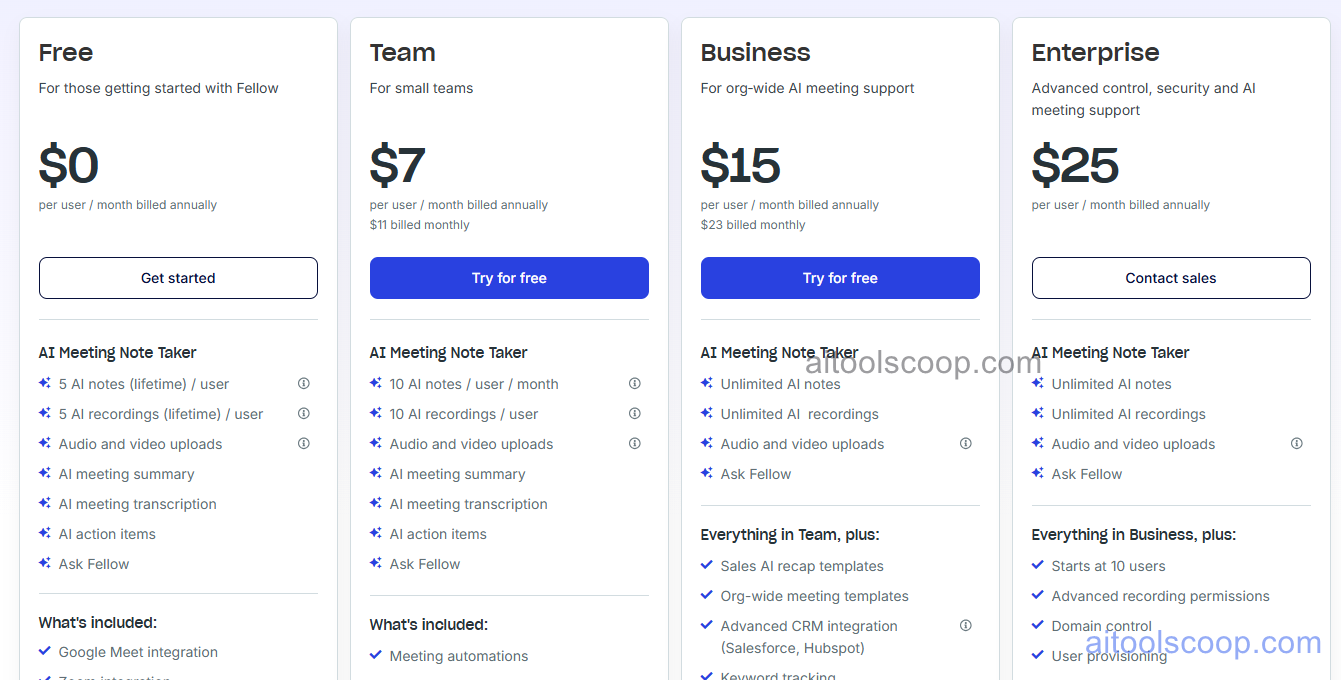
Fellow offers four plans. Annual billing provides significant savings over monthly pricing.
- Free — unlimited meetings and agendas, collaborative notes, action item tracking, calendar sync, and basic integrations. Up to 10 users. Ideal for small teams getting started.
- Pro — $11/month per user (annual: $7/month) — everything in Free plus Fellow Copilot AI summaries and transcription, unlimited users, advanced templates, and Slack integration.
- Business — $23/month per user (annual: $15/month) — everything in Pro plus meeting analytics, Jira and Asana sync, custom branding, and priority support.
- Enterprise — $25/month per user (annual: $25/month) — everything in Business plus SSO, SCIM provisioning, advanced security controls, dedicated customer success, and custom contracts.
The free plan is permanently available with no credit card required. Always verify current rates at fellow.app/pricing.
Who Should Use Fellow?
Fellow is well suited to managers and team leads who run frequent one-on-ones and team meetings and want to make them more structured and accountable. The free plan is generous for small teams (up to 10 users) who need shared agendas and action item tracking without AI features. The Pro plan is the key upgrade for teams who want AI-generated meeting summaries and transcription via Fellow Copilot. Business teams using Jira or Asana for project management benefit most from the Business plan's integration depth. Fellow is less suited to individuals who work alone, teams that do not hold regular meetings, or organisations looking purely for a task management or project management tool — dedicated tools like Asana or Linear serve those needs better.
Frequently Asked Questions
Is Fellow free to use?
Yes. Fellow offers a permanently free plan for teams of up to 10 users. The free plan includes unlimited meetings, collaborative agendas, action item tracking, and Google Calendar and Outlook integration. It does not include Fellow Copilot AI meeting summaries and transcription, which require the Pro plan or above. No credit card is required to sign up.
What does Fellow Copilot do?
Fellow Copilot is an AI meeting assistant that automatically joins your Zoom, Google Meet, or Microsoft Teams calls. It transcribes the conversation in real time, then generates a structured meeting summary after the call ends — including key decisions, action items with assignees, and next steps. Action items are automatically tracked in Fellow and can be synced to Slack, Jira, or Asana. Fellow Copilot is available on the Pro plan and above.
How much does Fellow cost?
Fellow's Pro plan costs $11 per user per month (or $7/month billed annually), the Business plan costs $23 per user per month ($15/month annually), and the Enterprise plan costs $25 per user per month. The free plan covers core meeting management for teams of up to 10 users at no cost.
Does Fellow integrate with Zoom and Google Meet?
Yes. Fellow Copilot integrates with Zoom, Google Meet, and Microsoft Teams. It automatically joins scheduled calls linked to Fellow meetings, records and transcribes the conversation, and generates the AI summary after the call. The integration requires connecting your video conferencing account in Fellow's settings and is available on Pro and higher plans.
Can Fellow replace Notion or Confluence for meeting notes?
Fellow is specifically optimised for meeting agendas and notes, with AI summarisation, action item tracking, and calendar integration built around the meeting workflow. While Notion and Confluence are flexible knowledge bases that can store meeting notes, they require more manual setup and lack Fellow's AI transcription, automatic action item extraction, and calendar-driven agenda population. Teams that want a dedicated meeting tool with AI automation will find Fellow more purpose-built; teams that want all notes in one wiki may prefer keeping Notion or Confluence as the source of truth and using Fellow's Slack integration to surface summaries there.