

Timely (timelyapp.com) is an AI-powered automatic time tracking platform built around the premise that manual time tracking is fundamentally inaccurate — people forget to start timers, round entries, and misremember how long tasks took. Timely solves this by tracking time automatically across thousands of apps and websites in the background, then using AI to categorise and suggest how that time should be recorded against projects and tasks, which users review and confirm rather than entering from memory. The platform is designed for freelancers, agencies, and professional service teams who need accurate billable hour data, project health visibility, and — on higher plans — team management and capacity planning. Every plan includes a free trial to evaluate the automatic tracking experience before committing.
Timely's three tiers separate clearly by team size and operational depth. The Starter plan ($11/month per user on monthly billing, $9/month annually) supports up to 5 users across 20 projects, covering automatic tracking, AI time categorisation, project health monitoring, billable hour reporting, app and website tracking, in-app support, and API access. The Premium plan ($20/month per user monthly, $16/month annually) removes project limits to unlimited, scales to 50 users, and adds synchronisation with project management tools, accounting tool integration, team management, and budget and cost management. The Unlimited plan ($28/month per user monthly, $22/month annually) removes all user caps, adds capacity management and reporting, overtime and undertime tracking, Azure User Management for enterprise identity management, 50+ currency support, and premium customer success.
How Timely Works
Users install the Timely app on their devices and connect their calendar, apps, and browser. Timely's Memory AI runs in the background, recording every application opened, document worked on, meeting attended, and website visited throughout the working day. At the end of the day or week, users open the Timely dashboard where the AI presents a suggested timeline of their day — pre-categorising blocks of time against the most likely projects and tasks based on the app or context. Users review and accept, edit, or reject these suggestions rather than filling in a blank timesheet from memory. Once confirmed, the time entries are locked and aggregated into project and team reports, billable hour calculations, and project health indicators.
Key Features
- Automatic time tracking — tracks time across thousands of apps and websites in the background without manual timers
- AI time categorisation — AI (Memory) analyses recorded activity and suggests project and task assignments for review rather than requiring manual entry
- Project health monitoring — real-time visibility into project progress, budget consumption, and estimated completion
- Accurate billable hour reporting — reports derived from automatically captured activity data rather than self-reported estimates
- API access — programmatic data access for integration with custom workflows and reporting systems (all plans)
- Project management tool sync — bidirectional synchronisation with PM tools for task-level time alignment (Premium and Unlimited)
- Accounting tool integration — connect time and billing data to accounting platforms (Premium and Unlimited)
- Team management — manage team members, roles, and permissions across the organisation (Premium and Unlimited)
- Budget and cost management — define and monitor project budgets against actual tracked costs (Premium and Unlimited)
- Capacity management and reporting — plan team capacity, track overtime and undertime, and report on resource utilisation (Unlimited)
Timely Pricing
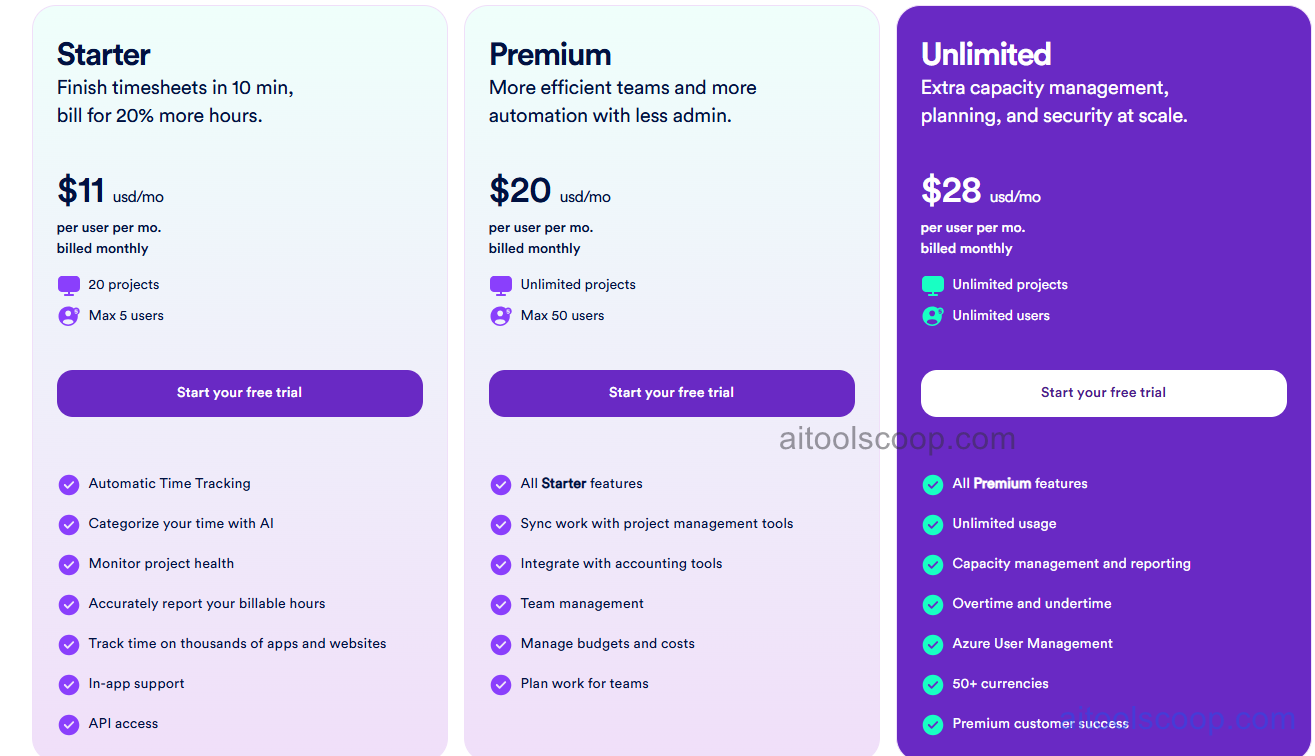
- Starter — $11/user/month (or $9/user/month billed annually) — Automatic time tracking, AI time categorisation, project health monitoring, accurate billable hour reporting, time tracking across thousands of apps and websites, in-app support, API access. Up to 20 projects. Maximum 5 users.
- Premium — $20/user/month (or $16/user/month billed annually) — All Starter features plus sync with project management tools, accounting tool integration, team management, budget and cost management, and plan work for teams. Unlimited projects. Maximum 50 users.
- Unlimited — $28/user/month (or $22/user/month billed annually) — All Premium features plus unlimited users, capacity management and reporting, overtime and undertime tracking, Azure User Management, 50+ currency support, and premium customer success.
No permanent free plan. Free trial available on all plans. Annual billing saves approximately 18% on Starter, 20% on Premium, and 21% on Unlimited. Always verify current rates at timelyapp.com/pricing.
Who Should Use Timely?
Timely is best suited to freelancers, agency teams, and professional service organisations that have consistently struggled to produce accurate timesheets from manual entry — particularly those who lose billable hours because team members underestimate or forget to log their time. The AI-reviewed automatic tracking model changes the workflow from "remember and enter" to "review and confirm," which tends to result in significantly higher capture rates of billable hours. The Starter plan suits solo users and very small teams. Premium serves agencies and teams needing project management integration and budget tracking. Unlimited is designed for larger professional service organisations with capacity planning, multi-currency billing, and enterprise identity management requirements. Teams that have a disciplined manual time tracking culture and find the AI-review workflow more complex than simply entering time may not see the same value from Timely's approach.
Frequently Asked Questions
What is Timely?
Timely is an AI-powered automatic time tracking platform that records how time is spent across thousands of apps and websites in the background, then uses AI to suggest project and task categorisations for users to review and confirm — rather than filling in timesheets manually from memory. This approach aims to produce more accurate billable hour data and reduce the administrative burden of manual time entry.
Does Timely have a free plan?
Timely does not offer a permanent free plan. A free trial is available on all three plans (Starter, Premium, and Unlimited), allowing users and teams to evaluate the automatic tracking and AI categorisation experience before committing to a paid subscription. Paid plans start at $11 per user per month on monthly billing or $9 per user per month on annual billing.
How does Timely's AI time tracking work?
Timely runs a Memory AI application in the background on the user's device, recording every application opened, document worked on, meeting attended, and website visited during the working day. This creates a detailed activity timeline without any user input. At review time, the AI analyses the recorded activity and presents suggested project and task categorisations on a visual timeline — the user reviews these suggestions and accepts, edits, or rejects them. This transforms timesheet completion from blank-slate recall into a faster review and confirmation process.
What is capacity management in Timely?
Capacity management is an Unlimited plan feature that tracks the difference between how much time team members are assigned to work on projects (their capacity) and how much they actually work (their utilisation). It surfaces overtime — where team members are working beyond their capacity — and undertime — where capacity is available and unused — enabling managers to balance workloads, plan new project intake accurately, and prevent team burnout from sustained overallocation.
Can Timely integrate with project management tools?
Yes. The Premium and Unlimited plans include synchronisation with project management tools, allowing time tracked in Timely to be aligned with tasks and projects in connected PM platforms. This ensures that time data and project task data stay in sync without manual duplicate entry. Accounting tool integration is also included on Premium and Unlimited plans for connecting billing data to financial systems.