
Blackbox AI (blackbox.ai) is an AI-powered coding assistant and multi-agent development platform designed to help developers write, debug, and ship code significantly faster. Founded in 2019 and headquartered in San Francisco, the platform has grown to serve over 30 million developers — including engineering teams at Meta, IBM, Google, and Salesforce — making it one of the most widely adopted AI coding tools available. Its core differentiator is the Chairman LLM architecture, which routes coding requests across 300+ AI models from every major provider (Claude, GPT, Gemini, Grok, DeepSeek, LLaMA, and more) and selects the best output for the task, giving developers model flexibility no other single-subscription coding tool currently matches.
The platform operates across an unusually broad range of surfaces: a VS Code extension with over 4.8 million installs, support for 35+ IDEs including JetBrains, Android Studio, and Xcode, a proprietary Blackbox IDE, a full CLI with agentic capabilities, a browser extension, iOS and Android mobile apps, and an end-to-end encrypted desktop application for sensitive work. Beyond autocomplete and chat, Blackbox AI has built several differentiated capabilities in 2026: a CyberCoder autonomous agent for end-to-end task execution, image-to-code conversion that turns Figma designs and wireframes into functional components, voice coding via ElevenLabs integration in the CLI, a Conductor project management system, and k-agents support for running multiple coding agents in parallel on the same repository.
How Blackbox AI Works
Developers install the Blackbox AI extension in their preferred IDE or open the web interface, then interact with the platform through inline code autocomplete, chat, code explanation, and fix suggestions. When a request is submitted, the Chairman LLM system evaluates it and routes it to the most appropriate model or combination of models from its 300+ library, returning the best result. For more complex tasks, the CyberCoder agent can autonomously execute multi-step workflows — reading code, planning changes, writing implementations, running tests, and iterating — without requiring manual intervention at each step. k-agents (added in 2026) allow multiple agents to work in parallel on the same codebase.
Key Features
- Chairman LLM multi-agent architecture — routes coding requests to the optimal model from a library of 300+ AI models including Claude, GPT, Gemini, Grok, and DeepSeek
- CyberCoder autonomous agent — executes end-to-end coding tasks autonomously including code generation, debugging, testing, and iteration across the full workflow
- k-agents parallel execution — runs multiple coding agents simultaneously on the same repository for complex multi-step tasks (added 2026)
- Image-to-code conversion — converts Figma designs, wireframes, and screenshots into functional code components for front-end workflows
- Voice coding — dictate code and instructions via ElevenLabs-powered voice integration in the CLI
- 35+ IDE integrations — VS Code (4.8M+ installs), JetBrains, Android Studio, Xcode, proprietary Blackbox IDE, browser extension, and mobile apps (iOS and Android)
- Conductor project management — structured project management system for organising and tracking multi-step development workflows within the platform
- SARIF and CI/CD integration — supports integration with development pipelines for automated code analysis
- E2E encrypted desktop agent — local encrypted environment for developers working with sensitive or proprietary codebases
- Free tier — unlimited chat with basic models, basic code autocomplete, and limited daily usage at no cost
Blackbox AI Pricing
- Free — $0/month — Unlimited chat with basic models (including DeepSeek), basic code autocomplete, and limited daily usage. No credit card required. Suitable for developers exploring the platform or with light coding assistance needs.
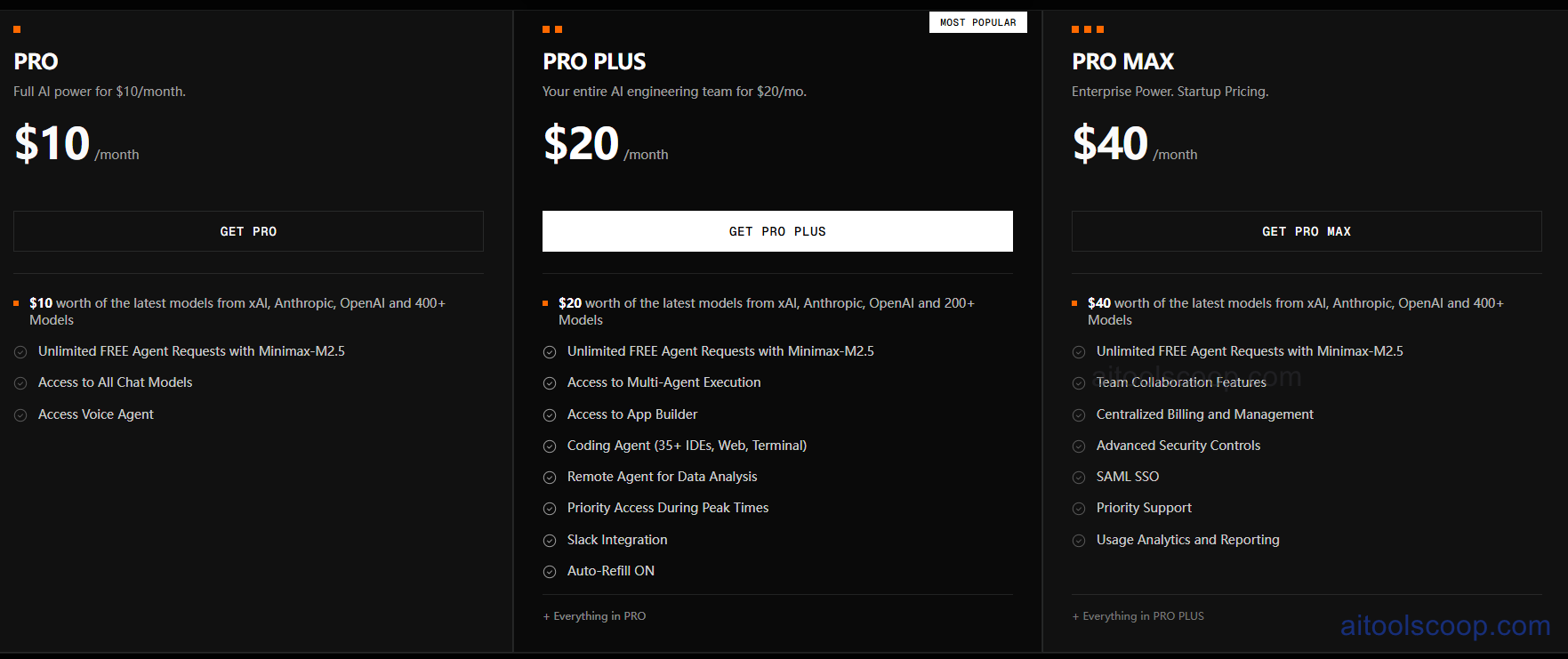
- Pro — $10/month ($8/month billed annually) — Full access to all 300+ AI models including premium frontier models, autonomous agents, Voice Agent, Screen Share Agent, and expanded usage limits. Includes $10 in model credits per month.
- Pro Plus — $20/month ($16/month billed annually) — Everything in Pro plus $20 model credits, Multi-Agent Execution, App Builder, Coding Agent for 35+ IDEs and web/terminal, Remote Agent for data analysis, priority access, Slack integration, and Auto-Refill. Most popular plan.
- Pro Max — $40/month ($32/month billed annually) — Everything in Pro Plus plus $200 model credits, unlimited agent requests, team collaboration features, centralised billing and management, advanced security controls, SAML SSO, priority support, and usage analytics with reporting.
Enterprise plans available with custom pricing, dedicated support, and full data retention controls. Note: data retention opt-out and training data controls are Enterprise-only — Free, Pro, and Pro Plus users should be aware that submitted code may be used for model improvement. Always verify current pricing at blackbox.ai/pricing.
Who Should Use Blackbox AI?
Blackbox AI is best suited to developers who want maximum model flexibility under a single affordable subscription, front-end developers who need image-to-code workflows, and teams exploring multi-agent autonomous execution. Its breadth of IDE support — including Android Studio and Xcode — makes it particularly useful for mobile developers who are poorly served by most competitors. Teams working with sensitive production code should note that data privacy controls are restricted to the Enterprise tier; developers handling NDAs or proprietary code should use the E2E encrypted desktop agent or upgrade to Enterprise. For developers who need more consistent complex-task reliability, tools like Cursor or Claude Code may complement Blackbox AI's model variety.
Frequently Asked Questions
What is Blackbox AI?
Blackbox AI is an AI-powered coding assistant and multi-agent development platform that gives developers access to 300+ AI models under a single subscription. It runs across 35+ IDEs including VS Code, JetBrains, Android Studio, and Xcode, and offers autonomous coding agents (CyberCoder), image-to-code conversion, voice coding, and parallel k-agent execution. It is used by over 30 million developers globally.
Is Blackbox AI free?
Yes — Blackbox AI offers a permanent free tier with unlimited chat using basic models, basic code autocomplete, and limited daily usage. No credit card is required. Paid plans starting at $10/month (or $8/month billed annually) unlock access to all 300+ premium models, autonomous agents, and expanded usage limits.
What is the Chairman LLM in Blackbox AI?
The Chairman LLM is Blackbox AI's multi-agent routing architecture. When a developer submits a coding request, the Chairman LLM evaluates it and routes it to the optimal model or combination of models from the 300+ available — including Claude, OpenAI Codex, Gemini, Grok, and DeepSeek — then returns the best output. This is what allows Blackbox AI to offer model-agnostic performance without the developer having to manually select a model for each task.
Is Blackbox AI safe for production code?
Blackbox AI offers an end-to-end encrypted desktop agent for sensitive work, which provides a local processing environment. However, full data retention controls and the ability to opt out of AI model training are restricted to Enterprise plans. Developers on Free, Pro, or Pro Plus plans should be aware that submitted code may be used for model improvement. Teams handling NDAs or proprietary code should use the encrypted desktop agent or upgrade to Enterprise.
How does Blackbox AI compare to GitHub Copilot?
Blackbox AI provides access to 300+ AI models under a single subscription at a comparable price to GitHub Copilot's single-model offering. Blackbox AI adds autonomous agents (CyberCoder), image-to-code conversion, voice coding, mobile app support, and broader IDE coverage including Android Studio and Xcode. GitHub Copilot has stronger enterprise compliance tooling and more consistent performance on complex tasks. For multi-model experimentation and platform breadth, Blackbox AI has an edge; for enterprise reliability and consistent code quality, Copilot competes closely.