
Make.com (make.com), formerly known as Integromat, is a visual no-code automation platform that allows individuals, teams, and enterprises to connect over 3,000 applications and build sophisticated multi-step automated workflows — called scenarios — using a flowchart-style drag-and-drop interface. Unlike linear automation tools that chain actions in a single sequence, Make's visual canvas represents the full data flow of a scenario as a branching diagram — making it possible to build conditional logic, error handling, iterators, aggregators, and parallel branches that would require code in simpler tools, all without writing a single line. The platform offers a permanently free plan with 1,000 credits per month and full access to the visual workflow builder, making it one of the most capable free automation platforms available for individuals and early-stage teams. Paid plans scale by credit volume, starting at 10,000 credits per month, with pricing adjusting dynamically via a slider as credit needs grow.
Make.com's credit-based pricing model measures automation consumption in operations — each action a scenario performs consumes one credit. This makes it predictable for teams with consistent workflow volumes and flexible for those with seasonal spikes. The Core plan adds unlimited active scenarios, minute-level scheduling (down to the minute rather than the 15-minute minimum on Free), increased data transfer limits, and access to the Make API. The Pro plan builds on Core with priority scenario execution — ensuring Pro users' workflows run first in shared infrastructure queues — custom variables for advanced data manipulation, and full-text execution log search for debugging complex scenarios. The Teams plan adds team and role management and the ability to create and share scenario templates across a shared workspace. The Enterprise plan adds custom functions support, enterprise app integrations, 24/7 enterprise support, access to the Value Engineering team, overage protection, and advanced security features.
How Make.com Works
Users open the Make canvas and add modules — one per app or action — connecting them with lines that represent the data flow. Each module represents a trigger or action in a connected app: a new row in Google Sheets, a new email in Gmail, a new order in Shopify, or a custom webhook event. Data from one module passes to the next, where it can be transformed using Make's built-in data manipulation tools, filtered with routers and filters, or branched into parallel paths. Scenarios run on a schedule — from every minute on Core and above to every 15 minutes on Free — or are triggered instantly by incoming webhooks. The execution log records every run, showing exactly what data each module received and sent, which is critical for debugging complex multi-app workflows.
Key Features
- Free plan — permanently free with 1,000 credits per month, full visual workflow builder access, 3,000+ app connections, routers and filters, and customer support
- Visual no-code scenario builder — flowchart-style canvas for building multi-branch, conditional, and parallel automation workflows without code
- 3,000+ app integrations — connects to over 3,000 applications across productivity, ecommerce, CRM, marketing, development, and communication categories
- Routers and filters — branch scenarios into parallel paths and apply conditions to control data flow through the workflow
- Unlimited active scenarios — run as many simultaneous workflows as needed without caps (Core and above)
- Minute-level scheduling — schedule scenarios to run as frequently as every minute for near-real-time automation (Core and above)
- Make API — programmatic access to create, manage, and trigger scenarios from external systems (Core and above)
- Priority scenario execution — Pro users' scenarios run first in the execution queue for faster, more reliable high-volume automation
- Custom variables — define and reuse persistent variables across modules within a scenario for advanced data handling (Pro and above)
- Team and role management — assign team members to workspaces with defined roles and permissions; create and share scenario templates (Teams and above)
Make.com Pricing
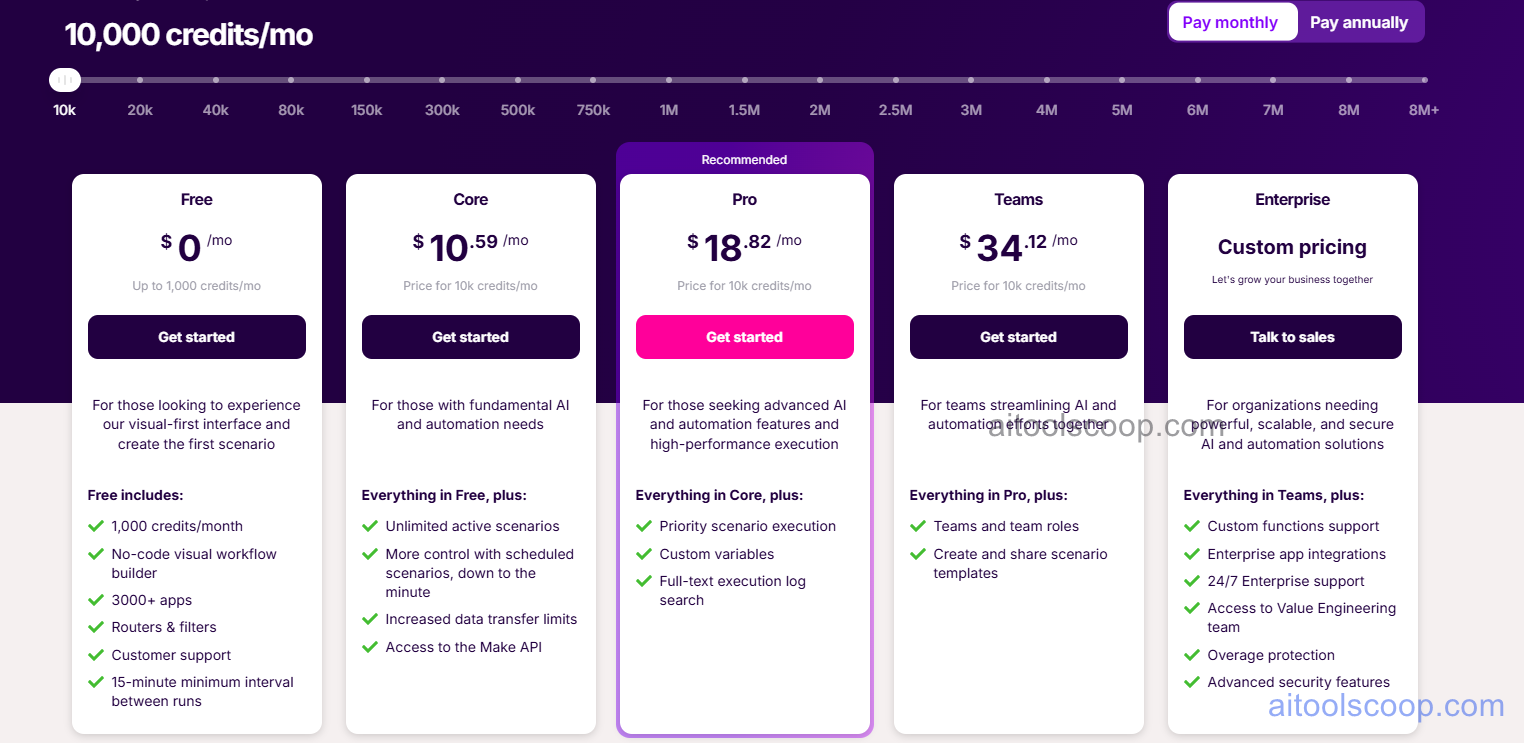
- Free — $0/month — 1,000 credits/month, no-code visual workflow builder, 3,000+ app connections, routers and filters, customer support, 15-minute minimum interval between runs. No time limit.
- Core — $10.59/month (or $9/month billed annually) — 10,000 credits/month base (scales via slider), unlimited active scenarios, scheduled scenarios down to the minute, increased data transfer limits, and Make API access.
- Pro — $18.82/month (or $16/month billed annually) — Everything in Core plus priority scenario execution, custom variables, and full-text execution log search.
- Teams — $34.12/month (or $29/month billed annually) — Everything in Pro plus teams and team roles, and the ability to create and share scenario templates across the workspace.
- Enterprise — Custom pricing — Everything in Teams plus custom functions support, enterprise app integrations, 24/7 enterprise support, access to the Value Engineering team, overage protection, and advanced security features.
Paid plan prices shown for 10,000 credits/month. Credit volume is adjustable via a slider up to 8M+ credits/month. Always verify current rates at make.com/en/pricing.
Who Should Use Make.com?
Make.com is best suited to individuals, operations teams, developers, and agencies who need to build automation workflows that are more complex than simple linear chains — involving conditional branching, error handling, data transformation, or parallel execution paths. The free plan is a genuine starting point for solo users automating personal or small-business workflows at low volume. Core suits freelancers and small teams who need unlimited scenarios and reliable scheduling. Pro is appropriate for teams running high-volume or time-sensitive automation where priority execution and advanced debugging matter. Teams plan fits collaborative operations teams sharing scenario templates and managing role-based access. Make.com has a steeper learning curve than simpler tools like Zapier for basic use cases, but offers significantly more power and flexibility for complex multi-step workflows.
Frequently Asked Questions
What is Make.com?
Make.com (formerly Integromat) is a visual no-code automation platform that connects over 3,000 applications through a flowchart-style scenario builder. It allows users to build complex multi-step automation workflows with conditional branching, parallel paths, routers, filters, and data transformation — all without writing code. A permanently free plan is available with 1,000 credits per month.
Is Make.com free?
Yes. Make.com offers a permanently free plan that includes 1,000 credits per month, full access to the visual no-code workflow builder, connections to 3,000+ apps, routers and filters, and customer support. The free plan runs scenarios at a minimum 15-minute interval. There is no time limit on the free plan.
What is a Make.com credit?
A Make.com credit represents one operation — one action that a module within a scenario performs. For example, a scenario that retrieves a row from Google Sheets, transforms the data, and sends a Slack message consumes 3 credits per run. Credits reset monthly, and paid plans allow the credit volume to be adjusted via a slider from 10,000 up to over 8 million per month.
What is priority scenario execution on the Pro plan?
Priority scenario execution means that Pro plan users' scenarios are placed at the front of the execution queue on Make.com's shared infrastructure, ensuring they run without delays caused by other users' workloads. This is particularly important for time-sensitive workflows — such as real-time webhook responses, customer-facing automations, or high-frequency triggers — where consistent, low-latency execution is critical.
How does Make.com compare to Zapier?
Make.com offers a more visual, flowchart-style builder with greater complexity support — including conditional branching, parallel paths, iterators, aggregators, and custom data transformation — making it more powerful for complex multi-step workflows. Zapier is generally simpler to set up for basic linear automations. Make.com's free plan (1,000 credits/month) is typically more generous than Zapier's free tier for users with moderate workflow volumes, and paid plans are competitively priced per operation compared to Zapier's task-based pricing.