

TextExpander (textexpander.com) is a text expansion and shared snippet management platform that allows individuals and teams to define short abbreviations that automatically expand into longer text, templates, boilerplate responses, dynamic date insertions, fill-in fields, and other structured content — across any application on any device. When a user types a defined shortcut — for example, ";;addr" — TextExpander instantly replaces it with a full mailing address, formatted signature, support response template, or any other stored content. For individuals, this eliminates repetitive typing of frequently used phrases, email templates, and standard responses. For teams, the shared snippet library functionality ensures that everyone in the organisation uses the same approved language — critical for customer support teams, sales teams, and any organisation with communication standards or brand guidelines to maintain. TextExpander supports Mac, Windows, iOS, Android, and Chrome, with a web app available for cross-device access.
TextExpander's plan structure reflects its evolution from an individual typing tool into a team communication platform. The Individual plan covers one user's personal snippet library at a low monthly effective rate. The Business plan adds team snippet sharing, enabling an administrator to create and distribute approved snippets to all team members — ensuring consistent customer-facing language across a support or sales team. The Growth plan adds advanced user management and data insights for organisations that need visibility into snippet usage and adoption across a larger team. The Enterprise plan provides custom solutions and personal support for large organisations with complex requirements. Annual billing is available at approximately 20% savings compared to monthly pricing across all standard tiers.
How TextExpander Works
Users install the TextExpander application on their devices. Snippets are defined in the TextExpander dashboard — each snippet has an abbreviation (the shortcut to type) and content (the expanded text). Content can be static text, dynamic fields that prompt for input when the snippet expands, date/time variables that insert the current date automatically, clipboard content, or multi-step fill-in forms. When the user types the abbreviation in any application — email, CMS, CRM, chat, code editor, or any text field — TextExpander detects it and immediately replaces it with the defined expansion. Shared team snippet groups are created by administrators and synced to all assigned team members' installations, ensuring everyone has access to the current approved versions of templates and standard responses.
Key Features
- Text expansion — type a short abbreviation and instantly expand it into any length of pre-defined text in any application
- Shared snippet libraries — create and distribute approved team snippet groups to ensure consistent language across all team members (Business and above)
- Dynamic content — snippets can include date/time variables, clipboard insertion, fill-in fields, and optional content sections
- Cross-platform support — Mac, Windows, iOS, Android, and Chrome extension with web app access
- Individual plan — personal snippet library for one user to eliminate repetitive typing
- Business plan — team snippet sharing with administrator control for consistent communication standards
- Growth plan — advanced user management and data insights into snippet usage and adoption across the organisation
- Enterprise plan — custom solutions and personal support for large-scale deployment
- Annual billing discount — save approximately 20% across all standard plans with annual payment
- Works in any app — text expansion triggers in any text field across any application without integration requirements
TextExpander Pricing
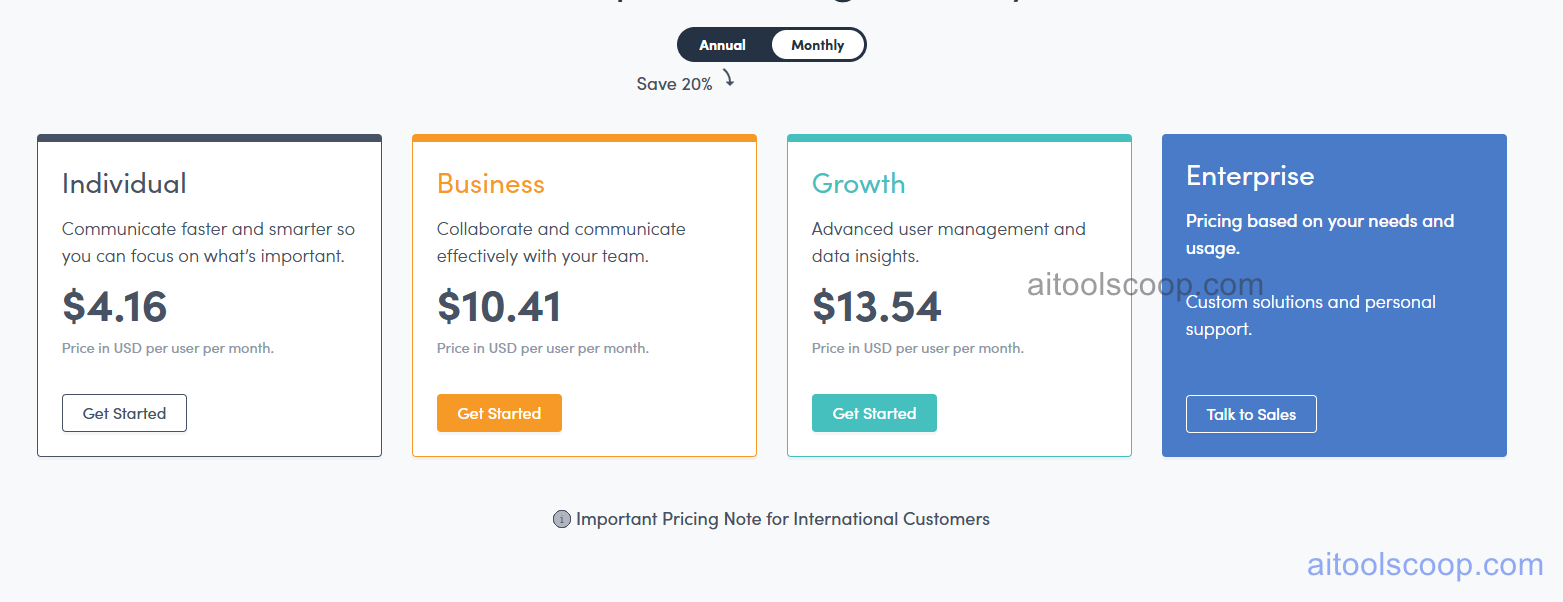
- Individual — $4.16/month (approximately $3.33/month billed annually, save 20%) — Personal snippet library for one user. Communicate faster and smarter with text expansion across all apps. Billed annually for maximum savings.
- Business — $10.41/month/user (approximately $8.33/month/user billed annually, save 20%) — Team snippet sharing, administrator control over shared snippet groups, and consistent communication for team collaboration.
- Growth — $13.54/month/user (approximately $10.83/month/user billed annually, save 20%) — Everything in Business plus advanced user management and data insights into snippet adoption and usage patterns across the organisation.
- Enterprise — Custom pricing — Custom solutions and personal support. Pricing based on needs and usage. Contact sales for a quote.
Prices shown are annual billing rates per user. Save 20% vs monthly billing. Always verify current rates at textexpander.com/pricing.
Who Should Use TextExpander?
TextExpander is valuable for any individual or team that types the same text repeatedly across their daily work — customer support agents responding to common queries, sales representatives using standard outreach templates, healthcare professionals documenting common clinical language, developers inserting standard code snippets, or any knowledge worker who produces high volumes of written communication. The Individual plan suits solo users looking to eliminate typing friction. The Business plan is the critical upgrade for teams that need shared, administrator-managed snippet libraries to ensure consistent brand voice and approved language across all customer touchpoints. Growth serves larger teams that want adoption analytics. Enterprise serves complex large-scale deployments.
Frequently Asked Questions
What is TextExpander?
TextExpander is a text expansion platform that lets users define short abbreviations which instantly expand into longer text, templates, dynamic content, and fill-in forms in any application. It works across Mac, Windows, iOS, Android, and Chrome. Individual users eliminate repetitive typing; teams use shared snippet libraries to maintain consistent language and approved templates across all team members.
Does TextExpander have a free plan?
TextExpander does not offer a permanent free plan. Individual plans start at $4.16 per month on monthly billing ($3.33 per month effective on annual billing). A trial period may be available — check textexpander.com for current trial offerings before subscribing.
Does TextExpander work in any application?
Yes. TextExpander works in any text field across any application — including email clients, CRM systems, customer support platforms, web browsers, code editors, document editors, and messaging apps. It does not require integration with specific tools; it operates at the system level to detect abbreviations and expand them regardless of where the user is typing.
What are shared snippet groups in TextExpander?
Shared snippet groups are collections of snippets that an administrator creates and distributes to all team members on Business and above plans. When the administrator updates a shared snippet — for example, changing a standard support response — the update is automatically synced to all team members' installations. This ensures everyone uses the current approved version of templates and standard responses without manual distribution.
Can TextExpander insert dynamic content like dates?
Yes. TextExpander snippets can include dynamic elements such as the current date and time inserted automatically, clipboard content, fill-in fields that prompt the user for input when the snippet expands, optional content sections that can be toggled on or off, and multi-step fill-in forms for structured data entry. This extends the tool well beyond simple static text replacement.