

Build Process Docs in Seconds, Not Hours
Scribe (scribehow.com) is an AI-powered process documentation platform that automatically converts any browser or desktop workflow into a complete, illustrated step-by-step guide in seconds. Designed for teams that spend too much time explaining repetitive processes, Scribe captures every click and keystroke as you work, then generates a polished guide with annotated screenshots and AI-written descriptions — with no manual writing required. The result can be instantly shared as a link, embedded in any tool, or exported for training and compliance purposes. Scribe is trusted by operations, customer success, sales enablement, and IT teams at thousands of companies worldwide.
How Scribe Works
Install the Scribe Chrome extension or desktop recorder. Click "Start Capture" before beginning any workflow — logging in to software, processing a form, setting up a system, or onboarding a new tool. Scribe silently records every click and interaction. When you finish, click "Stop" and Scribe instantly generates a fully formatted guide. Each step appears with a highlighted screenshot and an AI-generated description. Edit step text, redact sensitive data, add custom annotations or tips, then publish as a shareable link or embed directly in tools like Notion, Confluence, Guru, or your company wiki. Export as PDF for offline use or compliance archives.
Key Features
- Automatic process capture — records any browser or desktop workflow and generates a guide instantly
- AI-written descriptions — generates clear, accurate step descriptions without any manual writing
- Annotated screenshots — automatically highlights and numbers each action element in captured images
- Sensitive data redaction — blur or remove private information from screenshots with one click
- Embeddable anywhere — share via link or embed in Notion, Confluence, Guru, Zendesk, and more
- PDF export — download professional documentation for offline use and compliance records
- Team guide library — organize, search, and manage all documentation in a centralized workspace
- Scribe Pages — combine multiple guides and text into a single comprehensive document or SOP
- Desktop and browser capture — document workflows across web apps and native desktop software
- Analytics and tracking — monitor guide views and user engagement to measure knowledge base impact
Scribe Pricing
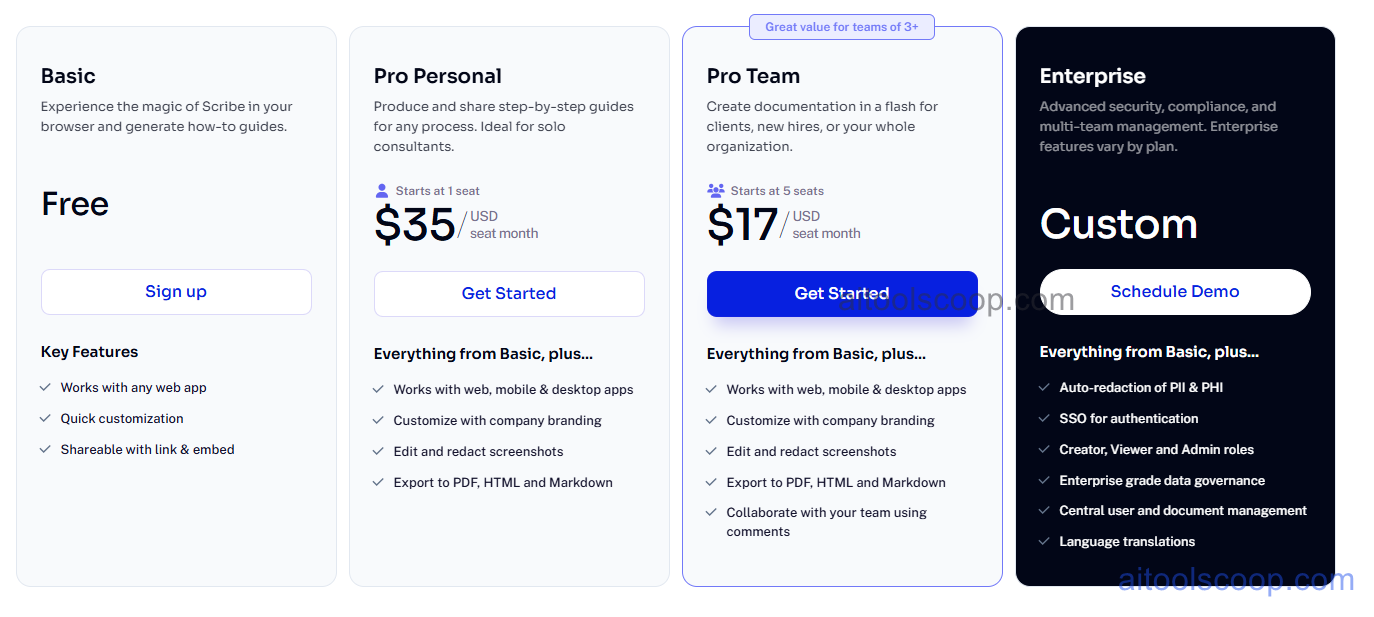
| Plan | Monthly | Annually | Key Inclusions |
|---|---|---|---|
| Free | $0 | $0 | Limited guides, basic capture, shareable links, personal use |
| Pro | $17/mo | $13/mo | Unlimited guides, desktop capture, PDF export, sensitive data redaction, integrations |
| Team | $35/mo | $25/mo | All Pro features, team workspace, Scribe Pages, analytics, admin controls, priority support |
| Enterprise | Custom | Custom | All Team features, SSO, advanced security, SLA, dedicated account management |
Always check the latest rates on the official website. For more AI tool reviews, visit aitoolscoop.com.
Who Should Use Scribe?
Scribe is the go-to tool for operations managers standardizing company-wide SOPs, customer success and support teams building self-service help content, IT departments documenting software onboarding and system procedures, sales enablement teams creating repeatable process playbooks, and HR professionals developing training materials for new hires. The Free plan covers individual users documenting a small number of personal workflows, the Pro plan suits power users who need unlimited guides and desktop capture, the Team plan serves departments needing a shared documentation library, and Enterprise addresses large organizations with security and compliance requirements.