

The No-Code Website Builder Built for Designers
Webflow (webflow.com) is a professional-grade no-code website design, CMS, and hosting platform that gives designers and developers the power to build fully custom, production-quality websites visually — without writing code — while maintaining the level of design control and technical precision that custom-coded sites deliver. Unlike template-based builders, Webflow operates like a visual CSS and HTML editor: every element on the page is individually controllable, responsive breakpoints are configurable at a granular level, interactions and animations are built through a visual motion designer, and the CMS enables completely custom dynamic content structures. The result is a platform that attracts professional web designers, design agencies, and technical marketing teams who need websites that look and perform like custom builds but can be maintained without a development team.
How Webflow Works
Create a Webflow account and start a new project either from a blank canvas, a Webflow template, or by cloning a community showcase site. The Webflow Designer opens as a visual editor where every element — divs, sections, headings, images, buttons, forms — is individually selectable and styleable using a properties panel that mirrors CSS properties directly. Set padding, margins, typography, colors, positioning, and display modes without writing a line of CSS. Build responsive layouts by defining specific styles for desktop, tablet, and mobile breakpoints. Add animations and interactions using the Interactions panel — scroll-triggered reveals, hover states, and page transitions configured visually. Connect the CMS to create dynamic content collections — blog posts, team members, case studies, products — with fully custom field structures, then bind these to repeating visual layouts. Publish to Webflow hosting or export clean HTML, CSS, and JavaScript for self-hosting.
Key Features
- Visual CSS designer — control every design property visually with no CSS writing required
- Custom CMS — build fully custom content collection structures for any type of dynamic content
- Interactions and animations — design scroll-triggered, hover, and page transition animations visually
- Responsive breakpoint control — define precise layouts for every screen size independently
- Component system — create reusable design components with shared styles and instances
- Webflow eCommerce — fully custom online store with design control over every checkout element
- SEO controls — granular meta, Open Graph, schema, and sitemap settings per page and collection
- Global CDN hosting — fast, reliable managed hosting with SSL and automatic performance optimization
- HTML and CSS export — export clean production code for self-hosting or handoff to developers
- Webflow AI — AI tools for generating page sections and component variations from descriptions
Webflow Pricing
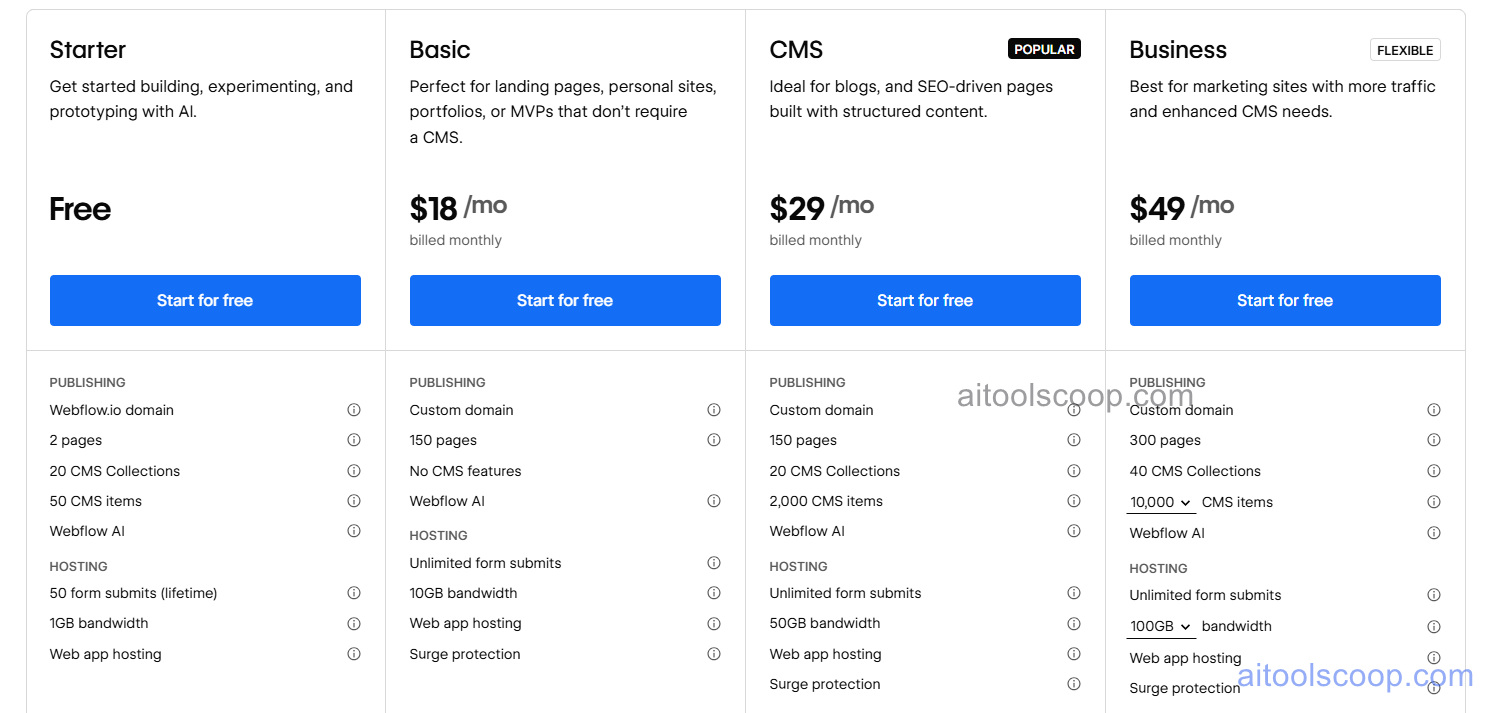
| Plan | Monthly | Annually | Key Inclusions |
|---|---|---|---|
| Free | $0 | $0 | 2 projects, Webflow subdomain, Designer access, CMS basics, community support |
| Basic | $18/mo | $14/mo | Custom domain, 50GB bandwidth, 25,000 monthly visits, static site hosting, SSL, basic SEO |
| CMS | $29/mo | $23/mo | All Basic features, 2,000 CMS items, 100GB bandwidth, 200,000 monthly visits, 3 editors, Webflow AI |
| Business | $49/mo | $39/mo | All CMS features, 10,000 CMS items, 400GB bandwidth, 400,000 monthly visits, 10 editors, form file uploads, priority support |
Always check the latest rates on the official website. For more AI tool reviews, visit aitoolscoop.com.
Who Should Use Webflow?
Webflow is the ideal platform for professional web designers who want the creative control of custom code without the development overhead, design agencies building client websites that need to be handed off for client CMS editing without custom development, marketing teams at technology companies who need to build and iterate on campaign landing pages and product marketing sites rapidly without engineering bottlenecks, startup founders with a design background who want a production-quality website that stands out visually from generic template builders, and developers who want a visual prototyping environment that exports production-ready HTML and CSS. The free plan is genuinely useful for designers learning the platform and building projects to showcase, while the annual CMS plan at $23/month is the primary tier for most professional websites with dynamic content.