
Guidde (guidde.com) is an AI-powered video documentation platform that converts screen recordings into polished, shareable how-to videos in minutes. Designed for customer success, product, and operations teams, Guidde automates the most labour-intensive parts of video documentation — adding step-by-step callouts, generating voiceover narration from text, applying brand kits, and exporting to video, PowerPoint, or PDF — without requiring any video editing skills. The platform works as a browser extension that captures workflows on any web app, and from the Business plan onward, it extends to desktop applications as well. With a free plan supporting up to 25 how-to videos, Guidde offers a meaningful no-cost entry point for individuals and small teams building their first knowledge libraries.
Guidde's core differentiator is the speed at which professional-quality documentation can be produced. A workflow recorded in real time becomes a structured video guide with transitions, soundtracks, and step annotations automatically — no timeline editing required. The Pro plan removes video caps and adds brand kit customisation, watermark removal, and export options. The Business plan expands to desktop app capture, text-to-voice generation, PDF and PPT conversion of existing content, advanced privacy controls, and analytics, scaling to up to five creators billed per seat. The Enterprise plan adds unlimited screen recordings and uploads, premium voices, multi-language translation, PII redaction, SSO (Okta, Microsoft, 1Login), and content review with version control for large organisations.
How Guidde Works
Users install the Guidde Chrome extension and record themselves completing a workflow in any web application. Guidde automatically captures each step, generates annotated callouts, and assembles the recording into a structured how-to video. A text script is produced alongside the video, which can be edited before AI voiceover is applied. Brand kit colours, logos, and fonts are applied automatically on Pro and above. Finished guides are shared via a link, embedded in a help centre or Notion page, or exported as an MP4, PDF, or PowerPoint presentation. Analytics on the Business plan track which guides are being viewed and by whom.
Key Features
- Free plan — up to 25 videos — record, annotate, and share how-to videos at no cost, no time limit on the free tier
- AI-generated voiceover — text-to-speech narration added automatically from the step script; premium voices on Enterprise
- Step-by-step annotation — automatic callouts, transitions, and soundtracks applied to each recorded workflow step
- Brand kit — apply logos, colours, and fonts across all videos for consistent brand presentation (Pro and above)
- Export to video, PPT, and PDF — publish guides as MP4s or convert them to PowerPoint and PDF formats (Pro and above)
- Blur sensitive information — redact on-screen data before sharing; PII magic redaction on Enterprise
- Web and desktop app capture — record workflows in any web app (all plans) or desktop application (Business and above)
- Advanced video privacy controls — manage viewer access and permissions for sensitive internal documentation (Business)
- Analytics and insights — track guide views and engagement to identify the most-used documentation (Business)
- SSO and version control — Okta, Microsoft, and 1Login SSO plus content review workflows for enterprise governance
Guidde Pricing
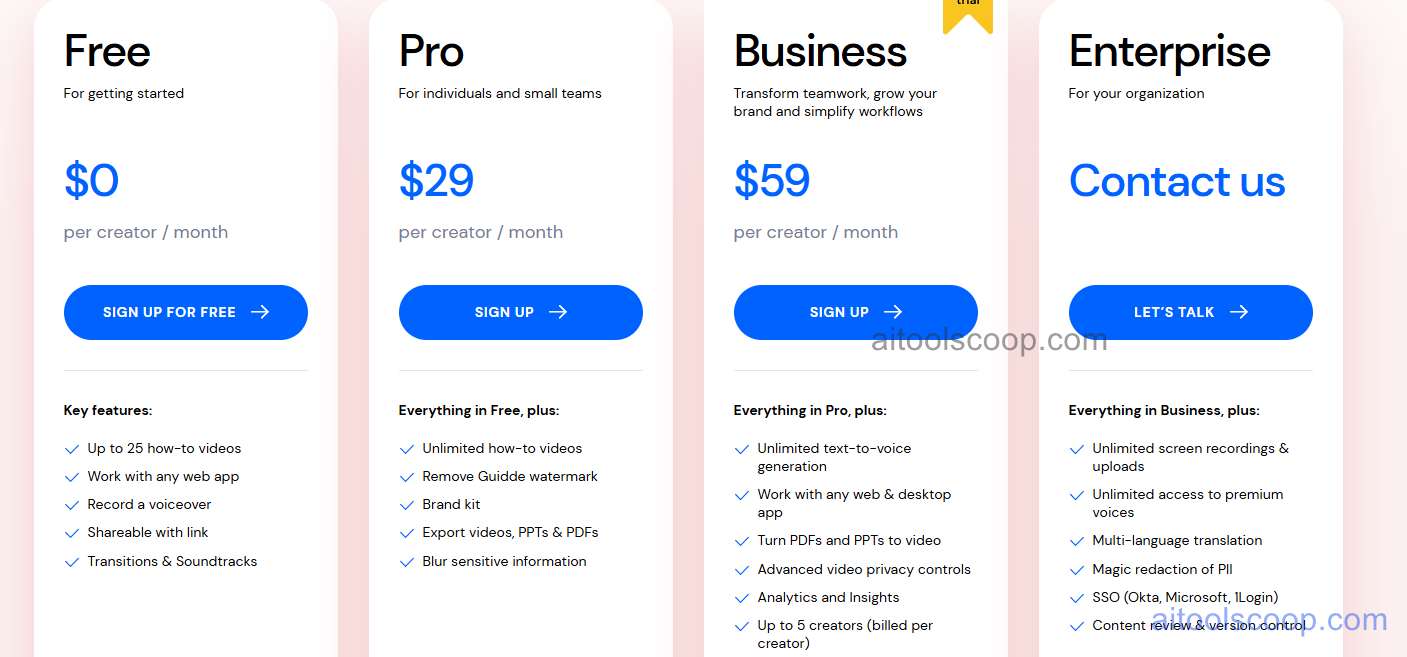
- Free — $0/month per creator — Up to 25 how-to videos, web app recording, voiceover recording, shareable links, transitions, and soundtracks. No time limit. Ideal for individuals and small teams getting started with video documentation.
- Pro — $29/month per creator (or $19/month billed annually) — Everything in Free plus unlimited how-to videos, watermark removal, brand kit, export to video/PPT/PDF, and blur for sensitive information.
- Business — $59/month per creator (or $39/month billed annually) — Everything in Pro plus unlimited text-to-voice generation, web and desktop app capture, PDF and PPT to video conversion, advanced video privacy controls, analytics and insights, and up to 5 creators billed per creator.
- Enterprise — Contact for pricing — Everything in Business plus unlimited screen recordings and uploads, unlimited access to premium voices, multi-language translation, magic redaction of PII, SSO (Okta, Microsoft, 1Login), and content review with version control.
Annual billing saves approximately 34% on Pro and 34% on Business. Always verify current rates at guidde.com/pricing.
Who Should Use Guidde?
Guidde is best suited to customer success, product, and operations teams that need to produce and maintain large libraries of software how-to guides without dedicated video production resources. The free plan is a genuine starting point for solo users or small teams documenting up to 25 workflows. Pro suits individuals or freelancers who need unlimited guides with brand customisation. Business works for teams managing internal knowledge bases or customer-facing help centres across web and desktop tools. Enterprise is designed for large organisations with compliance, security, and localisation requirements. Teams that need interactive walkthroughs embedded directly inside an application — rather than standalone video guides — may need to evaluate complementary tools alongside Guidde.
Frequently Asked Questions
What is Guidde?
Guidde is an AI video documentation platform that converts screen recordings into annotated how-to videos with automatic step callouts, voiceover narration, brand overlays, and export options. It is used by customer success, product, and operations teams to build and share software how-to guides without video editing skills.
Is Guidde free?
Yes. Guidde offers a permanent free plan that supports up to 25 how-to videos per creator with web app recording, voiceover, shareable links, and transitions. There is no time limit on the free plan. Paid plans start at $29 per creator per month and add unlimited videos, brand kits, and export options.
What is the difference between the Pro and Business plans?
The Pro plan adds unlimited how-to videos, brand kit, watermark removal, and export to video, PPT, and PDF over the free tier. Business adds text-to-voice generation, desktop app recording (not just web apps), the ability to convert existing PDFs and PPTs into videos, advanced privacy controls, and analytics. Business also supports up to five creators billed per creator.
Does Guidde work with desktop applications?
Recording workflows in desktop applications (not just web apps) is available from the Business plan upward. The Free and Pro plans are limited to web app capture via the Chrome browser extension.
Can Guidde generate voiceover in multiple languages?
Multi-language translation is available on the Enterprise plan. Pro and Business plans include AI text-to-voice generation in the primary language, while Enterprise adds access to premium voices and translation across multiple languages for global documentation needs.