

Home/ AI Tools /AI Automation /Tango
Tango Freemium
🤖 AI Automation
#2 in AI Automation

Tango

Tango is an AI workflow documentation tool that automatically generates step-by-step guides and SOPs from screen activity. Free plan available; paid plans from $20/month or $15/month billed annually.

4.5 / 5 Freemium From $20/mo
Quick Info
💰 Pricing$20/mo
⭐ Rating4.5 / 5
🆓 Free Plan✅ Yes
📂 CategoryAI Automation
🌐 WebsiteVisit ↗
🕐 Last UpdatedApr 17, 2026
🔀 Alternatives8 tools
Verified Data Updated Apr 17, 2026
Independently Reviewed No paid placements
Detailed Analysis Hands-on testing
Key Features
  • Automatic guide generation capturing browser and desktop workflows and producing step-by-step docs instantly
  • Screenshot annotation highlighting clicked elements with numbered callouts for every captured step
  • AI step descriptions generating natural language instructions for each action without manual writing
  • Sensitive data blurring hiding private information in screenshots before sharing with one click
  • Embeddable guides publishing as links or embedding into Notion, Confluence, and wiki platforms
  • PDF and HTML export downloading polished documentation in multiple portable formats
  • Team workspace organizing and sharing guides across departments in a centralized library
  • Chrome extension and desktop app capturing workflows across both web and desktop applications
  • Version history tracking changes and maintaining guide versions as processes evolve
  • Analytics tracking guide views and engagement to measure documentation effectiveness
4.5
Overall Rating
Ease of Use
4.7
Features
4.5
Value
4.2
Performance
4.6
Support
4.4
Pros & Cons
👍 Pros
  • Fully automatic capture eliminates manual screenshot-and-write documentation workflow
  • Guides ready to share within seconds of finishing a workflow capture
  • Sensitive data blur tool makes sharing guides externally safe and simple
  • Integrations with Notion and Confluence fit naturally into existing team knowledge bases
  • Free plan provides genuine value for individuals documenting personal workflows
  • Annual Pro plan at $15/month affordable for knowledge workers building SOPs regularly
  • Chrome extension keeps the capture workflow completely frictionless with no extra setup
👎 Cons
  • Free plan guide limits reached quickly by teams with active documentation needs
  • Desktop capture requires separate app installation beyond the Chrome extension
  • Pro plan required for PDF export which is a common basic documentation requirement
  • Business plan needed for team workspaces making collaboration expensive at scale
  • AI-generated descriptions occasionally require editing for complex multi-step workflows
  • No native video recording for processes where animation or motion is important
  • Guide customization options limited compared to dedicated documentation design tools
📖

About Tango

Tango (tango.us) is an AI-powered workflow documentation platform that automatically creates step-by-step guides, standard operating procedures, and training materials by capturing your screen activity as you work. Rather than spending hours writing documentation manually, Tango records each click and action in your browser or desktop application and instantly generates a polished, annotated guide complete with screenshots. The result is professional-quality documentation that stays up to date with your actual workflows — making Tango essential for operations teams, HR departments, and any organization that needs clear, repeatable process documentation at scale.

How Tango Works

Install the Tango Chrome extension or desktop recorder and click "Start Capture" before performing any workflow or process. As you click through your browser or application, Tango automatically captures each step with a precise screenshot and generates a descriptive annotation for every action. When you finish the workflow, stop the capture and Tango instantly produces a fully formatted guide. Edit any step description, blur sensitive information, add additional context, or reorder steps in the built-in editor. Publish the guide as a shareable link, embed it in Notion, Confluence, or your internal wiki, or export it as a PDF. Teammates viewing the guide see each step clearly illustrated with screenshots and instructions.

Key Features

  • Automatic guide generation — captures browser and desktop workflows and produces step-by-step guides instantly
  • Screenshot annotation — highlights clicked elements with numbered callouts automatically for every captured step
  • AI step descriptions — generates natural language instructions for each captured action without manual writing
  • Sensitive data blurring — one-click blur tool hides private information in screenshots before sharing
  • Embeddable guides — publish guides as links or embed directly into Notion, Confluence, and wiki tools
  • PDF and HTML export — download polished documentation in multiple portable formats
  • Team workspace — organize and share guides across departments in a centralized library
  • Chrome extension and desktop app — capture workflows across web and desktop applications
  • Version history — track changes and maintain guide versions as processes evolve
  • Analytics — track guide views and engagement to measure documentation effectiveness

Tango Pricing
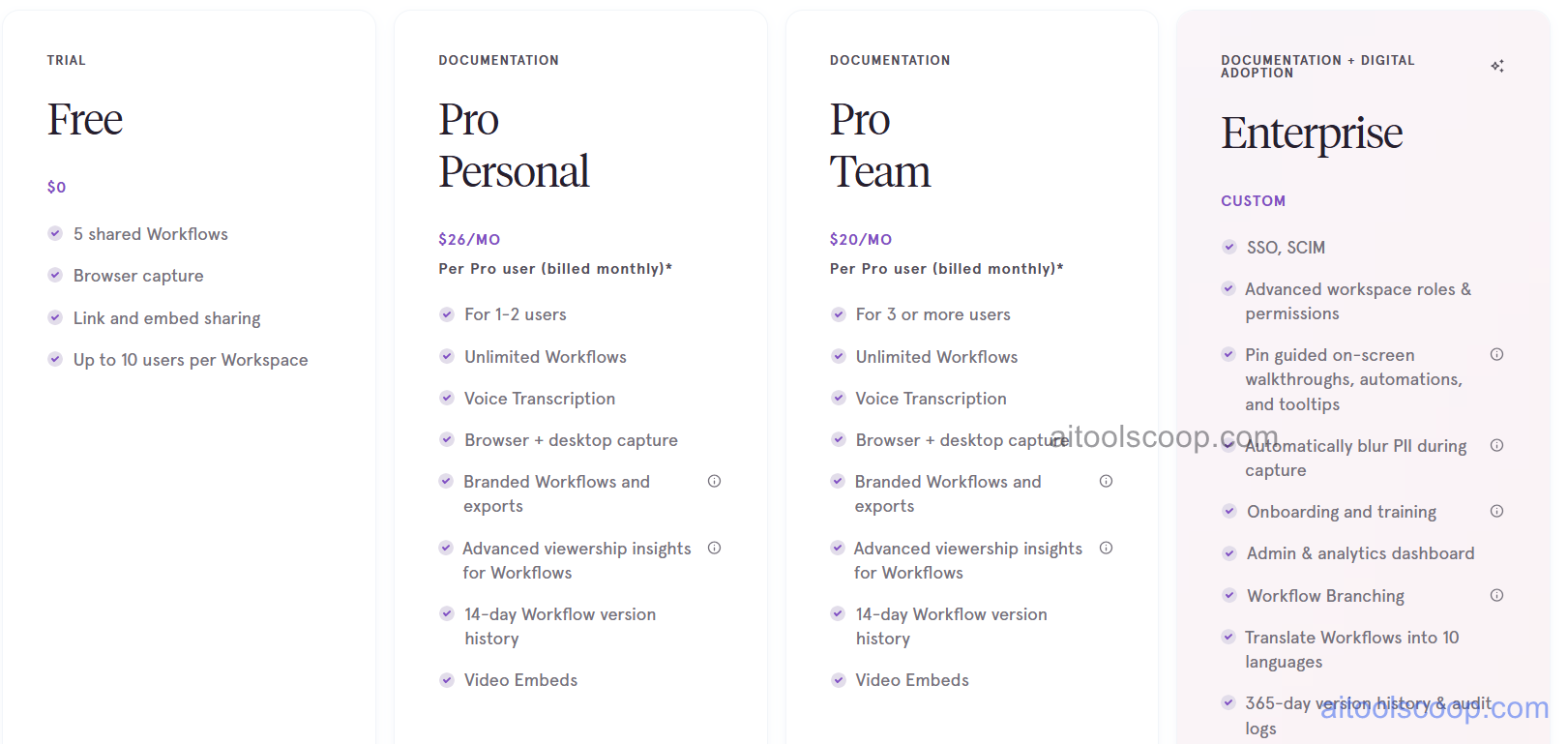
Tango pricing plans
Tango pricing — screenshot from tango.us
Plan Monthly Annually Key Inclusions
Free $0 $0 Limited guides, core capture, shareable links, personal use
Pro $20/mo $15/mo Unlimited guides, PDF export, analytics, sensitive data blur, integrations
Business $26/mo $22/mo All Pro features, team workspace, admin controls, SSO, priority support
Enterprise Custom Custom All Business features, advanced security, SLA, dedicated support

Always check the latest rates on the official website. For more AI tool reviews, visit aitoolscoop.com.

Who Should Use Tango?

Tango is ideal for operations and process teams standardizing internal workflows into repeatable SOPs, HR and onboarding managers creating training guides for new employees, IT support teams documenting software procedures for end users, customer success teams building self-service help resources, and any knowledge worker who currently documents processes manually. The Free plan suits individuals building a small personal guide library, the Pro plan fits solo professionals needing full export and analytics, the Business plan serves teams requiring shared workspaces and admin controls, and Enterprise covers large organizations with compliance and security requirements.


💰

Pricing Plans

Plan Price Includes
Pro $20/mo Full access + priority support
Check Current Pricing →
Affiliate Disclosure: This page contains affiliate links. If you click and make a purchase, we may earn a small commission at no extra cost to you. We only recommend tools we genuinely believe in.

🎯 Explore More

Discover other curated resources from our platform

🛠️ AI Tools View All →
Coda
Coda
★ 4.4
Kira 4.0
Kira 4.0
★ 4.1
Quso
Quso
★ 3.8
⚔️ VS Comparisons View All →
ChatGPT vs Gemini: Which AI Writing Tool Wins in 2026?
ChatGPT vs Gemini: Which AI Writing…
⚔️
ChatGPT vs DeepSeek: Which AI Is…
ChatGPT GPT-4o vs DeepSeek R1
ChatGPT vs Gemini: 2026 Comparison — Pricing, Features & Verdict
ChatGPT vs Gemini: 2026 Comparison —…
ChatGPT vs Gemini
💡 Free Prompts View All →
💡
How Freelancers Can Use Claude to…
🔥 8.3K uses
💡
The Education Ghostwriter's Beginner Playbook for…
🔥 6.2K uses
💡
How E-commerce Design Leads Can Build…
🔥 4.7K uses
💡 Free Prompts