

Parabola (parabola.io) is a no-code data workflow automation platform designed to give non-technical teams the ability to build, run, and maintain data pipelines without engineering support. Founded in 2018 and based in San Francisco, Parabola sits in the space between spreadsheets and full data engineering — it is more powerful than Excel or Google Sheets for data transformation, but does not require the coding knowledge of tools like dbt or Airflow. Teams use Parabola to automate recurring data tasks: cleaning and reformatting exports, combining data from multiple sources, syncing records between SaaS tools, and generating reports on a schedule.
Parabola's visual flow builder uses drag-and-drop steps to represent data operations — pulling data from a source, filtering rows, transforming columns, joining datasets, and pushing the result to a destination. The platform connects to spreadsheets, CSV files, databases (PostgreSQL, MySQL), REST APIs, and a library of pre-built integrations with tools like Shopify, Airtable, Salesforce, Slack, and FTP servers. Its AI features assist with step configuration by suggesting transformations based on data shape and helping write custom formula logic.
How Parabola Works
Users build flows in Parabola's visual canvas by adding and connecting steps. A flow typically starts with an import step — pulling data from a Google Sheet, a CSV upload, an API call, or a database query — and then chains transformation steps: filter rows, rename columns, join two datasets, deduplicate records, format dates, apply conditional logic. The final step pushes the transformed data to a destination: a Google Sheet, an Airtable base, a Shopify store, a Slack message, an email, or an API endpoint. Flows can be run manually, scheduled to run automatically (hourly, daily, weekly), or triggered by an incoming webhook. Parabola stores the full run history so teams can audit what data was processed and when.
Key Features
- Visual no-code flow builder — drag-and-drop canvas for building multi-step data transformation and automation pipelines without code
- Wide source and destination integrations — connects to Google Sheets, CSV, REST APIs, PostgreSQL, MySQL, Shopify, Airtable, Salesforce, Slack, FTP, and more
- AI-assisted step configuration — AI suggestions for data transformations and formula logic based on the shape of incoming data
- Scheduled flow execution — run flows automatically on hourly, daily, or weekly schedules without manual triggering
- Webhook triggers — trigger flows from external systems via incoming webhooks for event-driven automation
- Data transformation library — 50+ built-in transformation steps covering filtering, joining, deduplication, reformatting, pivoting, and conditional logic
- Run history and audit log — full history of every flow execution with data snapshots for debugging and compliance
- Team collaboration — share flows with teammates, assign ownership, and collaborate on building and maintaining pipelines
- Formula support — custom formula logic for complex transformations beyond the built-in step library
- Error alerting — automatic notifications when a scheduled flow fails or encounters data errors
Parabola Pricing
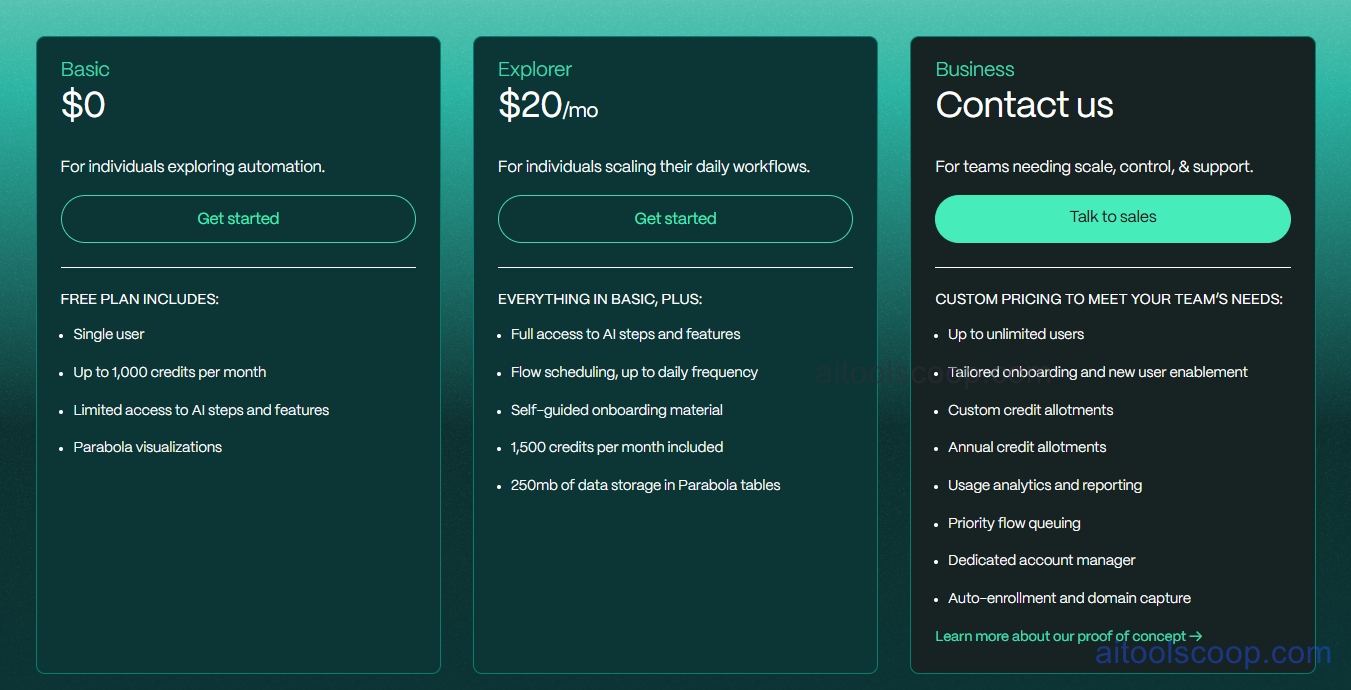
Parabola offers a free plan for individuals and small teams, with a paid plan for higher volume and team features.
- Free — unlimited flows, core integrations, manual and scheduled runs (limited frequency), and single-user access. Ideal for individuals and small teams automating occasional data tasks.
- Paid — from $20/month — higher run frequency, additional integrations, team collaboration features, run history, error alerting, and priority support. Pricing scales with usage and team size.
The free plan is permanently available with no credit card required. Always verify current rates at parabola.io/pricing.
Who Should Use Parabola?
Parabola is best suited to operations, e-commerce, marketing, and finance teams that deal with recurring data tasks — cleaning exports, merging reports, syncing data between tools — and want to automate those tasks without relying on engineering. It hits a sweet spot between the simplicity of a spreadsheet and the power of a coded data pipeline, making it particularly valuable for technically-comfortable but non-developer team members. The free plan is genuinely useful for individuals and small teams with light automation needs. Parabola is less suited to high-volume real-time data pipelines, complex multi-tenant data architectures, or use cases requiring tight database integration — those scenarios typically call for dedicated ETL tools like Fivetran or custom pipeline engineering.
Frequently Asked Questions
Is Parabola free to use?
Yes. Parabola offers a permanently free plan that includes unlimited flows, core source and destination integrations, and both manual and scheduled run capabilities. The free plan is suitable for individuals and small teams with light, occasional automation needs. No credit card is required to sign up. Paid plans unlock higher run frequency, team collaboration, advanced integrations, run history, and error alerting.
What can Parabola automate?
Parabola automates recurring data workflows: pulling data from sources like Google Sheets, Shopify, APIs, or databases; cleaning and transforming it (filtering rows, renaming columns, joining datasets, deduplicating records, reformatting dates); and pushing the result to a destination like another Google Sheet, Airtable, Salesforce, Slack, or an API endpoint. Common use cases include automating e-commerce reporting, syncing CRM data, cleaning vendor exports, and generating scheduled data summaries.
How is Parabola different from Zapier?
Zapier is primarily an event-driven app automation tool — it triggers actions when something happens in one app (e.g. new form submission → create CRM contact). Parabola is designed for batch data transformation workflows — pulling, cleaning, transforming, and syncing datasets rather than triggering single-record actions. Parabola is stronger for multi-step data manipulation, joining datasets, and processing bulk records; Zapier is stronger for real-time event-triggered workflow automation between SaaS tools. Many teams use both for different purposes.
Does Parabola require coding knowledge?
No. Parabola is built for non-technical users and does not require coding to build and run flows. The visual drag-and-drop builder and 50+ built-in transformation steps cover the majority of data workflow needs without writing code. For advanced cases, Parabola supports custom formula logic similar to spreadsheet formulas. Users comfortable with Excel or Google Sheets typically find Parabola intuitive to learn.
What integrations does Parabola support?
Parabola connects to Google Sheets, CSV files, REST APIs, PostgreSQL, MySQL, Shopify, Airtable, Salesforce, Slack, FTP/SFTP servers, and email — both as data sources and destinations. It also supports incoming and outgoing webhooks for triggering flows from external systems. The integration library continues to expand; users can also connect to any REST API directly using Parabola's API step for sources and destinations not covered by pre-built integrations.