Structured Note-Taking and Knowledge Management for Power Users
Tana (tana.inc) is a next-generation productivity and knowledge management tool built around the concept of the "supertag" — a way to turn any piece of text into a structured, typed object that can be searched, filtered, and automated. It sits at the intersection of note-taking, database management, and AI assistance, and has developed a dedicated following among knowledge workers, operators, and founders who have outgrown tools like Notion, Roam Research, or Obsidian.
What Is Tana?
Tana is an outliner-based workspace where every node can be tagged and given structure. Instead of writing a meeting note as unstructured text, you tag it as a "meeting" and Tana automatically applies a schema — attendees, action items, date, project link. Over time, your workspace becomes a queryable personal database rather than a pile of documents.
The AI layer (Tana AI) sits on top of this structure. Because Tana knows the type and relationships of everything you write, its AI commands are unusually precise — you can ask it to summarize all action items from meetings in Q1, extract all decisions made about a specific project, or generate a first draft using only content you have already written.
Who Makes Tana?
Tana was founded by Stian Håklev and a small team based in Norway. The company is bootstrapped and independent. Tana exited beta in 2023 and has grown steadily through word-of-mouth among productivity enthusiasts and knowledge workers.
Key Features
- Supertags — Tag any node as a typed object (person, project, meeting, task) with a custom schema. Creates a structured personal database from your notes automatically
- Live search nodes — Create views that dynamically query your entire workspace. A node showing "all open tasks tagged #project/Alpha due this week" updates in real time
- Tana AI commands — Because Tana understands structure, AI commands are context-aware. Summarize, extract, generate, or transform content using the full context of your typed data
- Tana Paste — Paste unstructured text and have Tana AI extract and structure it into typed nodes automatically
- Bi-directional links — Reference any node anywhere in your workspace. Backlinks give you a true graph of connected knowledge
- Templates — Build reusable templates for recurring workflows: weekly reviews, meeting notes, project kick-offs, CRM entries
- API and integrations — Connect to external tools via Tana's open API, with community-built integrations for Zapier and Make
Pricing
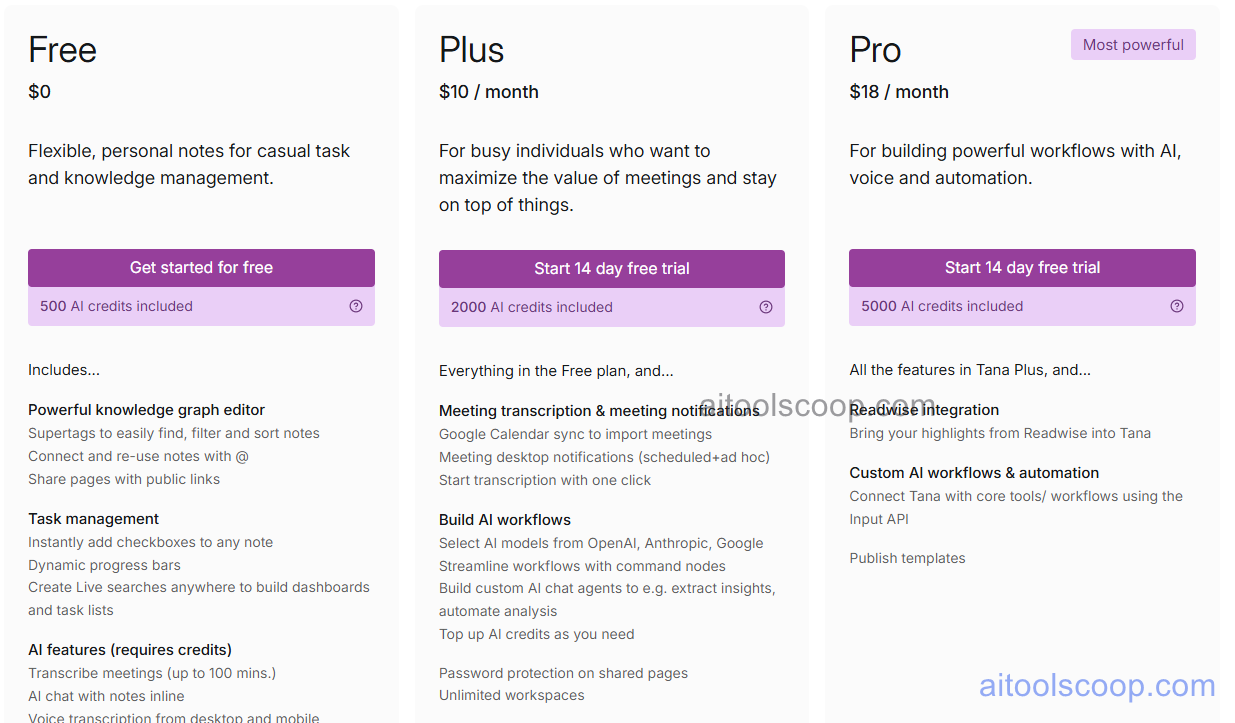
- Free — Full personal workspace, unlimited nodes, basic AI commands with limited monthly AI credits
- Starter — $10/month (billed annually) — Expanded AI credits, priority support, advanced AI commands
- Teams — Custom pricing — Shared workspaces, team permissions, collaborative editing, SSO, admin controls
Tana vs Notion vs Roam Research
Notion wins for team collaboration and shared wikis. Roam pioneered bi-directional linking and still has the deepest networked thought interface. Tana sits between them: it has Roam's outliner depth plus a typed data layer that neither Notion nor Roam match. Tana's AI is also stronger because it operates on structured data rather than raw text. The tradeoff: Tana has a steeper learning curve and less mature collaboration features. For solo knowledge workers who want a personal database that thinks with them, Tana is the strongest option in 2026.
Pros & Cons
Pros:
- Supertag system creates a self-organizing structured knowledge database
- AI commands are unusually precise because they operate on typed, structured data
- Live search nodes eliminate manual organization — workspace self-organizes
- Free plan is genuinely useful with no major feature restrictions
- Active development with regular updates and strong community
Cons:
- Steep learning curve — requires real investment to unlock full value
- Not a replacement for Notion for team wikis or document collaboration
- Mobile app less polished than desktop experience
- Smaller template ecosystem than Notion — you build most workflows yourself
- No offline mode — requires an internet connection
Who Should Use Tana?
Tana is for knowledge workers, operators, and founders who process large amounts of information daily and need more than a note-taking app. If you find yourself fighting Notion to maintain structure, or if you have outgrown Roam and want AI that understands your data, Tana is worth the learning curve. The free plan is a genuine starting point — use it for 30 days on your real workflows before deciding to pay.
Bottom Line
Tana is the most structurally sophisticated personal knowledge management tool in 2026. Its supertag system and AI integration represent a genuine step forward from first-generation note-taking apps. The learning curve is real, but the payoff for the right user is a workspace that actively helps you think rather than just storing your thoughts.