Free AI Math Solver Worth Using
Photomath (photomath.com) is the world's most downloaded math learning app, with over a billion problems solved. Originally founded in 2014 and acquired by Google in 2023, Photomath uses advanced AI and optical character recognition (OCR) to scan printed or handwritten math problems through a smartphone camera and return instant, step-by-step solutions. It covers everything from basic arithmetic to calculus, making it a trusted homework aid for students at every level.
How Photomath Works
Open the Photomath app on iOS or Android and point your camera at any math problem — printed in a textbook or handwritten on paper. The AI-powered OCR engine reads the equation in real time and displays the solution within seconds. Tap the solution card to expand it into a full step-by-step breakdown showing every calculation and the mathematical rule applied at each stage. For each problem, Photomath often provides multiple solution methods — for example, both elimination and substitution for a system of equations — so students learn different approaches. Upgrade to Photomath Plus to unlock animated video tutorials, textbook-specific solutions, and deeper explanations of each step's reasoning.
Key Features
- Camera math scanner — Point your phone at any printed or handwritten problem for instant AI-powered recognition and solving
- Step-by-step explanations — Every solution broken down into individual steps with the mathematical rule used at each stage
- Multiple solution methods — See alternative approaches to the same problem to deepen mathematical understanding
- Handwriting recognition — Accurately reads messy or non-standard handwritten equations written on paper
- Interactive graphing calculator — Plot functions, analyze equations, and visualize mathematical relationships in real time
- Animated tutorials (Plus) — Video walkthroughs showing solutions on a virtual whiteboard with voiceover explanations
- Textbook solutions (Plus) — Step-by-step answers for problems from thousands of specific textbooks used in schools worldwide
- Scientific calculator — Advanced manual input calculator for typed equations when camera scanning is not available
- Problem history and bookmarks — Save and revisit previously scanned problems for revision and exam preparation
- Google Lens integration — Seamlessly accessible via Google Lens on Android for instant math solving from any screen
Photomath Pricing
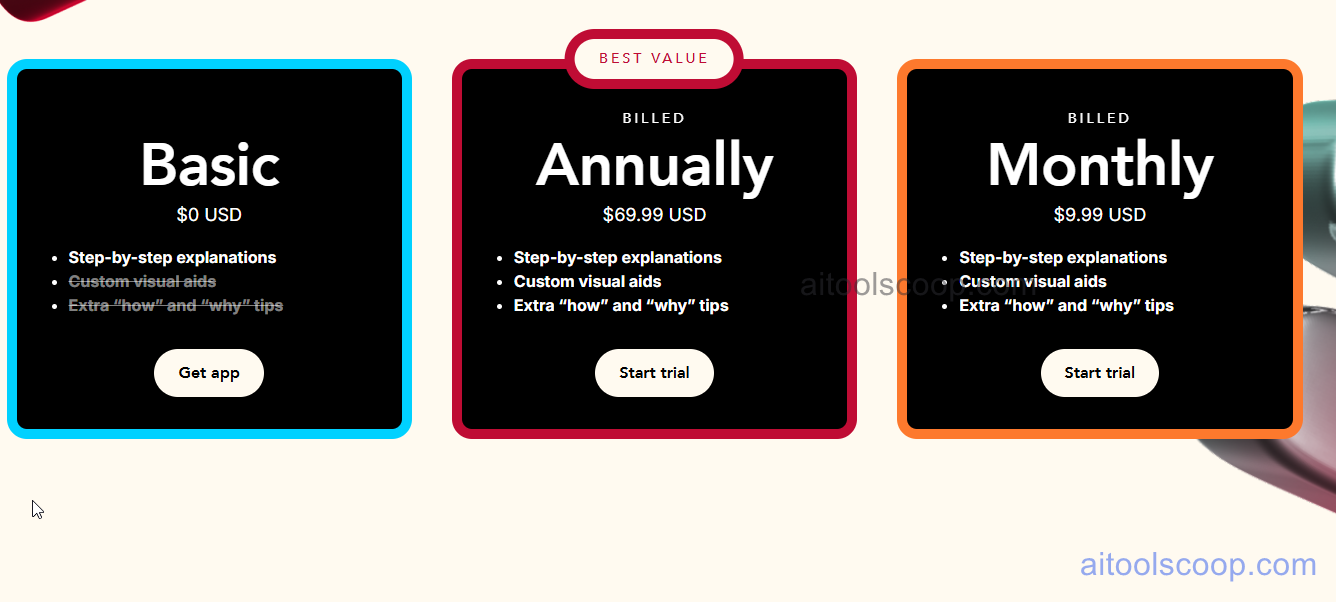
| Plan | Price | Key Features |
|---|---|---|
| Basic | $0 | Step-by-step explanations, camera scanner, scientific calculator, interactive graphs — no time limit |
| Plus — Annual | $69.99/year (~$5.83/mo) | Everything in Basic plus animated tutorials, textbook solutions, custom visual aids, extra how/why tips |
| Plus — Monthly | $9.99/month | Everything in Plus Annual, billed monthly with no annual commitment |
Always check the latest rates on the official website. For more AI tool reviews, visit aitoolscoop.com.
Who Should Use Photomath?
Photomath is ideal for middle school and high school students who need instant homework help and want to understand each step — not just get the answer. It works equally well for college students tackling calculus or statistics, and for parents who want to check their child's work or refresh their own math skills. Teachers use it to demonstrate multiple solution methods in class. The free Basic plan covers the needs of most casual users; Photomath Plus is worth the upgrade for students preparing for exams who need animated tutorials and textbook-specific solutions.
Frequently Asked Questions
Is Photomath free?
Yes, Photomath has a permanently free Basic plan with no time limit. It includes camera scanning, step-by-step explanations, interactive graphs, and a scientific calculator. The free version covers the needs of most students for everyday homework. Photomath Plus ($9.99/month or $69.99/year) unlocks animated tutorials, custom visual aids, and textbook solutions for more advanced learning.
How much does Photomath cost?
Photomath Basic is completely free. Photomath Plus costs $9.99 per month or $69.99 per year (about $5.83 per month), making the annual plan the better value. Both Plus plans include a free trial so you can test premium features before committing.
Is Photomath safe to use?
Yes, Photomath is a legitimate, Google-backed educational app used by hundreds of millions of students worldwide. It is available on the official Apple App Store and Google Play Store. As with any app, review the official privacy policy before use. Photomath recommends using the app as a learning tool to understand steps, not as a shortcut to copy answers.
What math topics does Photomath cover?
Photomath covers a wide range from elementary through university level: basic arithmetic, fractions, decimals, pre-algebra, algebra, linear equations, systems of equations, functions, trigonometry, geometry, sequences, statistics, and calculus including derivatives and integrals. It handles both printed textbook problems and handwritten equations.
Does Photomath have a mobile app?
Yes, Photomath is primarily a mobile app available for free on both iOS (App Store) and Android (Google Play). There is no standalone desktop version, though it is accessible via Google Lens on Android directly from your camera app.
What are the best Photomath alternatives?
The top alternatives to Photomath include Symbolab (stronger for university-level math and calculus), Mathway (broader subject coverage including chemistry), and Microsoft Math Solver (free, integrates with Windows and Office). Each offers step-by-step solutions but differs in depth, platform, and pricing.