Budibase (budibase.com) is an open-source low-code application platform founded in 2019 in Glasgow, Scotland. It enables developers and technical teams to build internal tools, customer portals, approval workflows, and data management applications faster than writing custom code — while retaining the flexibility and control that developers expect. Budibase is distinguished by its built-in database, which allows teams to store and manage application data directly within the platform without requiring an external database connection for simpler use cases.
Beyond the built-in database, Budibase connects to external data sources including PostgreSQL, MySQL, MongoDB, REST APIs, Google Sheets, Airtable, and others. Its automation engine handles recurring tasks, approval flows, and data sync workflows without requiring a separate automation tool. Budibase has introduced AI features including an AI-assisted query and formula builder, and a Budibase AI component that embeds AI chat and generation capabilities directly into built applications — allowing teams to add AI interfaces to internal tools without separate AI API management.
How Budibase Works
Teams connect data sources or use Budibase's built-in database to store application data. The design editor provides a grid-based layout system for arranging UI components — tables, forms, charts, buttons, and custom containers — and binding them to data. Automations are configured in the automation editor by chaining trigger conditions (form submission, row creation, scheduled time, webhook) with action steps (update database, send email, call API, run script). Role-based access control defines user groups and their permissions within the application. Apps are published to Budibase Cloud or a self-hosted instance, with end users accessing them via browser.
Key Features
- Built-in database — native relational database for storing application data without requiring an external database for simple use cases
- Open-source and self-hostable — fully open-source on GitHub; self-host on Docker, Kubernetes, or any cloud provider free of charge
- AI-assisted builder — AI helps generate queries, formulas, and component configurations from natural language descriptions
- Budibase AI component — embed AI chat and generation features into applications using connected LLM providers
- External data connectors — PostgreSQL, MySQL, MongoDB, REST APIs, GraphQL, Google Sheets, Airtable, Salesforce, and more
- Automation engine — visual workflow builder for approval flows, data sync, notifications, scheduled tasks, and webhook triggers
- Grid-based UI layout — precise grid layout system for building structured, alignment-consistent application interfaces
- Role-based access control — define user groups with granular permissions across app screens, data, and actions
- Custom components — build and import custom Svelte components to extend the standard component library
- Audit logging — track user actions, data changes, and automation runs for compliance and debugging on paid plans
Budibase Pricing
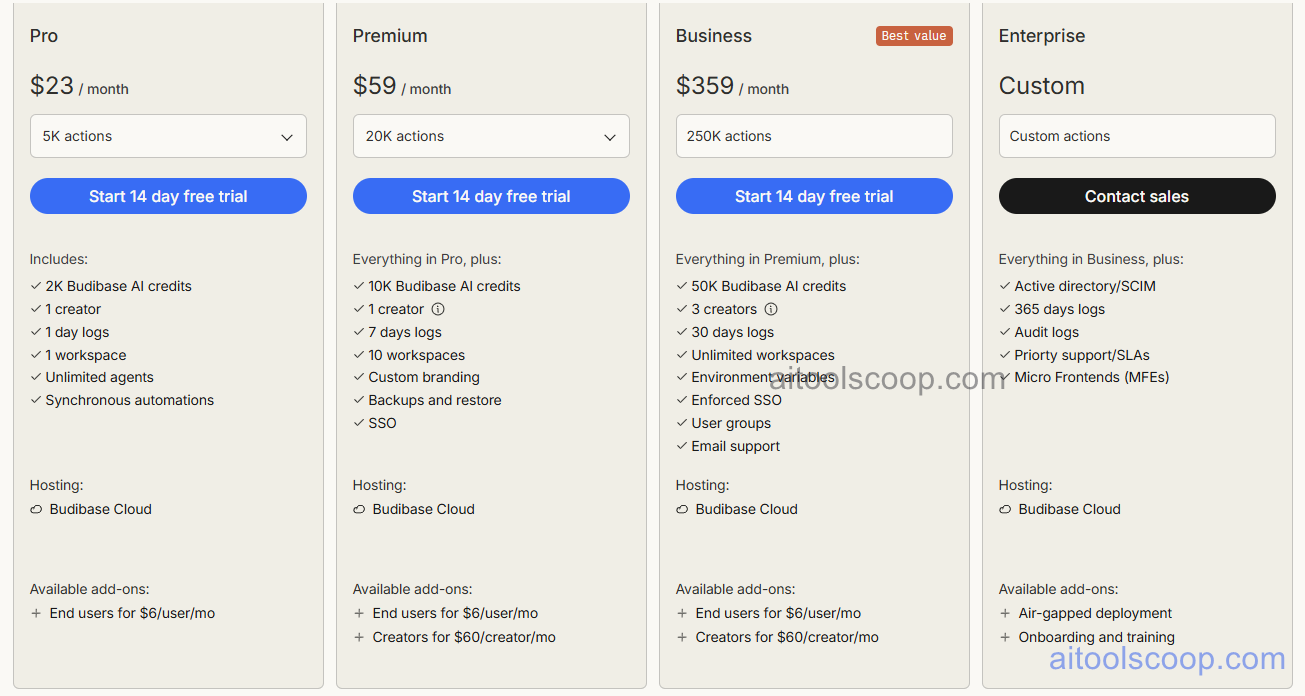
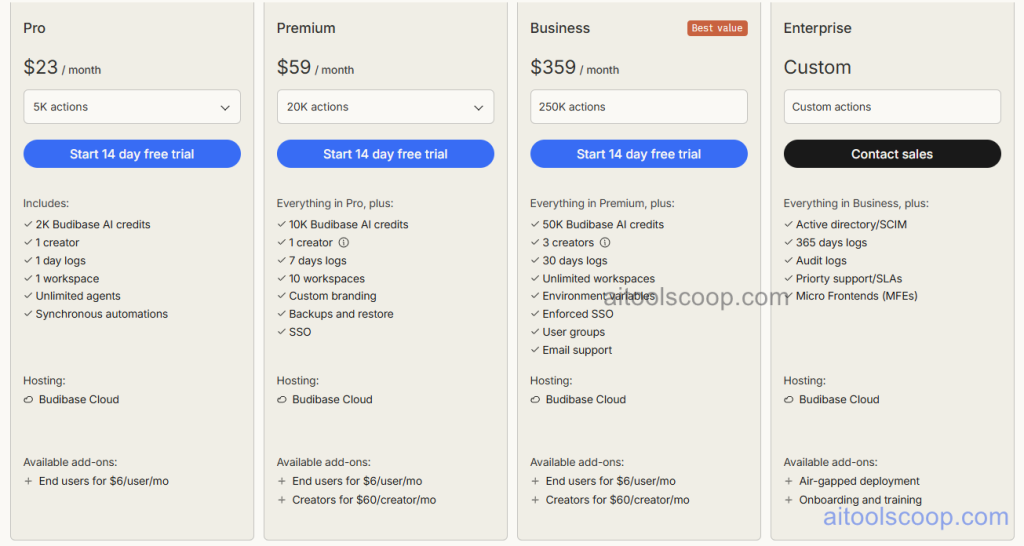
Budibase cloud offers three paid plans. Self-hosting is always free. A free cloud tier may be available for evaluation.
- Starter — $23/month (annual: $19/month) — core features, built-in database, external connectors, automation engine, and up to 5 creators with unlimited app users.
- Business — $59/month (annual: $49/month) — everything in Starter plus more creator seats, SSO, audit logs, custom branding, advanced automation steps, and priority support.
- Enterprise — $359/month (annual: $299/month) — everything in Business plus unlimited creators, dedicated support, SLA, advanced security, and enterprise compliance features.
Self-hosting is always free. A free cloud evaluation tier may be available — verify at budibase.com/pricing.
Who Should Use Budibase?
Budibase is best suited to developer-led teams and engineering organisations that want an open-source low-code platform they can self-host, extend with custom components, and contribute to — without the vendor dependency of proprietary tools. Its built-in database is particularly valuable for rapid prototyping or building simple data management applications without provisioning an external database. The automation engine makes it suitable for teams replacing manual approval or data-sync processes with structured workflows. Budibase is less suited to purely non-technical users who need a fully guided no-code experience, or to teams needing a native mobile app output.
Frequently Asked Questions
What is Budibase used for?
Budibase is an open-source low-code platform used to build internal tools, customer portals, approval workflows, and data management applications. It connects to external databases and APIs or uses its built-in database for simpler applications. Engineering teams use it to replace manually built internal dashboards and workflows with maintained, access-controlled applications built faster than custom development.
Is Budibase free to use?
Budibase's self-hosted version is completely free to use with no user limits — teams can deploy Budibase on their own infrastructure and build unlimited applications at no cost. A cloud-hosted version is available with paid plans starting at $23/month ($19/month annually). A free cloud evaluation tier may be available — check the Budibase pricing page for current cloud free access options.
What makes Budibase different from Retool?
Budibase is open-source and self-hostable for free, while Retool is a proprietary product. Budibase includes a built-in database for storing application data without an external database, which Retool does not. Budibase's automation engine covers approval workflows and scheduled tasks more visually than Retool's. Retool has a larger component library, more established community, and stronger brand recognition in the developer tooling market. Teams prioritising open-source and self-hosting choose Budibase; teams prioritising component breadth and ecosystem choose Retool.
Can I extend Budibase with custom components?
Yes. Budibase supports custom component development using Svelte, allowing developers to build components beyond the standard library and import them into their Budibase applications. Custom components follow Budibase's component API and can accept data bindings and user interactions just like built-in components. This extensibility makes Budibase suitable for teams with specific UI or interaction requirements that the standard library cannot fulfil.
Does Budibase have an automation engine?
Yes. Budibase includes a visual automation builder for creating workflows triggered by events — form submissions, database row creation or updates, scheduled timers, or incoming webhooks. Each automation chains action steps including database operations, email sending, REST API calls, script execution, and Slack notifications. This makes Budibase suitable for replacing manual approval processes, data synchronisation routines, and notification workflows without requiring a separate tool like Zapier.