

Home/ AI Tools /Ai Presentation /SlidesAI
SlidesAI Freemium
🤖 Ai Presentation
#8 in Ai Presentation

SlidesAI

SlidesAI is a Google Slides add-on that uses AI to instantly convert text or topics into professional presentation slides. Free plan available; paid plans from $10/month or $8.33/month billed annually.

4.2 / 5 Freemium From $10/mo
Quick Info
💰 Pricing$10/mo
⭐ Rating4.2 / 5
🆓 Free Plan✅ Yes
📂 CategoryAi Presentation
🌐 WebsiteVisit ↗
🕐 Last UpdatedApr 26, 2026
🔀 Alternatives9 tools
Verified Data Updated Apr 26, 2026
Independently Reviewed No paid placements
Detailed Analysis Hands-on testing
Key Features
  • Text-to-presentation conversion transforming any written content into a structured formatted slide deck instantly
  • Google Slides native add-on working directly inside Google Slides without switching to another application
  • Topic-to-deck generation producing a full presentation from a brief topic description or keyword input
  • Multiple visual themes applied automatically to generated slides for immediate professional appearance
  • Speaker notes generation producing presenter notes alongside slide content for each generated slide
  • Multi-language presentation generation for creating decks in different languages for international audiences
  • Adjustable slide count control for setting the number of slides generated to match presentation requirements
  • AI image suggestions recommending relevant visuals to complement generated slide content automatically
  • Full Google Workspace compatibility with Drive sharing, collaboration, and publishing features
  • One-click slide regeneration for refreshing individual slides or full decks with adjusted inputs
4.2
Overall Rating
Ease of Use
4.4
Features
4.2
Value
3.9
Performance
4.3
Support
4.1
Pros & Cons
👍 Pros
  • Native Google Slides add-on approach eliminates the learning curve of adopting an entirely new platform
  • Annual Basic plan at $8.33/month the most affordable AI presentation generation subscription available
  • Free plan with 3 presentations per month allows genuine evaluation of generation quality before committing
  • Speaker notes generated automatically alongside slides saves additional time beyond the slide content itself
  • Multi-language support covers international presentation needs without additional configuration overhead
  • Works entirely within Google Workspace keeping all presentations in Drive for familiar sharing and collaboration
  • Topic-based generation enables complete deck creation from a few words when source text is not available
👎 Cons
  • Slide count limits per deck (10 on Free, 15 on Basic, 25 on Premium) restrict longer presentations
  • Google Slides only — incompatible with PowerPoint, Keynote, or other presentation environments
  • AI-generated slide content typically requires significant editing before meeting professional quality standards
  • Visual design quality of generated slides dependent on selected theme — less polished than Beautiful.ai or Pitch
  • Premium plan required for more than 15 slides per deck which can be insufficient for comprehensive presentations
  • No real-time collaboration tools beyond what Google Slides natively provides
  • Analytics, brand kit, and audience tracking features absent — limited to content generation only
📖

About SlidesAI

SlidesAI (slidesai.io) is an AI-powered presentation generation tool that works directly inside Google Slides as a native add-on, enabling users to convert any block of text, article, notes, or topic description into a complete, formatted slide deck in seconds — without leaving the Google Workspace environment they already use every day. SlidesAI analyzes the provided content or prompt, identifies key points and logical structure, and generates a multi-slide presentation with titles, bullet points, and appropriate visual layouts — applying the selected theme automatically. For professionals who live in Google Slides but spend too much time on the initial setup and formatting of each new deck, SlidesAI removes the blank-slide problem entirely by providing a structured, formatted starting point that can then be refined within the familiar Slides environment.

How SlidesAI Works

Install the SlidesAI add-on from the Google Workspace Marketplace and open it within Google Slides. Paste in any text content — a blog post, meeting notes, a report, an essay, or any written material — or simply type a topic description. Select your preferred presentation length, language, and visual theme. Click Generate and SlidesAI analyzes the content, extracts key points, organizes them into a logical slide structure, and populates a complete presentation directly in your Google Slides file — with titles, bullet points, and speaker notes across each slide. Review the generated deck, make any edits using standard Google Slides tools, add images and additional visual elements, and share or present directly from Google Slides as you normally would. The entire generation process takes under a minute for most content lengths.

Key Features

  • Text-to-presentation — converts any text content into a structured, formatted slide deck instantly
  • Google Slides native — works as an add-on directly inside Google Slides without switching tools
  • Topic-to-deck generation — generate a full presentation from a brief topic description or keyword
  • Multiple themes — choose from a range of visual themes applied automatically to generated slides
  • Speaker notes generation — AI produces speaker notes alongside slide content for each slide
  • Multi-language support — generate presentations in multiple languages for international audiences
  • Adjustable slide count — control the number of slides generated to suit your presentation length
  • Image suggestions — AI recommends relevant images to complement generated slide content
  • Google Workspace integration — fully compatible with Google Drive, sharing, and collaboration features
  • One-click regeneration — regenerate individual slides or the full deck with adjusted inputs

SlidesAI Pricing
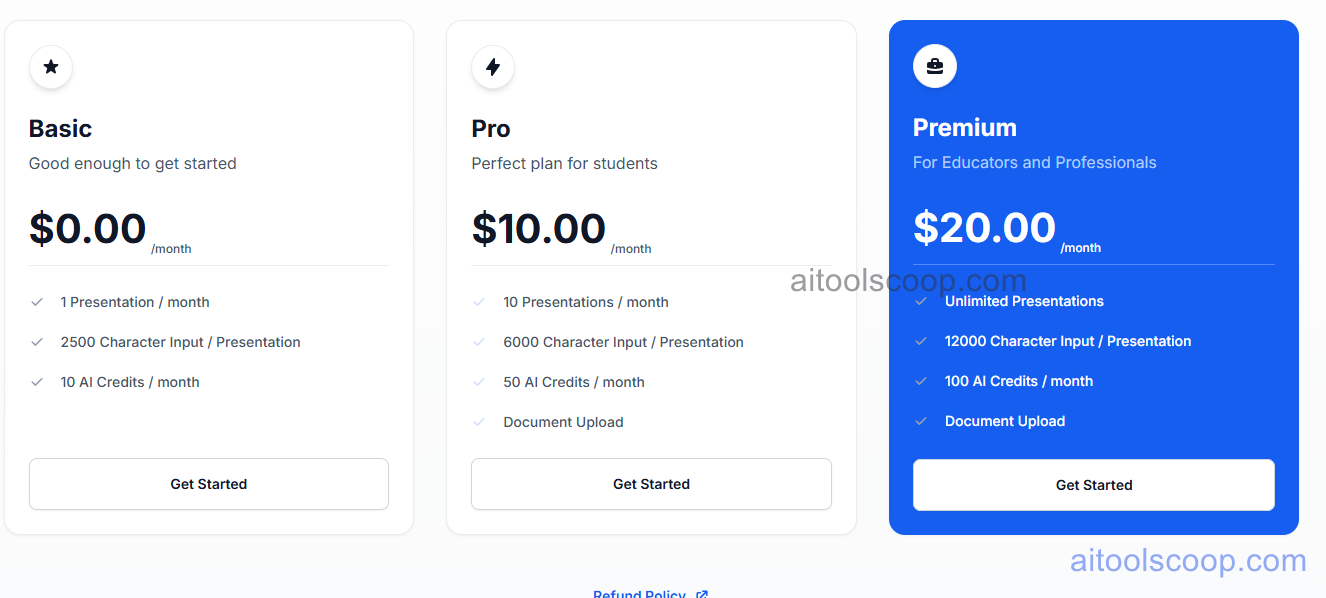
SlidesAI pricing plans
SlidesAI pricing — screenshot from slidesai.io
Plan Monthly Annually Key Inclusions
Free $0 $0 3 presentations per month, up to 10 slides per deck, core themes, speaker notes, Google Slides integration
Basic $10/mo $8.33/mo Unlimited presentations, up to 15 slides per deck, all themes, multi-language, image suggestions, priority support
Premium $20/mo $16.67/mo All Basic features, up to 25 slides per deck, advanced themes, higher text input limits, priority support

Always check the latest rates on the official website. For more AI tool reviews, visit aitoolscoop.com.

Who Should Use SlidesAI?

SlidesAI is the ideal tool for Google Workspace users who create presentations regularly and want to eliminate the time spent on initial slide setup and formatting, educators and trainers who convert lesson materials, notes, and articles into structured presentation content quickly, content marketers and writers repurposing long-form written content into visual presentation formats for webinars or speaking engagements, consultants and business analysts who need to rapidly turn report or research content into presentable slide formats for client meetings, and students who want to convert study notes or essay content into structured review presentations. The annual Basic plan at $8.33/month is among the most affordable AI presentation generation subscriptions available for Google Slides users.


💰

Pricing Plans

Plan Price Includes
Pro $10/mo Full access + priority support
Check Current Pricing →
Affiliate Disclosure: This page contains affiliate links. If you click and make a purchase, we may earn a small commission at no extra cost to you. We only recommend tools we genuinely believe in.

🎯 Explore More

Discover other curated resources from our platform

🛠️ AI Tools View All →
Canva
Canva
★ 4.5
Notta
Notta
★ 4.4
Wordtune
Wordtune
★ 4.2
⚔️ VS Comparisons View All →
ChatGPT vs Gemini: Which AI Writing Tool Wins in 2026?
ChatGPT vs Gemini: Which AI Writing…
⚔️
DeepSeek vs Gemini: Which AI Is…
DeepSeek R1 vs Google Gemini 2.0 Pro
Claude vs ChatGPT
Claude vs ChatGPT
Claude 3.7 Sonnet vs ChatGPT GPT-4o
💡 Free Prompts View All →
💡
Business Revenue Leak Auditor
🔥 15.3K uses
💡
Contract Signature Authority Gaps Solved: Claude…
🔥 3.5K uses
💡
2026 Updated: Claude Prompts for Financial…
🔥 11.8K uses
💡 Free Prompts