

Best Screen Recording for Tutorials
Camtasia (techsmith.com) is a desktop screen recording and video editing application designed specifically for educational content, software tutorials, and corporate training. Developed by TechSmith, Camtasia combines high-quality screen capture with a timeline-based editor optimized for screencasts, featuring cursor effects, callouts, annotations, and quizzing tools. The software serves educators, trainers, and technical content creators who prioritize clarity and instructional design over cinematic production values. Available for Windows and macOS, Camtasia emphasizes ease of use for non-editors while providing professional features including multi-track editing, green screen, and audio enhancement.
How Camtasia Works
Launch Camtasia and start a new recording or import existing video files. For screen recording, select capture area (full screen, window, or custom region), enable webcam overlay if desired, and configure audio sources (system audio, microphone, or both). Record your screen activity with automatic tracking of cursor movements and clicks. After recording, the footage opens in Camtasia's timeline editor. Trim unnecessary sections, split clips, and arrange sequences. Add annotations including arrows, shapes, and text callouts to highlight important elements. Apply cursor effects like magnification, clicks visualization, and smooth tracking. Insert interactive quizzes and surveys for training videos. Use transitions, zoom-and-pan effects, and green screen removal. Enhance audio with noise removal, volume leveling, and music. Export as MP4, MOV, or directly to YouTube, Vimeo, Screencast.com, and LMS platforms including Moodle and Blackboard.
Key Features
- Screen and webcam recording — capture desktop, applications, and camera simultaneously
- Cursor effects — highlight, magnify, and track cursor movements automatically
- Annotations and callouts — arrows, shapes, text, and blur tools for clarity
- Interactive quizzing — embed surveys and knowledge checks in training videos
- Audio enhancement — noise removal, volume leveling, and audio ducking
- Green screen — remove backgrounds and replace with custom images or videos
- Multi-track editing — layer video, audio, and effects on separate tracks
- Asset library — pre-built animations, lower thirds, and intro/outro templates
- Captions and subtitles — automated speech-to-text with editing capabilities
- LMS integration — export SCORM packages for learning management systems
Camtasia Pricing
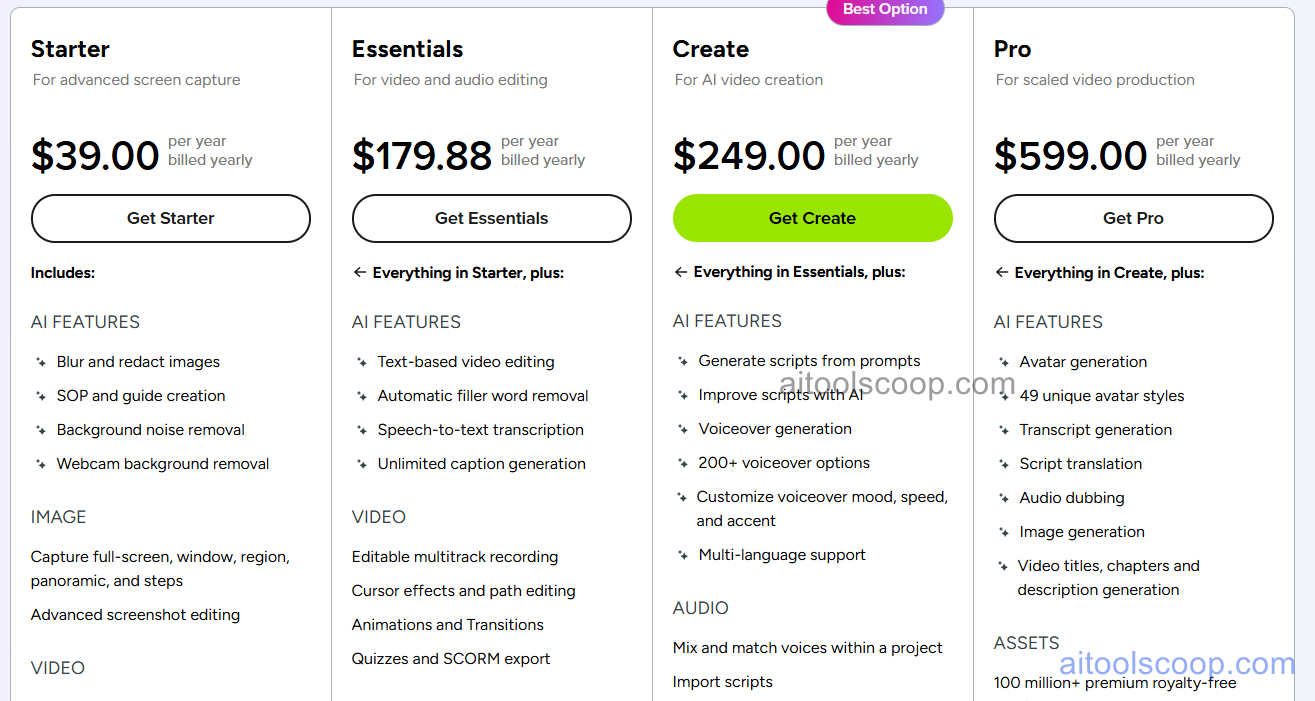
- Subscription — $39/month — monthly billing, full software access, all features, cloud storage, updates included, cancel anytime.
- Annual License — $179.88/year ($14.99/month) — yearly billing, full software access, all features, cloud storage, updates included, renews annually.
- Perpetual License — $249 one-time — lifetime license for current version, all features, 1 year of updates and support, upgrades sold separately.
- Enterprise — $599 one-time — volume licensing for organizations, perpetual license, advanced deployment options, dedicated support, maintenance contracts available.
Always check the latest rates on the official website. For more AI tool reviews, visit aitoolscoop.com.
Who Should Use Camtasia?
Camtasia is ideal for educators and instructional designers creating online course content and tutorials, corporate trainers producing employee onboarding and compliance videos, software companies documenting products with demo videos and user guides, YouTubers focused on software tutorials and how-to content, technical writers creating visual documentation and knowledge bases, and small businesses producing internal training materials. The Annual License suits individuals and small teams with ongoing content needs, while the Perpetual License serves users preferring one-time purchases. Enterprise licenses fit organizations deploying to multiple users with centralized management requirements.