
Home/ AI Tools /Ai Presentation /Sendsteps
Sendsteps Freemium
🤖 Ai Presentation
#4 in Ai Presentation

Sendsteps

Sendsteps is an AI presentation platform with built-in live audience interaction tools including polls, quizzes, and Q&A for engaging presentations. Free plan available; paid from $9.50/month or $6.50/month billed annually.

4.3 / 5 Freemium From $9.50/mo
Quick Info
💰 Pricing$9.50/mo
⭐ Rating4.3 / 5
🆓 Free Plan✅ Yes
📂 CategoryAi Presentation
🌐 WebsiteVisit ↗
🕐 Last UpdatedApr 27, 2026
🔀 Alternatives9 tools
Verified Data Updated Apr 27, 2026
Independently Reviewed No paid placements
Detailed Analysis Hands-on testing
Key Features
  • AI slide generator creating complete presentations with suggested interaction points from a topic description
  • Live polls collecting real-time audience responses with instant results displayed on the presentation screen
  • Interactive quizzes with knowledge-check questions, scoring, and live leaderboard display for participants
  • Q&A session management with audience-submitted questions moderated and displayed by the presenter
  • Word clouds generating live visual displays from audience text responses in real time
  • Surveys and rating tools collecting structured feedback from attendees during or after the session
  • No app required for participants who join on any device via browser with a shared session code
  • PowerPoint import for adding interactive elements to existing slide decks on the Pro plan
  • Response analytics for reviewing all collected audience responses and participation data post-session
  • Team collaboration for sharing and co-editing presentations with colleagues on higher plans
4.3
Overall Rating
Ease of Use
4.5
Features
4.3
Value
4.0
Performance
4.4
Support
4.2
Pros & Cons
👍 Pros
  • All-in-one presentation plus audience interaction eliminates the need for a separate polling platform
  • Annual Basic plan at $6.50/month exceptional value for live interaction capability including polls and quizzes
  • Free plan allows evaluating core interaction features with up to 10 participants before committing
  • No app download required for participants — any device with a browser works immediately
  • AI generator includes interaction point suggestions alongside slide content for smarter deck planning
  • Word cloud and Q&A tools add engagement variety beyond basic multiple-choice polling
  • Annual Pro plan at $13.50/month covers up to 500 participants suitable for medium-scale events and webinars
👎 Cons
  • Free plan 10-participant limit too restrictive for any real classroom or business presentation scenario
  • PowerPoint import only available on Pro plan at $19.50/month limiting existing deck conversion on Basic
  • Custom branding requires Pro plan upgrade making Sendsteps-branded experiences inevitable on Basic
  • Participant limits across plans may require Enterprise upgrade for large conferences or all-hands events
  • AI slide generation quality requires editing — the content serves as a starting draft not a finished product
  • Design aesthetic of generated slides less polished than purpose-built presentation design platforms
  • Enterprise pricing and unlimited participant access require direct contact rather than self-serve signup
📖

About Sendsteps

Sendsteps (sendsteps.com) is an AI-powered presentation and audience interaction platform that combines an AI slide generator with built-in live engagement tools — polls, quizzes, Q&A, word clouds, and surveys — that presenters can embed directly within their slides and activate during live sessions. Sendsteps bridges the gap between passive presentation delivery and active audience participation, enabling speakers, educators, trainers, and event facilitators to create and deliver interactive presentations in a single platform without juggling separate slide tools and audience response systems. Participants respond to polls and quizzes in real time on their smartphones or devices, with results displayed live on the presentation screen as the session progresses.

How Sendsteps Works

Create a Sendsteps account and use the AI presentation generator to build a slide deck from a topic description — Sendsteps generates slides with content and suggested interactive elements for each slide. Add interaction slides at any point: insert a poll, a multiple-choice quiz question, a word cloud prompt, an open Q&A, or a rating question. Customize the design, adjust content, and set the correct answers for quiz questions. When presenting, activate the session in Sendsteps and share the participation code with the audience. Attendees navigate to the Sendsteps join page on any device and enter the code to participate — no app download required. As the presenter advances through slides, interactive elements activate automatically, collecting live audience responses displayed in real time on the presentation screen. Review collected responses and participation data after the session in the analytics dashboard.

Key Features

  • AI slide generator — creates complete presentations with suggested interaction points from a topic
  • Live polls — real-time audience polling with instant results displayed on screen
  • Interactive quizzes — knowledge-check quiz questions with scoring and leaderboard display
  • Q&A sessions — audience-submitted questions moderated and displayed by the presenter
  • Word clouds — live word cloud generation from audience text responses
  • Surveys and ratings — collect structured feedback from attendees during or after the session
  • No app required — participants join on any device via browser with a shared code
  • PowerPoint import — import existing PowerPoint decks and add interactive elements
  • Response analytics — review all collected responses and participation data post-session
  • Team collaboration — share and co-edit presentations with colleagues on higher plans

Sendsteps Pricing
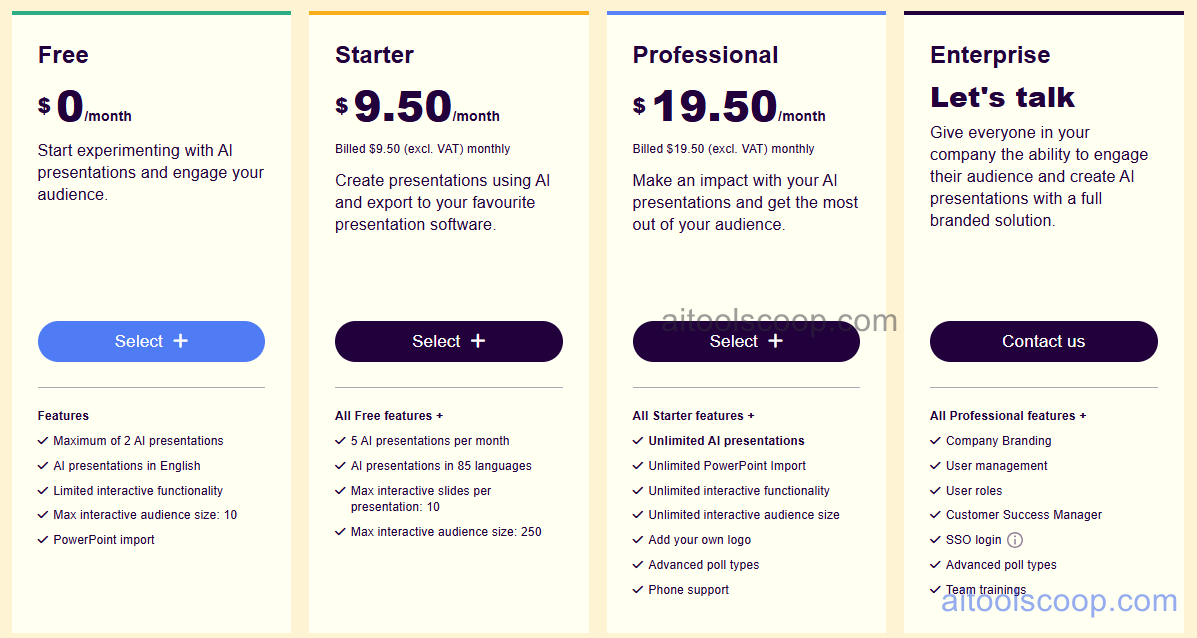
Sendsteps pricing plans
Sendsteps pricing — screenshot from sendsteps.com
Plan Monthly Annually Key Inclusions
Free $0 $0 Limited presentations, basic interaction types, up to 10 participants per session, community support
Basic $9.50/mo $6.50/mo Unlimited presentations, all interaction types, up to 100 participants, AI generator, analytics, email support
Pro $19.50/mo $13.50/mo All Basic features, up to 500 participants, team collaboration, PowerPoint import, custom branding, priority support
Enterprise Custom Custom All Pro features, unlimited participants, SSO, advanced security, SLA, dedicated support, account management

Always check the latest rates on the official website. For more AI tool reviews, visit aitoolscoop.com.

Who Should Use Sendsteps?

Sendsteps is ideal for educators and corporate trainers who want to transform passive classroom or training sessions into interactive experiences with live polls and knowledge-check quizzes, event speakers and conference presenters who want audience engagement data and live Q&A without a separate audience response system, HR and L&D teams running engagement surveys and pulse checks during all-hands meetings and workshops, marketing teams running interactive webinar presentations where audience participation improves conversion and engagement, and team leads who want to make internal presentations more engaging by embedding live polls and discussion prompts. The annual Basic plan at $6.50/month is a remarkably affordable entry point for live interactive presentation capability.

💰

Pricing Plans

Plan Price Includes
Pro $9.50/mo Full access + priority support
Check Current Pricing →
Affiliate Disclosure: This page contains affiliate links. If you click and make a purchase, we may earn a small commission at no extra cost to you. We only recommend tools we genuinely believe in.

🎯 Explore More

Discover other curated resources from our platform

🛠️ AI Tools View All →
Grammarly
Grammarly
★ 4.6
PicsArt
PicsArt
★ 4.3
Civitai
Civitai
★ 3.8
⚔️ VS Comparisons View All →
Claude vs ChatGPT
Claude vs ChatGPT
Claude 3.7 Sonnet vs ChatGPT GPT-4o
ChatGPT vs Claude: 2026 Comparison — Pricing, Features & Verdict
ChatGPT vs Claude: 2026 Comparison —…
ChatGPT vs Claude
ChatGPT vs Grok: 2026 Comparison — Pricing, Features & Verdict
ChatGPT vs Grok: 2026 Comparison —…
ChatGPT vs Grok
💡 Free Prompts View All →
💡
How Agency Software Developers Can Write…
🔥 3.7K uses
💡
How Agency E-commerce SEO Managers Can…
🔥 4.1K uses
💡
How Startup Founders Can Use ChatGPT…
🔥 8.1K uses
💡 Free Prompts