

Home/ AI Tools /Ai Presentation /MagicSlides
MagicSlides Paid
🤖 Ai Presentation
#9 in Ai Presentation

MagicSlides

MagicSlides is an AI presentation generator that creates professional Google Slides and PowerPoint decks from text, PDFs, or URLs in seconds. Paid plans from $8/month or $6.70/month billed annually.

4.2 / 5 Paid From $8/mo
Quick Info
💰 Pricing$8/mo
⭐ Rating4.2 / 5
🆓 Free Plan❌ No
📂 CategoryAi Presentation
🌐 WebsiteVisit ↗
🕐 Last UpdatedApr 27, 2026
🔀 Alternatives9 tools
Verified Data Updated Apr 27, 2026
Independently Reviewed No paid placements
Detailed Analysis Hands-on testing
Key Features
  • Multi-source input generating presentations from text, PDFs, URLs, and YouTube video content
  • Google Slides native add-on working directly inside Google Slides without switching applications
  • PowerPoint integration for generating decks directly into Microsoft PowerPoint files
  • Speaker notes generation producing presenter notes automatically alongside every generated slide
  • Multi-language support for generating presentations in dozens of languages for international audiences
  • Adjustable slide count for setting the exact number of slides needed per presentation
  • Visual theme selection with multiple themes applied automatically at generation time
  • One-click slide regeneration for refreshing individual slides or full decks with updated content inputs
  • Image search integration for adding relevant visuals to slides from within the generation tool
  • Higher plan access for teams and agencies needing increased generation volumes across multiple users
4.2
Overall Rating
Ease of Use
4.4
Features
4.2
Value
3.9
Performance
4.3
Support
4.1
Pros & Cons
👍 Pros
  • YouTube-to-slides conversion is a rare and genuinely useful differentiator for content creators
  • Annual Basic plan at $6.70/month among the most affordable AI presentation generation subscriptions available
  • Works natively inside both Google Slides and PowerPoint covering the two most common presentation environments
  • Multi-source input flexibility covers text, PDFs, URLs, and video without requiring content reformatting
  • Speaker notes generated automatically alongside slide content saves additional time beyond the slides themselves
  • Multi-language support extends utility to international teams without any extra configuration effort
  • Annual Business plan at $23.30/month competitive for teams needing higher volume and priority support
👎 Cons
  • No free plan — even basic evaluation requires a paid subscription commitment
  • AI-generated slide content typically requires significant editing before meeting professional quality standards
  • Visual design quality of generated themes less sophisticated than purpose-built tools like Beautiful.ai or Pitch
  • PowerPoint integration requires Pro plan at $16/month — not available at the entry Basic tier
  • Generation limits on Basic and Pro plans can be reached quickly by high-frequency presentation creators
  • No real-time collaboration beyond what Google Slides and PowerPoint natively provide
  • Analytics, brand kit, and viewer tracking features absent — the tool is focused purely on content generation
📖

About MagicSlides

MagicSlides (magicslides.app) is an AI-powered presentation generation platform that converts text, documents, PDFs, YouTube videos, and website URLs into complete, formatted slide decks in seconds. Available as a Google Slides add-on, a standalone web app, and a PowerPoint integration, MagicSlides meets users inside the presentation tools they already use rather than forcing them into a new environment. The AI analyzes the provided content, extracts key points, structures them logically across slides, and applies a chosen visual theme — producing a presentation-ready draft that users can refine without starting from a blank slide. With support for dozens of languages, a growing template library, and extremely competitive pricing, MagicSlides is particularly popular among educators, content creators, and business professionals who produce presentations regularly.

How MagicSlides Works

Access MagicSlides through the Google Slides add-on, the web app at magicslides.app, or the PowerPoint integration. Enter your content source — paste text directly, upload a PDF, enter a URL for automatic web content extraction, or paste a YouTube link for video-to-slides conversion. Select the number of slides, language, and visual theme. Click Generate and MagicSlides produces a complete slide deck in under a minute with titles, bullet points, and speaker notes on each slide. The finished presentation appears directly in your Google Slides or PowerPoint file ready for editing. Review the generated content, swap images, adjust formatting using familiar Slides or PowerPoint tools, and share or present as you normally would. For recurring presentation needs, save prompts and settings for faster generation in future sessions.

Key Features

  • Multi-source input — generate from text, PDFs, URLs, and YouTube video content
  • Google Slides add-on — works natively inside Google Slides without switching tools
  • PowerPoint integration — generate decks directly into Microsoft PowerPoint files
  • Speaker notes generation — AI produces presenter notes alongside every slide
  • Multi-language support — generate presentations in dozens of languages
  • Adjustable slide count — set the exact number of slides needed for your presentation
  • Visual theme selection — choose from multiple themes applied automatically on generation
  • One-click regeneration — re-generate any slide or the full deck with updated inputs
  • Image search integration — add relevant images to slides from within the tool
  • Team and agency use — higher plans support multiple users and higher generation volumes

MagicSlides Pricing
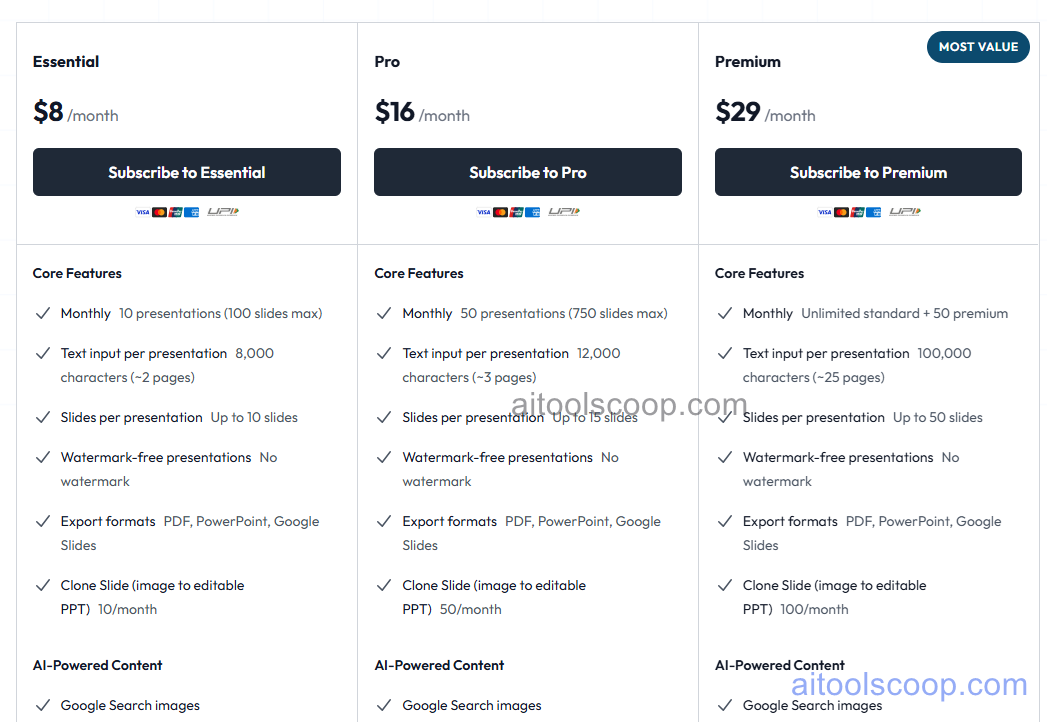
MagicSlides pricing plans
MagicSlides pricing — screenshot from magicslides.app
Plan Monthly Annually Key Inclusions
Basic $8/mo $6.70/mo Core AI generation, Google Slides add-on, PDF and URL input, speaker notes, multi-language, standard themes
Pro $16/mo $12.40/mo All Basic features, PowerPoint integration, YouTube input, higher generation limits, image search, priority support
Business $29/mo $23.30/mo All Pro features, maximum generation limits, team access, advanced themes, dedicated support

Always check the latest rates on the official website. For more AI tool reviews, visit aitoolscoop.com.

Who Should Use MagicSlides?

MagicSlides is ideal for educators and teachers converting lesson notes and articles into structured classroom presentations quickly, business professionals who create recurring presentations from reports and documents and want a faster starting point, content creators repurposing YouTube videos and blog posts into visual slide formats, consultants who need rapid client presentation drafts from existing written deliverables, and any Google Slides or PowerPoint user who wants AI generation without adopting a new presentation platform. The annual Basic plan at $6.70/month is one of the most affordable AI presentation tools on the market.


💰

Pricing Plans

Plan Price Includes
Paid $8/mo Full access + priority support
Check Current Pricing →
Affiliate Disclosure: This page contains affiliate links. If you click and make a purchase, we may earn a small commission at no extra cost to you. We only recommend tools we genuinely believe in.

🎯 Explore More

Discover other curated resources from our platform

🛠️ AI Tools View All →
Camtasia
Camtasia
★ 4.5
InVideo AI
InVideo AI
★ 4.0
Stitch 2.0 by Google
★ 4.0
⚔️ VS Comparisons View All →
⚔️
ChatGPT vs Gemini for Writing in…
ChatGPT GPT-4o vs Gemini 1.5 Pro
ChatGPT vs Kimi: 2026 Comparison — Pricing, Features & Verdict
ChatGPT vs Kimi: 2026 Comparison —…
ChatGPT vs Kimi
⚔️
DeepSeek vs Gemini: Which AI Is…
DeepSeek R1 vs Google Gemini 2.0 Pro
💡 Free Prompts View All →
💡
ChatGPT Prompt to Write Backlink Outreach…
🔥 8.9K uses
💡
ChatGPT Prompt for Writing a Marketing…
🔥 17.8K uses
💡
Gut Health Improvement Plan with Diet…
🔥 17.4K uses
💡 Free Prompts
