

Home/ AI Tools /Ai Presentation /Plus AI
Plus AI Paid
🤖 Ai Presentation
#6 in Ai Presentation

Plus AI

Plus AI is a Google Slides and PowerPoint add-on that generates, edits, and remixes AI presentations directly inside your existing workflow. Paid plans from $10/month.

4.3 / 5 Paid From $10/mo
Quick Info
💰 Pricing$10/mo
⭐ Rating4.3 / 5
🆓 Free Plan❌ No
📂 CategoryAi Presentation
🌐 WebsiteVisit ↗
🕐 Last UpdatedApr 27, 2026
🔀 Alternatives9 tools
Verified Data Updated Apr 27, 2026
Independently Reviewed No paid placements
Detailed Analysis Hands-on testing
Key Features
  • Google Slides native add-on working as a sidebar tool directly inside the Google Slides editor
  • PowerPoint compatibility for Microsoft PowerPoint on Windows and Mac via add-on installation
  • AI slide generation creating complete decks from topic descriptions within existing presentation files
  • AI editing commands for rewriting, expanding, condensing, and improving any slide content inline
  • Content remixing converting documents, articles, and meeting notes into structured presentation formats
  • Speaker notes generation writing presenter notes for any selected slide on demand with a single command
  • Tone adjustment changing the formality and communication style of slide content with AI commands
  • Template library providing starting points accessible directly within the add-on interface
  • Team sharing for distributing AI-generated content and settings across team members on higher plans
  • Revision history for reviewing and restoring previous AI-generated content versions in the editor
4.3
Overall Rating
Ease of Use
4.5
Features
4.3
Value
4.0
Performance
4.4
Support
4.2
Pros & Cons
👍 Pros
  • Native Google Slides and PowerPoint integration eliminates any tool-switching or workflow disruption
  • AI editing commands for improving existing slides is a capability most standalone generators lack entirely
  • Basic plan at $10/month accessible entry point for individuals adding AI to their existing Slides workflow
  • Content remixing from documents and articles saves significant time repurposing written content into slides
  • Speaker notes generation on demand available for any slide without regenerating the entire presentation
  • Tone adjustment command enables adapting the same deck content for different audience formality levels
  • No migration or learning curve required — works entirely within the presentation software already in daily use
👎 Cons
  • No free plan prevents risk-free evaluation before financial commitment is required
  • PowerPoint integration requires Pro plan at $20/month — not available at the Basic entry tier
  • Team workspace and admin controls require Team plan at $30/month limiting collaboration on lower tiers
  • AI usage limits on Basic and Pro plans can constrain high-frequency presentation creators
  • Generation quality depends heavily on the quality and specificity of the topic description provided
  • No native analytics or viewer tracking — requires separate tools for presentation engagement measurement
  • Annual billing option not offered — monthly-only pricing for all plans
📖

About Plus AI

Plus AI (plusdocs.com) is an AI presentation assistant that integrates directly inside Google Slides and Microsoft PowerPoint as a native add-on, enabling users to generate complete slide decks, remix and improve existing presentations, and edit slides using AI commands — all without leaving the presentation software they already use. Unlike standalone AI presentation platforms, Plus AI enhances the tools users are already comfortable with rather than replacing them, making adoption seamless for individuals and teams embedded in Google Workspace or Microsoft 365 workflows. With AI commands for generating slides from text, rewriting content, changing tone, suggesting improvements, and converting existing content into new presentation formats, Plus AI functions as an intelligent co-pilot throughout the entire presentation creation and editing process.

How Plus AI Works

Install the Plus AI add-on from the Google Workspace Marketplace or the Microsoft AppSource and open it within Google Slides or PowerPoint. To generate a new presentation, open Plus AI from the sidebar, describe your topic, audience, and key points, and select the number of slides. Plus AI generates a complete formatted deck directly in your active Slides or PowerPoint file. To improve an existing presentation, select any slide or text block and use the AI edit commands — rewrite this section, make this more concise, change the tone to formal, expand this bullet into a paragraph, or generate speaker notes for this slide. Use the AI to remix content from other formats — paste a document, blog post, or meeting notes and Plus AI converts it into a presentation structure. All AI interactions happen inline within your existing workflow without any external tool switching.

Key Features

  • Google Slides add-on — works natively inside Google Slides as a sidebar tool
  • PowerPoint add-on — compatible with Microsoft PowerPoint for Windows and Mac
  • AI slide generation — creates complete decks from topic descriptions within existing files
  • AI editing commands — rewrite, expand, condense, and improve any slide content with AI
  • Content remixing — converts documents, articles, and notes into presentation structure
  • Speaker notes generation — AI writes presenter notes for any slide on demand
  • Tone adjustment — change the formality and style of slide content with a single command
  • Template library — access a library of starting templates within the add-on
  • Team sharing — share AI-generated content and settings across team members on higher plans
  • Revision history — review and restore previous AI-generated content versions

Plus AI Pricing
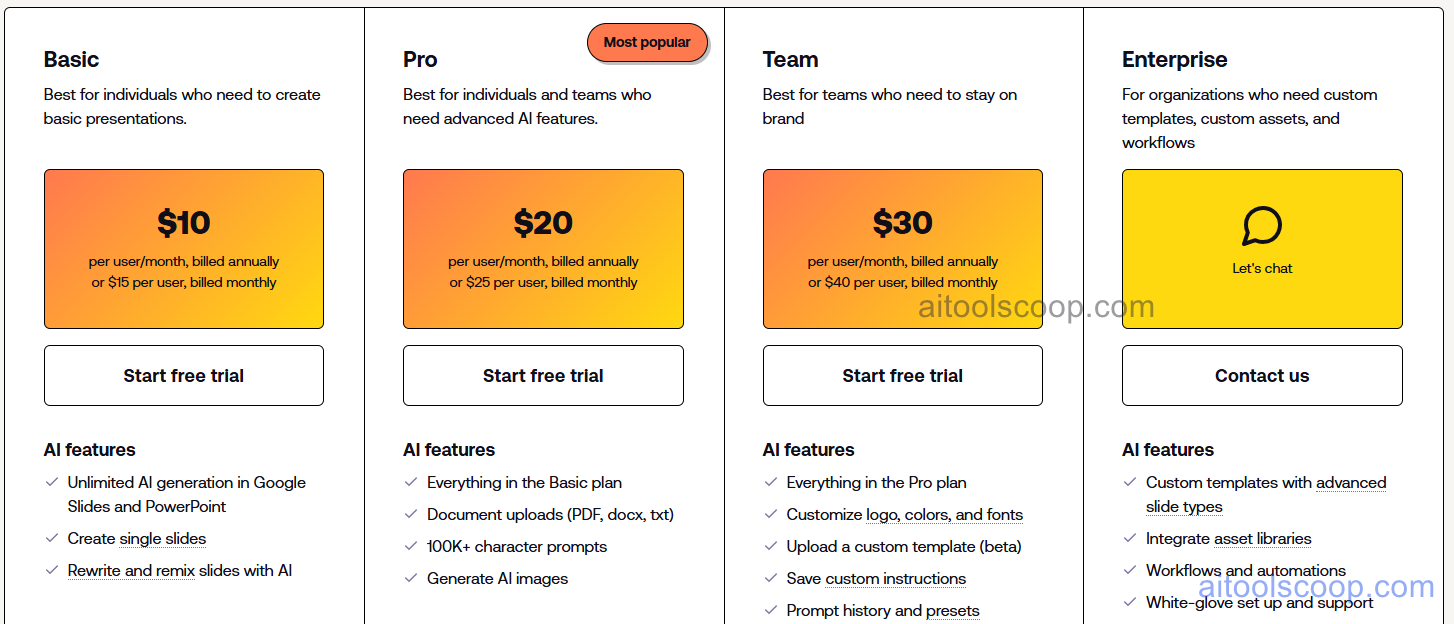
Plus AI pricing plans
Plus AI pricing — screenshot from plusdocs.com
Plan Monthly Key Inclusions
Basic $10/mo AI slide generation, editing commands, content remixing, speaker notes, Google Slides, standard templates
Pro $20/mo All Basic features, PowerPoint add-on, higher AI usage limits, advanced editing commands, priority support
Team $30/mo All Pro features, team workspace, shared settings, admin controls, team analytics, dedicated support
Enterprise Custom All Team features, SSO, advanced security, SLA, dedicated infrastructure, account management

Always check the latest rates on the official website. For more AI tool reviews, visit aitoolscoop.com.

Who Should Use Plus AI?

Plus AI is the ideal tool for professionals deeply embedded in Google Workspace who want AI presentation capability without adopting a new platform, Microsoft 365 users who want an AI co-pilot inside PowerPoint for both generation and editing tasks, business analysts and consultants who regularly convert written reports and research into client presentation formats, content marketers repurposing blog posts and strategy documents into slide decks using AI transformation commands, and teams that want to add AI assistance to their existing Slides or PowerPoint workflows without a training or migration investment. The Basic plan at $10/month is an accessible entry point for any Google Slides user wanting AI generation and editing assistance.


💰

Pricing Plans

Plan Price Includes
Paid $10/mo Full access + priority support
Check Current Pricing →
Affiliate Disclosure: This page contains affiliate links. If you click and make a purchase, we may earn a small commission at no extra cost to you. We only recommend tools we genuinely believe in.

🎯 Explore More

Discover other curated resources from our platform

🛠️ AI Tools View All →
DataSieve 2.0
DataSieve 2.0
★ 3.9
Luma AI Dream Machine
★ 4.4
Notion
Notion
★ 4.6
⚔️ VS Comparisons View All →
ChatGPT vs Claude: 2026 Comparison — Pricing, Features & Verdict
ChatGPT vs Claude: 2026 Comparison —…
ChatGPT vs Claude
⚔️
ChatGPT vs Gemini for Writing in…
ChatGPT GPT-4o vs Gemini 1.5 Pro
ChatGPT vs Kimi: 2026 Comparison — Pricing, Features & Verdict
ChatGPT vs Kimi: 2026 Comparison —…
ChatGPT vs Kimi
💡 Free Prompts View All →
💡
Beginner Guide: Fix Low Engagement for…
🔥 5.7K uses
💡
Claude Prompts for Hospitality CX Directors:…
🔥 0.4K uses
💡
15 Gemini Prompts Every Financial Analyst…
🔥 8.4K uses
💡 Free Prompts