

Home/ AI Tools /Ai Presentation /Beautiful.ai
Beautiful.ai Paid
🤖 Ai Presentation
#3 in Ai Presentation

Beautiful.ai

Beautiful.ai is an AI-powered presentation maker that automatically designs professional slides as you add content. Paid plans from $12/month or $12/month billed annually.

4.4 / 5 Paid From $12/mo
Quick Info
💰 Pricing$12/mo
⭐ Rating4.4 / 5
🆓 Free Plan❌ No
📂 CategoryAi Presentation
🌐 WebsiteVisit ↗
🕐 Last UpdatedApr 26, 2026
🔀 Alternatives9 tools
Verified Data Updated Apr 26, 2026
Independently Reviewed No paid placements
Detailed Analysis Hands-on testing
Key Features
  • AI presentation generator creating a complete multi-slide deck from a topic description automatically
  • Smart Slides providing intelligent templates that auto-adjust layout as content is added or edited
  • Auto-design formatting maintaining visual balance and professional quality without any manual arrangement
  • 60+ Smart Slide types covering text, data, timelines, comparisons, team bios, and process flow layouts
  • Theme system applying consistent brand colors, fonts, and styling across an entire deck in one step
  • Brand kit storing and applying brand colors, fonts, and logos for consistent team presentations
  • Real-time multi-user collaboration with comments and version history on shared presentations
  • PowerPoint and PDF export for downloading finished presentations in standard portable formats
  • Presentation analytics tracking who viewed shared decks and for how long after sharing
  • Team workspace providing a centralized library for sharing and managing presentations across departments
4.4
Overall Rating
Ease of Use
4.6
Features
4.4
Value
4.1
Performance
4.5
Support
4.3
Pros & Cons
👍 Pros
  • Auto-design AI eliminates all manual slide formatting — layouts stay professional regardless of content changes
  • Pro plan at $12/month consistent monthly and annual pricing — no commitment needed to access the best rate
  • AI generator produces a complete usable draft deck in seconds from a brief topic description
  • 60+ Smart Slide types cover virtually every business presentation structure without starting from blank
  • Presentation analytics provide engagement insight typically only available on enterprise presentation tools
  • Annual Team plan at $40/month reasonable for small teams needing brand kit and collaborative workspace
  • Export to PowerPoint preserves compatibility with Microsoft 365 workflows without locking into the platform
👎 Cons
  • No free plan — a paid subscription is required to access and use any presentation features
  • Smart Slide constraints can limit creative layout control for users who want pixel-level design freedom
  • Brand kit and real-time collaboration require Team plan at $50/month monthly — not available on Pro
  • Template variety narrower than Canva for non-standard or highly visual creative presentation formats
  • AI generator output typically requires editing to match specific messaging and structure requirements
  • Export quality to PowerPoint occasionally introduces layout variations that need manual correction
  • Enterprise pricing and features require direct sales contact rather than transparent self-serve access
📖

About Beautiful.ai

Beautiful.ai (beautiful.ai) is an AI-powered presentation platform that reimagines how slide decks are created by automating the design layer entirely. Rather than manually arranging text, images, and elements on a blank canvas, Beautiful.ai uses smart slide templates — called Smart Slides — that automatically adjust layout, sizing, and visual balance as content is added or edited. The result is that every slide stays professionally designed without any manual formatting work, eliminating the most time-consuming part of presentation creation for business professionals. With an AI presentation generator that builds complete deck drafts from a prompt, a polished template library, brand kit support, and a collaborative workspace, Beautiful.ai is the presentation tool of choice for teams that consistently need boardroom-quality slides without a professional designer.

How Beautiful.ai Works

Create a Beautiful.ai account and start a new presentation. Use the AI generator by entering a topic or brief description — Beautiful.ai generates a full multi-slide deck outline with content and designs automatically. Alternatively, choose from the Smart Slide template library covering dozens of slide types: text layouts, data charts, timelines, comparison tables, process flows, team bios, and more. As you add, remove, or rearrange content within any Smart Slide, the AI automatically rebalances the layout — text resizes, icons redistribute, and spacing adjusts so the slide always looks clean and intentional. Apply a theme to set consistent colors, fonts, and styles across all slides in one step. Collaborate with teammates in real time, leave comments, and share finished presentations as a link or export as a PowerPoint or PDF.

Key Features

  • AI presentation generator — creates a complete slide deck from a topic description automatically
  • Smart Slides — intelligent templates that auto-adjust layout as content is added or edited
  • Auto-design formatting — AI maintains visual balance and professional design without manual work
  • 60+ Smart Slide types — pre-built layouts for text, data, timelines, comparisons, team bios, and more
  • Theme system — apply consistent brand colors, fonts, and styling across an entire deck in one step
  • Brand kit — store and apply brand colors, fonts, and logos for consistent team presentations
  • Real-time collaboration — simultaneous multi-user editing with comments and version history
  • PowerPoint and PDF export — download finished presentations in standard portable formats
  • Analytics — track who viewed your shared presentation and for how long
  • Team workspace — centralized library for sharing and managing presentations across departments

Beautiful.ai Pricing
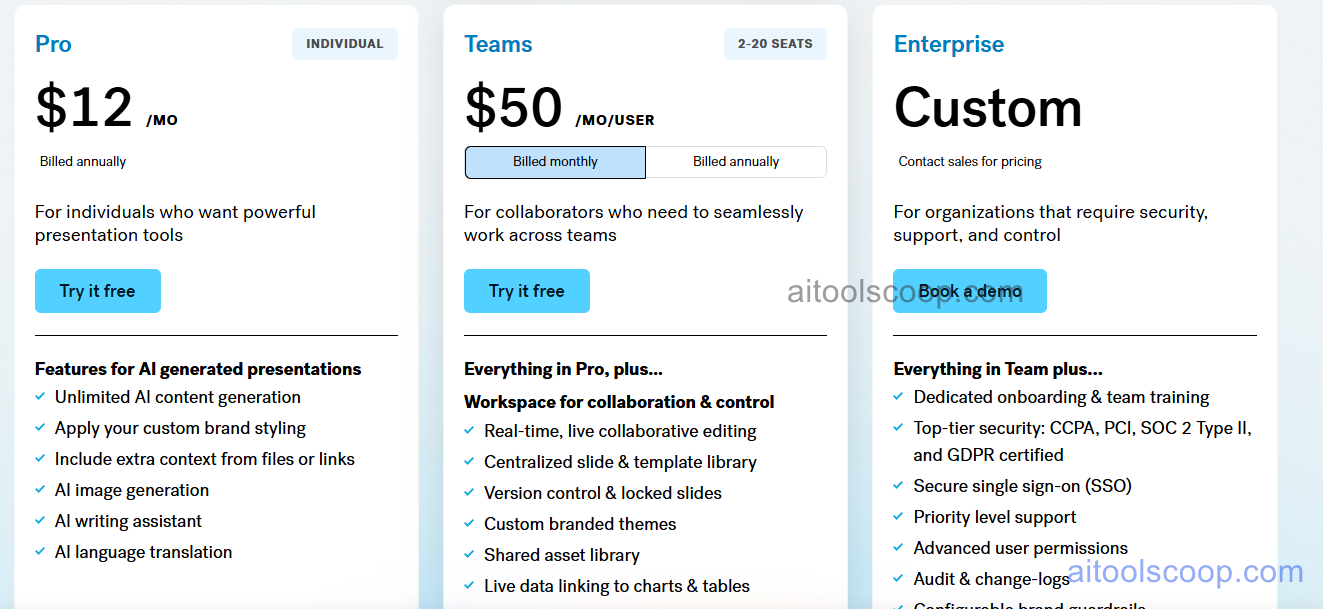
Beautiful.ai pricing plans
Beautiful.ai pricing — screenshot from beautiful.ai
Plan Monthly Annually Key Inclusions
Pro $12/mo $12/mo Unlimited presentations, all Smart Slides, AI generator, themes, PowerPoint and PDF export, analytics, priority support
Team $50/mo $40/mo All Pro features, shared team workspace, brand kit, real-time collaboration, admin controls, template locking, priority support
Enterprise Custom Custom All Team features, SSO, advanced security, SLA, dedicated support, custom integrations, account management

Always check the latest rates on the official website. For more AI tool reviews, visit aitoolscoop.com.

Who Should Use Beautiful.ai?

Beautiful.ai is ideal for business professionals who create presentations frequently and want slides that always look polished without spending time on manual design, consultants and analysts who deliver client-facing presentations regularly and need reliable visual quality across every deck, sales teams building pitch decks and proposal presentations that must look professional without dedicated design support, marketing managers producing campaign presentations, board reports, and strategy decks for executive audiences, and startup founders creating investor pitch decks where visual presentation quality directly impacts credibility. The Pro plan at $12/month makes it one of the most affordable paths to professional AI-assisted presentation quality — with no difference between monthly and annual pricing on this tier.


💰

Pricing Plans

Plan Price Includes
Paid $12/mo Full access + priority support
Check Current Pricing →
Affiliate Disclosure: This page contains affiliate links. If you click and make a purchase, we may earn a small commission at no extra cost to you. We only recommend tools we genuinely believe in.

🎯 Explore More

Discover other curated resources from our platform

🛠️ AI Tools View All →
Hiver
Hiver
★ 4.4
PageOn.AI
PageOn.AI
★ 3.8
Recraft
Recraft
★ 4.3
⚔️ VS Comparisons View All →
Claude vs ChatGPT
Claude vs ChatGPT
Claude 3.7 Sonnet vs ChatGPT GPT-4o
ChatGPT vs Kimi: 2026 Comparison — Pricing, Features & Verdict
ChatGPT vs Kimi: 2026 Comparison —…
ChatGPT vs Kimi
ChatGPT vs Grok: 2026 Comparison — Pricing, Features & Verdict
ChatGPT vs Grok: 2026 Comparison —…
ChatGPT vs Grok
💡 Free Prompts View All →
💡
Too Many Revision Rounds With Clients…
🔥 8.9K uses
💡
Injury Prevention and Prehab Protocol for…
🔥 10.8K uses
💡
How Legal Operations Teams in Healthcare…
🔥 5.1K uses
💡 Free Prompts