Animaker (animaker.com) is a cloud-based animated video creation platform used by businesses, educators, and content creators to produce animated explainer videos, social media content, e-learning modules, product demos, and marketing videos without professional animation skills. Founded in 2014 and headquartered in Chennai, India, Animaker has grown to over 20 million users and offers one of the largest libraries of pre-built animated characters, props, backgrounds, and music tracks available in a no-code video tool.
Animaker's AI features include AI Animate for generating animated character movements from text descriptions, AI Voiceover with 200+ realistic text-to-speech voices in 50+ languages, AI-powered subtitle generation from uploaded audio or video, and an AI video script generator that creates structured video scripts from a topic or brief. Together these features allow users to go from a written idea to a finished narrated animated video with subtitles entirely within the platform.
How Animaker Works
Users select a video type — animation, live action, short, presentation, or infographic — and choose a template or start from scratch on the canvas. The drag-and-drop editor allows characters, backgrounds, props, and text to be arranged on screen and animated using Animaker's pre-built character actions and transitions. AI Voiceover converts script text to realistic narration in the chosen language and voice style. Scene timing is set by adjusting the duration of each slide or scene. Finished projects are exported as MP4 video files or GIFs, and can be published directly to YouTube or shared via link.
Key Features
- AI Animate — generate animated character movements and expressions from text descriptions without manual keyframing
- AI Voiceover — 200+ realistic text-to-speech voices in 50+ languages for automated narration without recording equipment
- AI subtitle generator — automatically generates and syncs subtitles from uploaded audio or video content
- AI video script generator — creates structured video scripts from a topic prompt to accelerate the content creation process
- Massive asset library — 100+ million stock assets including animated characters, props, backgrounds, music tracks, and sound effects
- Character customisation — customise character appearance, clothing, skin tone, and expressions for brand or persona alignment
- Multiple video formats — create animated videos, live-action videos, short-form content, presentations, and infographics in one tool
- Brand kit — upload brand colours, fonts, and logo for consistent visual identity across all video projects
- Collaboration features — invite team members to view, comment, and co-edit video projects in shared workspaces
- Direct YouTube publishing — export and publish finished videos directly to YouTube from within the Animaker platform
Animaker Pricing
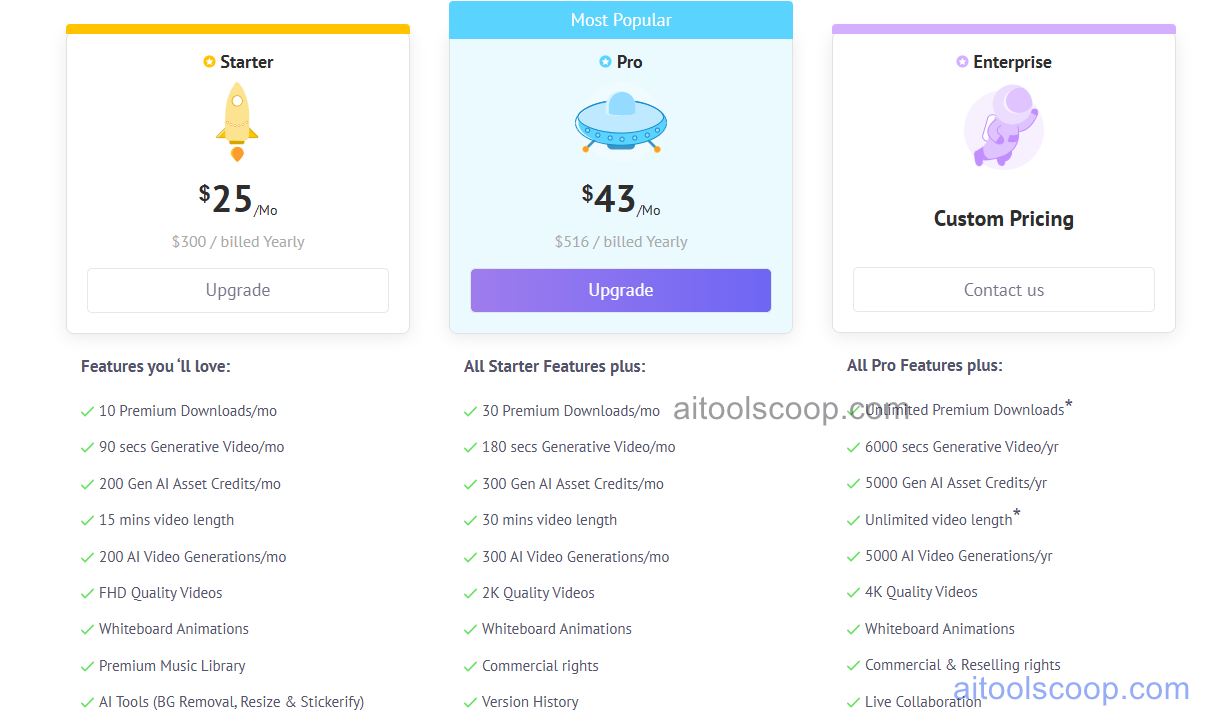
Animaker offers two main paid plans with significant savings on annual billing.
- Basic — $45/month (annual: $25/month) — full asset library access, AI voiceover, animated video creation, HD export, and watermark-free output. Suitable for individual creators and small marketing teams.
- Starter — $79/month (annual: $43/month) — everything in Basic plus higher export limits, AI subtitle generation, more collaboration seats, priority support, and access to advanced AI features.
A limited free plan may be available for evaluation. Always verify current rates at animaker.com/pricing.
Who Should Use Animaker?
Animaker is best suited to marketers, educators, e-learning content creators, HR teams, and small business owners who need to create animated explainer videos, training content, or social media animations without hiring a professional animator. Its AI voiceover and subtitle generation features make it particularly well suited to teams producing multilingual video content or accessibility-compliant videos at scale. The annual Basic plan at $25/month is competitively priced for the depth of the asset library and AI feature set included. Animaker is less suited to teams needing live-action video editing, highly custom brand motion graphics beyond the template library, or enterprise-grade collaboration and rights management.
Frequently Asked Questions
What is Animaker used for?
Animaker is an animated video creation platform used to produce explainer videos, social media animations, e-learning modules, product demos, and marketing videos without professional animation skills. It provides a drag-and-drop editor with a library of animated characters, backgrounds, and props, alongside AI features for voiceover narration, subtitle generation, and script writing that allow non-animators to create finished narrated animated videos entirely within the browser.
How much does Animaker cost?
Animaker's Basic plan costs $45/month ($25/month billed annually) and the Starter plan costs $79/month ($43/month annually). Annual billing saves approximately 44–46% compared to monthly pricing. A limited free plan may be available for initial evaluation — check the Animaker website for current free access terms.
Does Animaker include AI voiceover?
Yes. Animaker's AI Voiceover feature converts typed script text into realistic narration using more than 200 text-to-speech voices across 50+ languages. Users choose a voice style, language, and speaking pace, and the AI generates the audio track automatically — eliminating the need for recording equipment, voice talent, or audio editing. AI voiceover is included in the paid plans and supports multilingual video production for global audiences.
Can Animaker generate subtitles automatically?
Yes. Animaker's AI subtitle generator automatically transcribes spoken audio from uploaded video or AI voiceover and generates time-synced subtitle captions. Subtitles can be customised in terms of font, colour, and positioning, and are burned into the exported video or exported as a separate subtitle file. This feature is particularly useful for teams producing social media videos that are watched without sound, or for accessibility compliance requirements.
How does Animaker compare to Powtoon and Biteable?
Animaker, Powtoon, and Biteable are all browser-based template video tools for non-professional creators, but each has a different emphasis. Animaker has the largest animated character library and the most comprehensive AI feature set including voiceover, subtitle generation, and AI animate. Powtoon specialises in presentation-style animated business videos suited to corporate communication and e-learning. Biteable blends live-action stock footage with animation templates and is strongest for social media ad formats. Teams primarily creating animated character-based explainer videos or e-learning content typically find Animaker the best fit.