

Prezi (prezi.com) is a cloud-based presentation platform founded in 2009 in Budapest, Hungary. It introduced a fundamentally different approach to presentations: rather than a linear sequence of flat slides, Prezi uses an infinite zoomable canvas where content is arranged spatially and the presenter navigates between topics by zooming in and out — creating a visual map of ideas rather than a one-way slide deck. This non-linear format makes Prezi particularly well suited to explaining complex relationships, hierarchical concepts, and interconnected topics where a spatial overview aids understanding.
Prezi has evolved significantly with AI capabilities including an AI presentation designer that generates complete Prezi presentations from a topic or outline, AI-assisted content rewriting and structure suggestions, and smart templates that adapt to the content type entered. Prezi Video is an integrated feature that allows presenters to appear alongside their visual content in a floating overlay during video calls on Zoom, Microsoft Teams, and Google Meet — creating a more engaging remote presentation experience than traditional screen sharing.
How Prezi Works
Users create a new Prezi, choose a template or use the AI builder to generate one from a topic, and arrange content on the zoomable canvas. Topics are grouped into clusters, and subtopics zoom in from within a topic when clicked. The presentation path is set by defining the order in which Prezi navigates between canvas areas. Prezi Video allows the presenter's camera feed to be composited with the Prezi content so the presenter appears alongside the slides as a floating overlay during live video calls. Finished presentations can be shared via public link, embedded, downloaded as a PDF, or presented live in the browser or desktop app.
Key Features
- AI presentation builder — generates a complete zoomable canvas presentation from a topic, outline, or imported document automatically
- Zoomable canvas — infinite spatial canvas where content is arranged in topic clusters that zoom in and out for non-linear navigation
- Prezi Video — present alongside visual content in a floating overlay during Zoom, Teams, and Google Meet video calls
- Smart templates — AI-adaptive templates that adjust layout and content suggestions based on the presentation topic and type
- AI content rewriting — AI assistant that rewrites, refines, and restructures slide text within the editor
- Real-time collaboration — multiple users co-edit the same Prezi simultaneously with live cursor visibility
- Presenter notes and teleprompter — slide notes with teleprompter mode for scripted delivery during live presentations
- Analytics — view counts, engagement tracking, and audience interaction data for shared presentations
- PDF export — export Prezi content as a PDF for sharing with recipients who cannot view the live Prezi
- Mobile app — iOS and Android apps for presenting and editing Prezis on mobile devices
Prezi Pricing
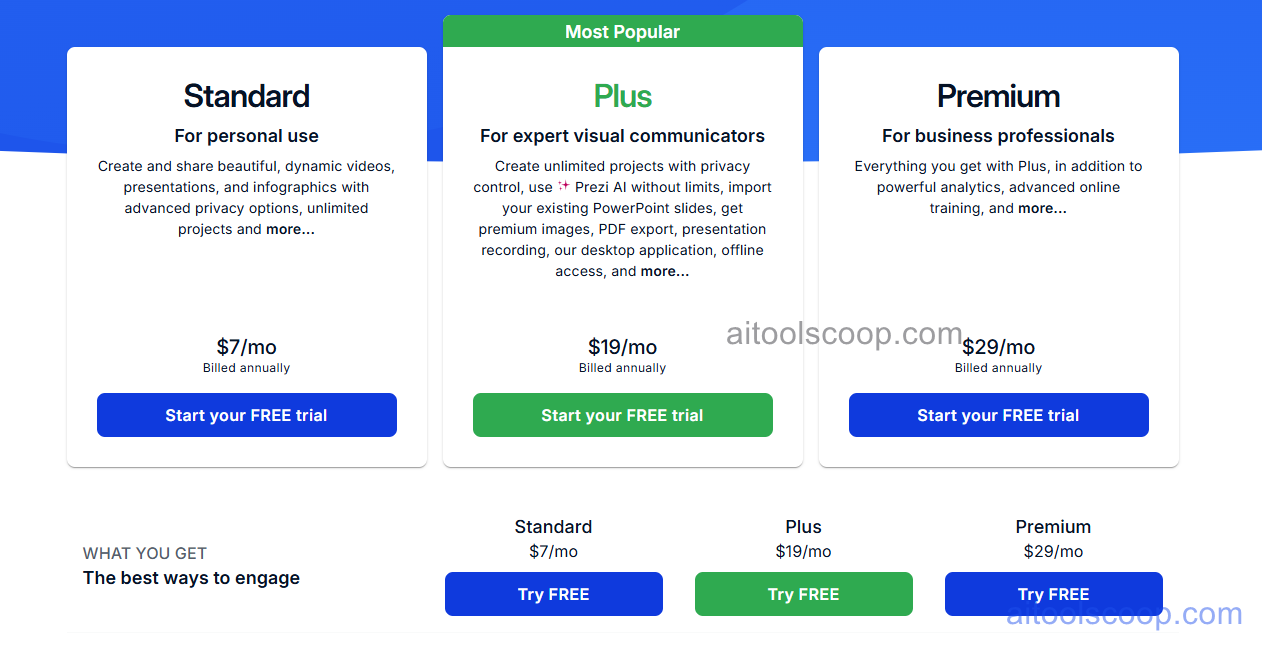
Prezi offers three paid plans. A free plan with limited features is also available.
- Plus — $7/month — basic Prezi creation, limited templates, and public sharing. Suitable for students and personal use.
- Premium — $19/month — full template library, AI builder, Prezi Video, privacy controls, analytics, and offline presentation. Suited to individual professionals.
- Teams — $29/month per user — everything in Premium plus team collaboration, shared brand kit, team analytics, and advanced admin controls for business teams.
A free plan with limited features is available. Always verify current rates at prezi.com/pricing.
Who Should Use Prezi?
Prezi is best suited to educators, sales professionals, consultants, and speakers who present complex, interconnected ideas and want a format that reflects the structure of those ideas spatially. Its zoomable canvas is particularly effective for explaining ecosystems, strategies, and multi-layered concepts where a linear slide deck loses the big-picture context. Prezi Video is a strong differentiator for remote presenters who want to appear engaged and visible alongside their content during video calls rather than disappearing behind screen share. Prezi is less suited to data-heavy corporate reports, financial presentations, or users who need to share editable source files in a universally compatible format.
Frequently Asked Questions
What makes Prezi different from PowerPoint?
Prezi uses an infinite zoomable canvas instead of linear slides — content is arranged spatially in topic clusters, and the presentation navigates by zooming in and out rather than flipping pages. This spatial format helps audiences maintain a sense of the overall structure while diving into specific topics. Prezi Video also allows the presenter to appear alongside content in a floating overlay during video calls, which PowerPoint does not support natively. PowerPoint remains stronger for data tables, charts, and universally compatible file sharing.
How much does Prezi cost?
Prezi's Plus plan costs $7/month, the Premium plan costs $19/month, and the Teams plan costs $29/month per user. A free plan with limited features is available for evaluation and personal use. Annual billing options may reduce these rates — check the Prezi pricing page for current annual versus monthly pricing.
What is Prezi Video?
Prezi Video is a feature that composites the presenter's camera feed with their Prezi content so they appear as a floating overlay alongside the slides during live video calls on Zoom, Microsoft Teams, Google Meet, and other platforms. Rather than disappearing behind a shared screen, the presenter remains visible and can point to, gesture toward, or interact with the visual content — creating a more engaging and dynamic remote presentation experience. Prezi Video is included in the Premium and Teams plans.
Does Prezi have an AI presentation builder?
Yes. Prezi's AI builder generates a complete zoomable canvas presentation from a typed topic, outline, or imported document. The AI selects a template, structures the content into topic clusters and subtopics on the canvas, and generates initial slide text — giving the user a working presentation draft to refine rather than starting from a blank canvas. AI content rewriting is also available within the editor for refining individual text blocks.
Can I use Prezi offline?
Yes. Prezi offers a desktop app that supports offline presentation and editing. The offline mode requires the Prezi to be downloaded for offline use while connected to the internet first. Offline access is available on the Premium and Teams plans. The free and Plus plans require an internet connection for full functionality.