
Shortwave (shortwave.com) is an AI-first email client built specifically for Gmail and Google Workspace, created by a team of ex-Google Inbox engineers who set out to rebuild what they considered the best parts of Google's discontinued Inbox product, enhanced with modern AI. Rather than treating AI as a bolt-on feature, Shortwave integrates it throughout the inbox experience: AI-powered search that understands natural-language queries even when you only remember the gist of an email, automatic thread summaries that condense long email chains into key points, and an AI writing assistant that drafts contextually appropriate replies.
In January 2026, Shortwave introduced Tasklet, an AI agent layer designed to automate multi-step email workflows entirely without human intervention — representing a shift from an AI-assisted client toward an inbox where AI can take on actual work, not just assist with it. The platform also includes AI Filters and AI Bundles that automatically group related emails (such as receipts, newsletters, or notifications) into organised collections, AI Scheduling for coordinating meeting times via email, and Model Context Protocol (MCP) integrations that connect Shortwave's AI to external tools and data sources. Shortwave is exclusively built on the Gmail and Google Workspace API — it does not support Outlook or Microsoft 365.
How Shortwave Works
Users connect their Gmail or Google Workspace account to Shortwave, which replaces the standard Gmail interface with its own AI-enhanced client. Incoming email is automatically organised using AI Bundles — grouping similar messages like newsletters or notifications together to keep the priority inbox focused on what matters. When searching, users can describe what they're looking for in natural language rather than recalling exact keywords, and Shortwave's AI search retrieves the relevant email or thread. Long threads can be summarised with one click, condensing dozens of messages into key takeaways. The AI writing assistant drafts replies based on the context of the conversation, which users can edit before sending. Tasklet, introduced in 2026, allows users to define multi-step workflows that Shortwave's AI agent executes autonomously across the inbox. Team-oriented plans add shared team inboxes for addresses like support@ or hello@, with collaboration features for assigning and discussing emails.
Key Features
- AI-powered natural-language search — find emails by describing what you remember in plain language, even without exact keywords
- AI thread summaries — condense long email threads into key points and takeaways with one click
- AI writing assistant — draft contextually appropriate email replies based on the conversation history
- Tasklet AI agent — automates multi-step email workflows autonomously without manual intervention (introduced January 2026)
- AI Filters and AI Bundles — automatically group related emails like receipts, newsletters, and notifications into organised collections
- AI Scheduling — coordinate meeting times and scheduling directly through email with AI assistance
- Model Context Protocol (MCP) integrations — connect Shortwave's AI to external tools and data sources beyond the inbox
- Shared team inboxes — collaborative inboxes for shared addresses like support@ or hello@ with assignment and discussion features (Business and above)
- Unified inbox and core productivity tools — read receipts, snooze, pin, and basic templates available across plans
- Encryption and impersonation protection — advanced security features including misdirection and impersonation protection on higher tiers
Shortwave Pricing
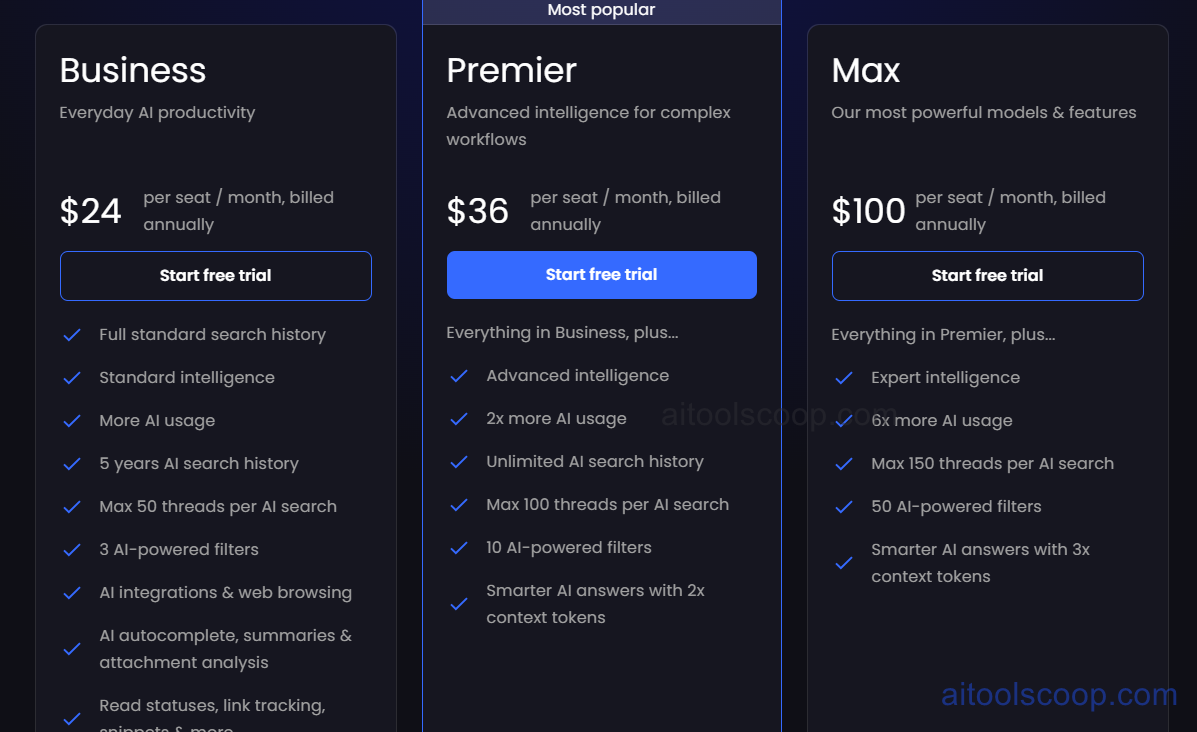
- Business — $30/month per user ($24/month per user billed annually) — Unrestricted core AI features including reply drafting, AI search, and summarisation, AI Filters and Bundles, shared team inboxes, and priority support.
- Premier — $45/month per user ($36/month per user billed annually) — Everything in Business plus an expanded daily AI request allowance, additional AI filters, AI Scheduling, and Tasklet automation features.
- Max — $120/month per user ($100/month per user billed annually) — The highest daily AI request limits, the most advanced AI model tier, full Tasklet agent capabilities, MCP integrations, and the most extensive team collaboration and admin tools.
Shortwave also offers Free and lower-cost Personal/Growth tiers for individual Gmail users at home or school, with core productivity features remaining free and AI features capped. Shortwave is Gmail and Google Workspace only — Outlook and Microsoft 365 are not supported. Always verify current rates at shortwave.com/pricing.
Who Should Use Shortwave?
Shortwave is best suited to Gmail and Google Workspace users — particularly busy professionals and small teams with shared inboxes — who want AI search, summarisation, and writing assistance deeply integrated into their daily email workflow rather than bolted on as a separate tool. Its AI search and thread summaries are genuinely useful for anyone managing high email volume, and Tasklet's autonomous workflow automation appeals to users who want AI to handle repetitive email tasks end-to-end. The hard requirement of Gmail/Google Workspace is a dealbreaker for any organisation using Outlook or Microsoft 365. Teams whose primary need is shared inbox collaboration with CRM-style features may find Shortwave's integrations less mature than dedicated team inbox tools, and per-user pricing at the Premier and Max tiers compounds quickly for larger teams.
Frequently Asked Questions
What is Shortwave?
Shortwave is an AI-first email client built exclusively for Gmail and Google Workspace, created by former Google Inbox engineers. It adds AI-powered natural-language search, automatic thread summaries, AI-drafted replies, AI Filters and Bundles for organising email, and Tasklet — an AI agent layer for automating multi-step email workflows.
Does Shortwave work with Outlook?
No. Shortwave is built exclusively on the Gmail and Google Workspace API. Users on Outlook, Exchange, or Microsoft 365 cannot use Shortwave; an alternative AI email client built for those platforms would be required instead.
What is Tasklet in Shortwave?
Tasklet, introduced in January 2026, is an AI agent layer within Shortwave that automates multi-step email workflows entirely without human intervention. It represents a shift from Shortwave being purely an AI-assisted email client toward one where AI can complete actual tasks — such as following up, organising, or responding based on defined workflows — rather than just helping the user perform them manually.
How does Shortwave's AI search work?
Shortwave's AI search allows users to find emails by describing what they remember in natural language — for example, the general topic or who an email was from — even if they don't remember the exact subject line or keywords. The AI indexes the user's email history and retrieves the most relevant matches based on meaning rather than exact text matching alone.
Does Shortwave support team or shared inboxes?
Yes, on Business plans and above. Shortwave supports shared team inboxes for addresses like support@ or hello@, with features for assigning emails to team members and discussing them collaboratively. However, the product is primarily optimised for individual Gmail accounts, and team/shared inbox functionality is less extensive than tools purpose-built for collaborative email management.