Collaborative AI Video Editing Platform
Kapwing (kapwing.com) is a cloud-based video editing platform designed for teams and creators producing social media content. Combining traditional editing tools with AI-powered features like auto-subtitles, smart background removal, and text-to-video generation, Kapwing emphasizes collaboration with real-time multiplayer editing and commenting. The platform supports all major social formats with smart resizing, template libraries for trending content styles, and direct publishing to YouTube, TikTok, and Instagram. Built for speed and accessibility, Kapwing enables professional video production entirely in the browser without software installations.
How Kapwing Works
Create a new project and upload media from your device, Google Drive, or import from YouTube links. Choose a template or start from scratch on the canvas editor. Drag and drop video clips, images, and audio onto the timeline. Use AI tools to auto-generate subtitles with customizable styles, remove backgrounds from videos without green screens, or convert text scripts into talking head videos. Add text overlays, stickers, transitions, and music from the royalty-free library. Invite team members to collaborate in real-time with cursor tracking and comments. Use Smart Cut to remove silences automatically, or Magic Resize to adapt videos for different platform aspect ratios instantly. Preview and export in resolutions up to 4K, or publish directly to social platforms.
Key Features
- Real-time collaboration — multiplayer editing with live cursor tracking and commenting
- AI auto-subtitles — automatic caption generation with 70+ language support and custom styling
- Smart background removal — AI removes backgrounds from videos without green screen setup
- Text-to-video — generate talking head videos from text scripts using AI avatars
- Smart Cut — automatically remove silences and pauses from recordings
- Magic Resize — instant conversion between aspect ratios (16:9, 9:16, 1:1, 4:5) for multi-platform posting
- Template library — hundreds of pre-designed templates for TikTok, Instagram, YouTube, and LinkedIn
- Stock media — access to Pexels and Pixabay libraries with millions of free assets
- Brand kit — save logos, fonts, colors, and watermarks for consistent branding
- Direct publishing — export to YouTube, TikTok, Instagram, and download in multiple formats
Kapwing Pricing
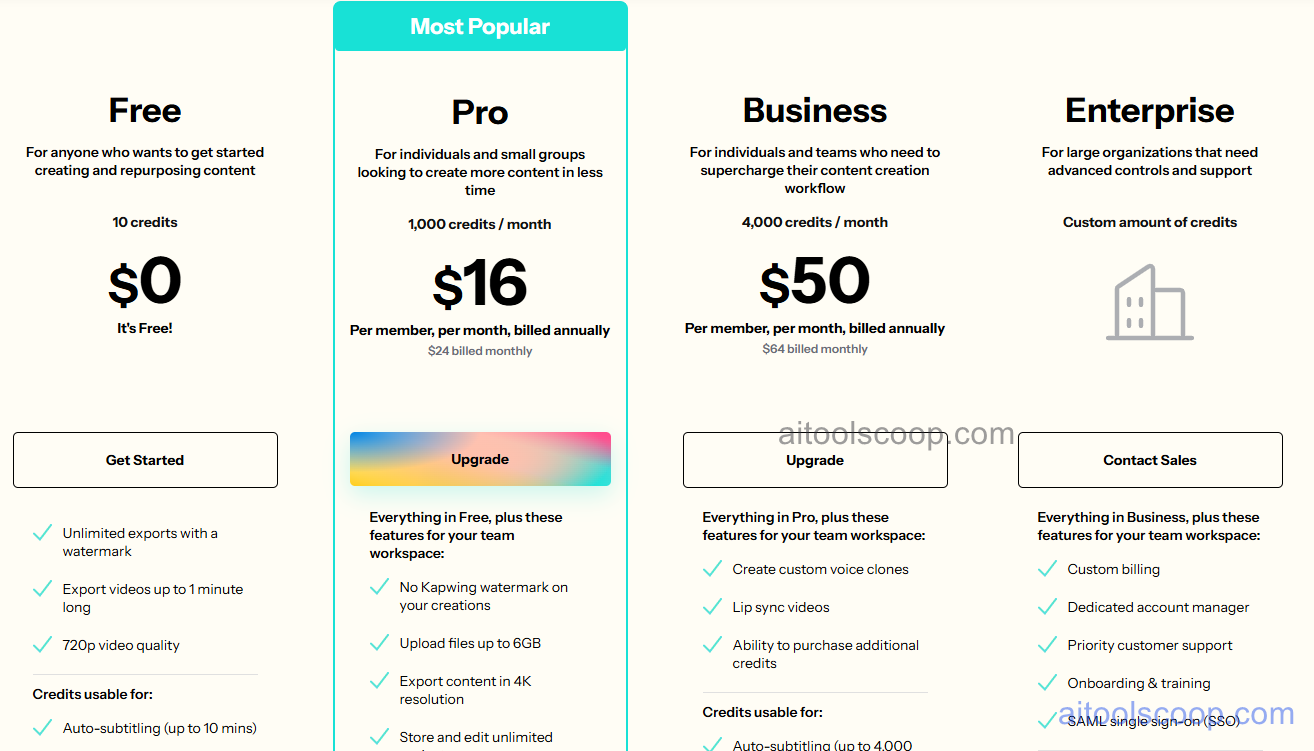
- Free — $0/month — unlimited projects, 720p exports, 250MB upload limit, Kapwing watermark, basic AI features, 4 hours video processing/month.
- Pro — $16/month — no watermark, 1080p exports, 5GB upload limit, unlimited video processing, brand kit, priority rendering, advanced AI features including background removal.
- Business — $50/month — 4K exports, 50GB upload limit, team collaboration (up to 10 seats), unlimited cloud storage, API access, dedicated support.
- Enterprise — Custom pricing — unlimited seats, custom integrations, white-label options, SLA guarantees, dedicated account manager.
Always check the latest rates on the official website. For more AI tool reviews, visit aitoolscoop.com.
Who Should Use Kapwing?
Kapwing is ideal for social media teams collaborating on branded content across multiple platforms, marketing agencies managing video projects for multiple clients, content creators producing daily TikTok, Instagram, and YouTube content, remote teams needing real-time video collaboration without software coordination, educators creating lesson videos and course materials, and small businesses producing marketing videos in-house. The Pro plan suits individual creators and freelancers with consistent video needs, while the Business plan serves teams requiring collaboration features and higher export quality. Enterprises benefit from unlimited seats and custom integrations.