

RescueTime (rescuetime.com) is an automatic productivity measurement and focus tool that runs passively in the background on a user's devices, tracking how time is spent across applications, websites, and documents without requiring any manual input. Unlike manual time tracking tools where users must remember to start and stop timers, RescueTime captures activity data automatically and categorises it by productivity level — surfacing where time actually goes rather than where users believe it goes, which are often significantly different. The platform serves two distinct use cases through its plan structure: Focus (productivity tracking and distraction blocking for individuals) and a bundled Timesheets plus Focus option that adds professional timesheet and billing data for freelancers and contractors who need both productivity awareness and billable hour documentation. Both use cases are available for individuals (Solo and Solo+) and teams (Team and Team+).
RescueTime's four plan tiers reflect this clean separation: Solo ($9/month, $7/month annually) provides Focus features for individual productivity tracking; Solo+ ($15/month, $12/month annually) bundles Timesheets with Focus for individuals who need professional billing data; Team ($12/month per user, $10/month annually) extends Focus tracking to collaborative team environments; and Team+ ($18/month per user, $16/month annually) delivers the Timesheets plus Focus bundle for teams. The platform's automatic tracking engine categorises every application and website visited by productivity level, generates daily and weekly reports, and highlights focus time versus distracted time patterns over time.
How RescueTime Works
Users install the RescueTime client on their devices — Mac, Windows, iOS, Android, and Linux are supported — and the application runs in the background automatically. Every application opened, website visited, and document worked on is recorded with time-stamped duration data. RescueTime categorises these activities into a productivity scoring system, labelling common tools as productive, neutral, or distracting — with users able to customise categories to match their specific work context. Weekly email summaries and detailed dashboard reports surface patterns over time: which hours are most productive, which applications consume the most time, and how actual work time compares to perceived work time. The Focus Block feature (on all plans) allows users to trigger distraction-free sessions that block specified distracting sites. The Timesheets module (Solo+ and Team+) automatically generates professional timesheet reports from tracked activity, reducing manual administrative burden for client-billing contexts.
Key Features
- Automatic time tracking — passive background tracking of all applications, websites, and documents without manual timers
- Productivity categorisation — AI-assisted automatic labelling of tracked activities by productivity level with user customisation
- Focus blocking — built-in distraction blocking for specified websites during defined focus sessions (all plans)
- Daily and weekly reports — automatic productivity summary reports highlighting focus patterns, distracting activity, and time distribution
- Solo plan — $9/month ($7/month annually) — Focus features for individual productivity tracking
- Solo+ plan — $15/month ($12/month annually) — Timesheets plus Focus for individuals needing billing-ready timesheet reports
- Team plan — $12/month/user ($10/month/user annually) — Focus features for team-level productivity measurement
- Team+ plan — $18/month/user ($16/month/user annually) — Timesheets plus Focus bundle for professional teams
- Cross-platform support — Mac, Windows, Linux, iOS, and Android clients available under all plans
- Annual billing discount — approximately 20–22% savings on all plans with annual payment
RescueTime Pricing
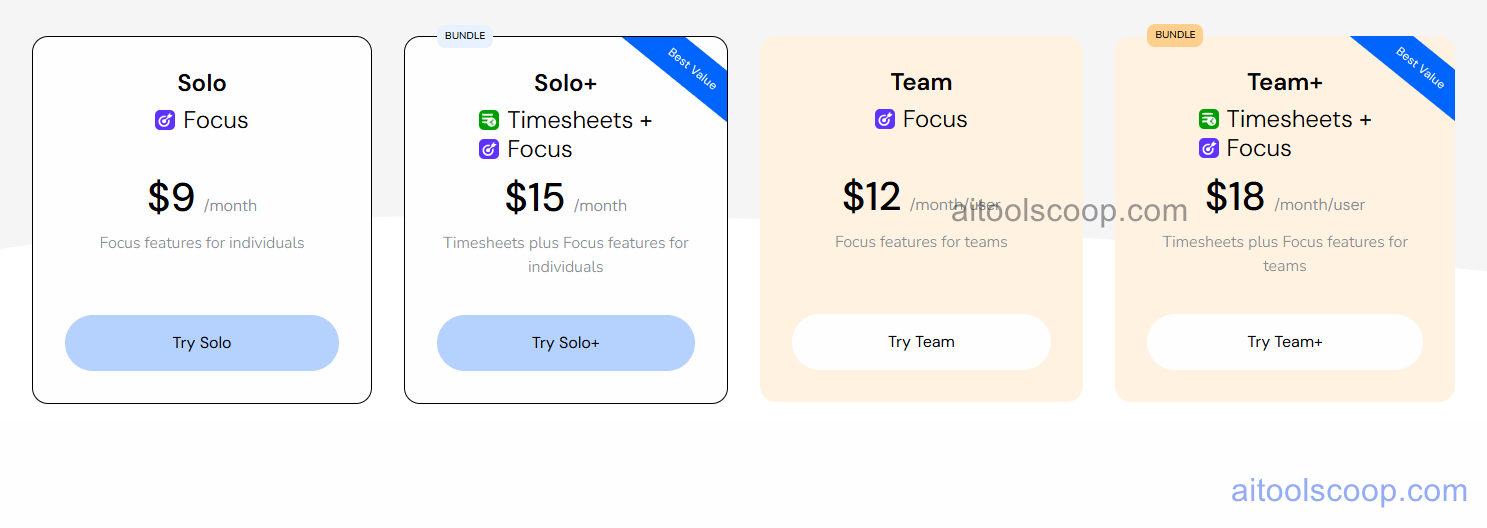
- Solo — $9/month ($7/month billed annually) — Focus features for individuals: automatic time tracking, productivity categorisation, focus blocking, and daily/weekly reports.
- Solo+ — $15/month ($12/month billed annually) — Timesheets plus Focus for individuals: everything in Solo plus professional timesheet generation for freelancers and contractors needing billable hour documentation.
- Team — $12/month/user ($10/month/user billed annually) — Focus features extended to teams: team-level automatic tracking, shared productivity insights, and focus blocking for collaborative environments.
- Team+ — $18/month/user ($16/month/user billed annually) — Timesheets plus Focus for teams: everything in Team plus automatic timesheet reporting for teams managing client billing across multiple users.
No permanent free plan. Annual billing saves approximately 20-22% across all plans. Always verify current rates at rescuetime.com/pricing.
Who Should Use RescueTime?
RescueTime is best suited to knowledge workers, remote workers, freelancers, and managers who want objective data on how their work time is actually distributed — without the friction of manual time entry. The Solo plan is the natural choice for individuals who want passive productivity measurement and focus blocking without billing requirements. Solo+ serves freelancers and consultants who need both productivity awareness and professional timesheet data for client invoicing. Team and Team+ extend these benefits to distributed teams and agencies managing client projects. Teams that need deep project-based time tracking, integration with project management tools, or invoicing capabilities beyond timesheet export should evaluate whether RescueTime's automatic tracking model covers their full requirements.
Frequently Asked Questions
What is RescueTime?
RescueTime is an automatic time tracking and productivity measurement platform that runs in the background on devices and records how time is spent across applications and websites — without manual timers. It categorises tracked activity by productivity level, generates daily and weekly reports, and includes focus blocking for distraction management. Plans are available for individuals (Solo and Solo+) and teams (Team and Team+), with optional Timesheets bundling for professional billing workflows.
Does RescueTime have a free plan?
RescueTime does not offer a permanent free plan. A trial period is available to evaluate the platform before subscribing. Paid plans start at $9 per month on the Solo plan, or $7 per month with annual billing.
What is the difference between Solo and Solo+?
Solo provides Focus features: automatic background time tracking, productivity categorisation, focus blocking for distraction management, and daily and weekly productivity reports. Solo+ adds Timesheets to the Focus features, automatically generating professional timesheet records from tracked activity — making it suited for freelancers and contractors who need billing-ready time documentation alongside their personal productivity data.
Does RescueTime require manual time entry?
No. RescueTime's core differentiator is fully automatic tracking — the client application runs passively in the background and records all activity without the user needing to start timers, log tasks, or enter time manually. This removes the friction and inaccuracy of self-reported time tracking and provides objective data on actual time distribution.
What platforms does RescueTime support?
RescueTime provides clients for Mac, Windows, Linux, iOS, and Android — providing broad cross-platform coverage for tracking time across desktop and mobile devices under a single subscription account.