

Home/ AI Tools /AI Productivity Tools /Raycast
Raycast Freemium
🤖 AI Productivity Tools
#8 in AI Productivity Tools

Raycast

Raycast is a keyboard-first productivity launcher for Mac that puts AI, app switching, file search, and workflow automation into a single command bar. Free plan available. Pro with AI from $10/month.

4.5 / 5 Freemium From $10/mo
Quick Info
💰 Pricing$10/mo
⭐ Rating4.5 / 5
🆓 Free Plan✅ Yes
🌐 WebsiteVisit ↗
🕐 Last UpdatedApr 4, 2026
🔀 Alternatives42 tools
Verified Data Updated Apr 4, 2026
Independently Reviewed No paid placements
Detailed Analysis Hands-on testing
Key Features
  • AI Chat and Quick AI — instant answers without leaving the current app or switching windows
  • AI Commands — reusable text automations triggered on selected content
  • 1,500+ community extensions for GitHub, Jira, Linear, Notion, Spotify, and more
  • Cloud Sync — settings, clipboard, extensions, and snippets across all Macs
  • Built-in window management via keyboard — no separate app required
  • Searchable clipboard history for everything copied across sessions
4.5
Overall Rating
Ease of Use
4.7
Features
4.5
Value
4.2
Performance
4.6
Support
4.4
Pros & Cons
👍 Pros
  • Free plan is genuinely powerful — replaces Spotlight, a window manager, and a clipboard app
  • AI is deeply embedded in the OS layer — no browser tab or alt-tab required
  • 1,500+ community extensions cover almost every developer and productivity tool
  • $8/month Pro plan is one of the most affordable AI productivity upgrades available
  • 50% student discount available on request
👎 Cons
  • macOS-first — Windows version is still in beta with limited feature parity
  • AI features require internet connection — offline use is limited to local commands
  • Advanced AI models (GPT-4 extended) are a paid add-on on top of the Pro plan
  • Cloud data stored in the US — a consideration for GDPR-sensitive users
  • Learning curve for power features like custom extension development
📖

About Raycast

Raycast (raycast.com) is a command bar for macOS (and Windows in beta) that replaces Spotlight with a dramatically faster and more extensible launcher. At its core, it lets you open apps, search files, manage windows, and execute custom commands without touching the mouse. The Pro plan adds AI directly into that workflow — you can write, summarize, translate, fix code, and ask questions without switching to a separate chat window.

How Raycast Works

A single keyboard shortcut summons the Raycast bar from anywhere on your screen. From there you can launch apps, search files, trigger snippets, or invoke AI. The Pro plan integrates models including GPT-4o, Claude 3.5, and Llama 3, accessible from Quick AI (one-shot answers), AI Chat (persistent conversation), and AI Commands (reusable automations you build once and trigger on selected text). Cloud Sync keeps settings, history, and extensions in sync across all your Macs.

Key Features

  • AI Chat and Quick AI — ask anything, get answers instantly without leaving your current app
  • AI Commands — create reusable automations like "fix grammar," "summarize this," or custom dev workflows
  • 1,500+ community extensions — connect GitHub, Jira, Linear, Notion, Spotify, and hundreds more
  • Cloud Sync — settings, clipboard history, extensions, and snippets synced across devices
  • Window management — resize and arrange windows via keyboard without a separate app
  • Clipboard history — searchable history of everything you have copied

Raycast Pricing
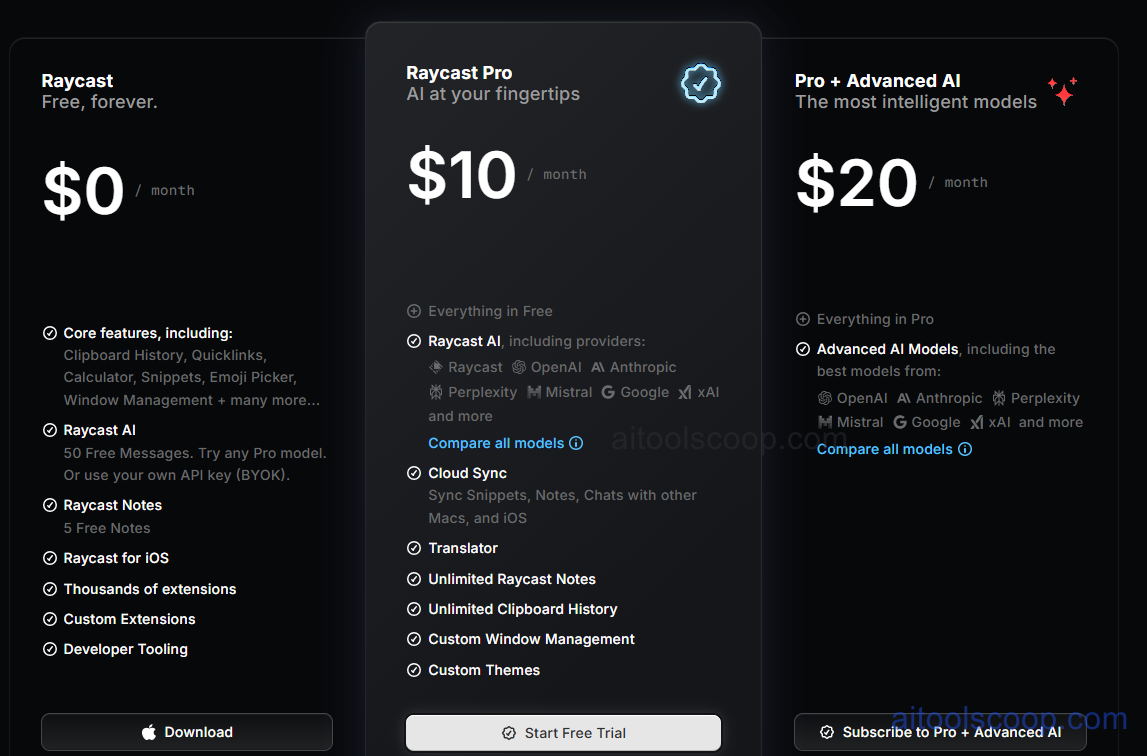
Raycast Pro Pricing, AI Expansion Pack, Custom Themes and Team Sharing Features
Raycast: Pro and Team Subscription Models for Mac Productivity
  • Free — $0 — All core features forever: launcher, clipboard history, window management, snippets, and all 1,500+ community extensions. A limited number of AI messages included to try the feature.
  • Pro — $10/month (billed annually) — Adds unlimited Raycast AI (GPT-4o, Claude, Llama 3), Cloud Sync, custom themes, unlimited clipboard history, and a 14-day free trial.
  • Team — $20/user/month — Everything in Pro plus shared snippets, shared quicklinks, shared extensions, and team commands across the workspace.
  • Enterprise — custom pricing — Advanced security, SSO, compliance controls, and dedicated support.Pricing is subject to change. Always check the latest rates on the official website. For more AI tool reviews, visit aitoolscoop.com.

Who Should Use Raycast?

Raycast is made for developers, designers, and power users on Mac who spend most of their day at a keyboard and want to eliminate context-switching overhead. The free plan alone replaces Spotlight and several standalone apps. Upgrading to Pro makes sense the moment you want AI that is always available mid-task — without opening a browser tab. Student discounts (50% off Pro) are available via application on their website.


💰

Pricing Plans

Plan Price Includes
Pro $10/mo Full access + priority support
Check Current Pricing →
Affiliate Disclosure: This page contains affiliate links. If you click and make a purchase, we may earn a small commission at no extra cost to you. We only recommend tools we genuinely believe in.

🎯 Explore More

Discover other curated resources from our platform

🛠️ AI Tools View All →
Zoom
Zoom
★ 4.5
ElevenLabs
ElevenLabs
★ 4.7
Pika Labs
Pika Labs
★ 4.3
⚔️ VS Comparisons View All →
⚔️
ChatGPT vs Gemini for Writing in…
ChatGPT GPT-4o vs Gemini 1.5 Pro
Claude vs ChatGPT
Claude vs ChatGPT
Claude 3.7 Sonnet vs ChatGPT GPT-4o
⚔️
DeepSeek vs Gemini: Which AI Is…
DeepSeek R1 vs Google Gemini 2.0 Pro
💡 Free Prompts View All →
💡
AI Prompt to Write a YouTube…
🔥 19.2K uses
💡
Gemini for Financial Advisors: Write Portfolio…
🔥 1.5K uses
💡
Claude for Real Estate Sales Representatives:…
🔥 3.9K uses
💡 Free Prompts