

Best Invoicing Tool for Freelancers
FreshBooks (freshbooks.com) is a cloud-based accounting software platform designed specifically for freelancers, consultants, agencies, and small service-based businesses. Unlike enterprise accounting tools, FreshBooks prioritizes ease of use — letting non-accountants send professional invoices, track expenses, log billable hours, accept online payments, and generate financial reports without any accounting knowledge. Over 30 million people have used FreshBooks since its founding in 2003.
How FreshBooks Works
Sign up and connect your bank account or credit cards to FreshBooks. Expenses are automatically imported and can be categorized with one click. Create and send professional invoices in minutes — with automatic payment reminders and online payment acceptance via credit card, ACH, or PayPal. Use the built-in time tracker to log billable hours and convert them directly to invoice line items. FreshBooks generates profit and loss statements, tax summaries, and expense reports automatically from your data, making year-end accounting straightforward.
Key Features
- Professional invoicing — Customizable invoice templates, automatic payment reminders, and recurring billing
- Online payment acceptance — Accept credit cards, ACH bank transfers, and PayPal directly on invoices
- Expense tracking — Automatic bank import, receipt scanning via mobile app, and mileage tracking
- Time tracking — Built-in timer with project-based tracking that converts to billable invoices
- Financial reports — Profit and loss, tax summary, expense reports, and accounts aging reports
- Project management — Client collaboration, file sharing, and project budget tracking
- Double-entry accounting — Available on higher plans for GAAP-compliant bookkeeping
FreshBooks Pricing
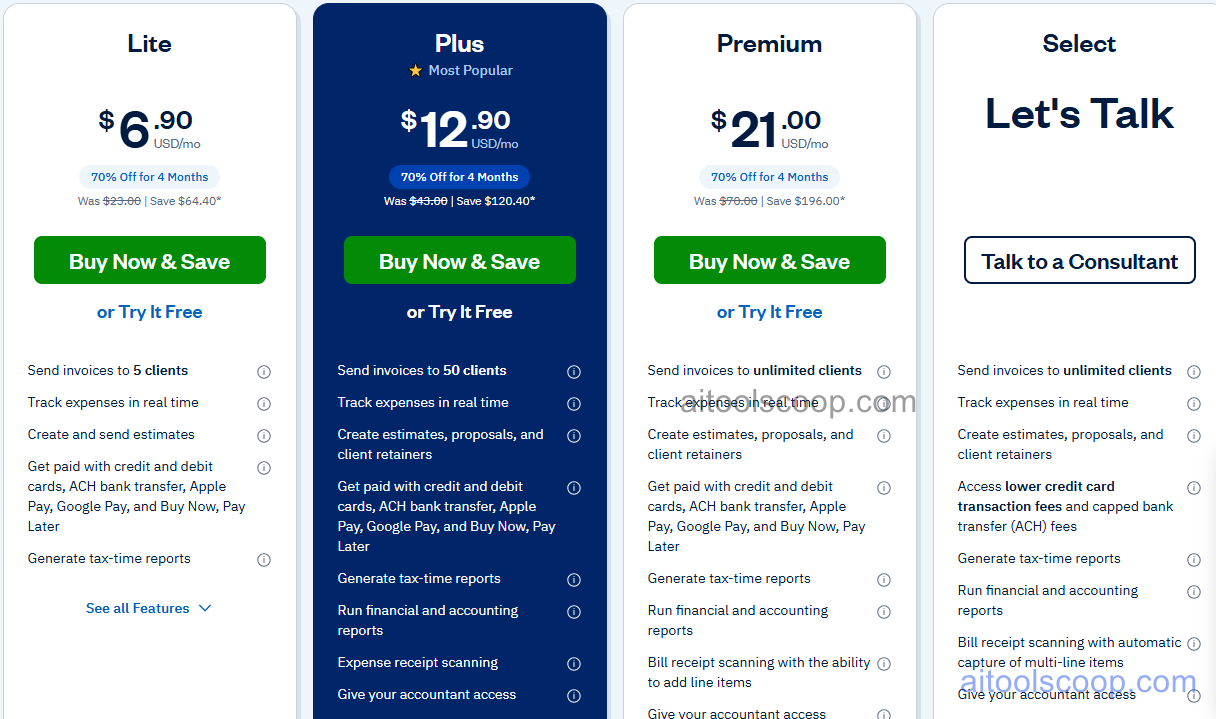
| Plan | Monthly | Annual (per mo) | Key Features |
|---|---|---|---|
| Lite | $6.90/mo | ~$15.73/mo | 5 clients, invoicing, expense tracking, time tracking, basic reports |
| Plus | $12.90/mo | ~$29.41/mo | 50 clients, proposals, recurring invoices, double-entry accounting |
| Premium | $21.00/mo | ~$47.88/mo | Unlimited clients, project profitability, accounts payable, advanced reporting |
| Select | Custom | Custom | Dedicated account manager, lower payment processing fees, custom onboarding |
FreshBooks frequently offers promotional discounts for new subscribers. Always verify current rates at freshbooks.com. For more AI finance tool reviews, visit aitoolscoop.com.
Who Should Use FreshBooks?
FreshBooks is best suited for freelancers, consultants, photographers, designers, agencies, and other service-based small businesses that invoice clients regularly and need simple accounting without complexity. It is particularly strong for businesses where time tracking and client invoicing are core workflows. FreshBooks is not designed for product-based businesses that need inventory management, or for businesses that require advanced GAAP bookkeeping without upgrading to higher plans.
Frequently Asked Questions
FreshBooks is a cloud-based accounting and invoicing platform designed for freelancers, self-employed professionals, and small service businesses. It handles invoicing, expense tracking, time tracking, online payment acceptance, and financial reporting. FreshBooks is known for its user-friendly interface that makes accounting accessible to non-accountants.
FreshBooks Lite starts at $6.90 per month and supports up to 5 clients. Plus is $12.90 per month for up to 50 clients. Premium is $21.00 per month with unlimited clients. Select is custom-priced. FreshBooks frequently offers introductory discounts for new subscribers, so the first few months may be significantly cheaper than standard rates.
Yes. FreshBooks offers a 30-day free trial on all plans with no credit card required. This gives freelancers and small business owners enough time to set up their account, send test invoices, and evaluate whether the platform meets their needs before committing to a paid plan.
Yes. FreshBooks is particularly well-suited for self-employed freelancers and sole proprietors. The Lite plan at $6.90/month covers the core needs of most solo freelancers — invoicing, expense tracking, and time logging — at an affordable entry price. The mobile app makes it easy to track expenses and hours on the go.
Top FreshBooks alternatives include QuickBooks Online (more powerful for growing businesses with inventory), Wave (completely free for invoicing and accounting), Xero (strong for international businesses and multi-currency), and HoneyBook (better for creative service businesses that need CRM alongside invoicing). Choose FreshBooks if simplicity, time tracking, and clean invoicing are your top priorities.