

Best AI Image Upscaler for Print Quality
Let's Enhance (letsenhance.io) is a cloud-based AI image upscaling platform that uses six specialized super-resolution models to enhance and enlarge low-resolution images while reconstructing lost details. Unlike simple interpolation or sharpening tools, Let's Enhance employs generative AI that analyzes image content and intelligently "imagines" what missing pixels should be, adding realistic skin texture, fabric weaves, and fine details that weren't present in the original. The platform supports upscaling up to 16x with outputs reaching 512 megapixels on business plans — sufficient for billboards, large-format prints, and professional photography applications that demand exceptional resolution.
How Let's Enhance Works
Upload an image to Let's Enhance's web platform and select your enhancement goal: upscale for larger size, enhance for better quality, or sharpen to fix blur. Choose from specialized AI models including Prime (default for most images), Gentle (preserves fine details and text), Balanced (natural enhancement), Strong and Ultra (maximum detail improvement), Digital Art (optimized for illustrations and AI-generated content), or Old Photo (repairs damage and restores aged images). The AI processes your image in the cloud, analyzing content to reconstruct missing details rather than simply enlarging pixels. For text-heavy images like logos or documents, the Text Improvement mode prevents distortion. Batch processing allows uploading multiple images for consistent enhancement across entire catalogs. The Chat Editor feature enables editing images through natural language prompts before upscaling, streamlining creative workflows.
Key Features
- Six specialized AI models — Prime, Gentle, Balanced, Strong, Ultra, Digital Art, and Old Photo modes for different content types
- Up to 16x upscaling — enlarge images dramatically while maintaining quality, outputs up to 512MP on business plans
- Generative super-resolution — AI reconstructs missing details rather than simply interpolating pixels
- Text preservation — specialized Text Improvement mode keeps logos and fonts crisp without distortion
- Batch processing — upload and enhance multiple images simultaneously for efficient workflows
- Old photo restoration — dedicated mode for repairing damage, removing scratches, and restoring aged images
- Chat Editor — edit images using natural language prompts before upscaling
- Background removal — AI subject detection and background removal integrated into workflow
- API access — integrate upscaling into custom applications and automated pipelines
- Print optimization — ensure images hit 300 DPI at any size for professional printing
Let's Enhance Pricing
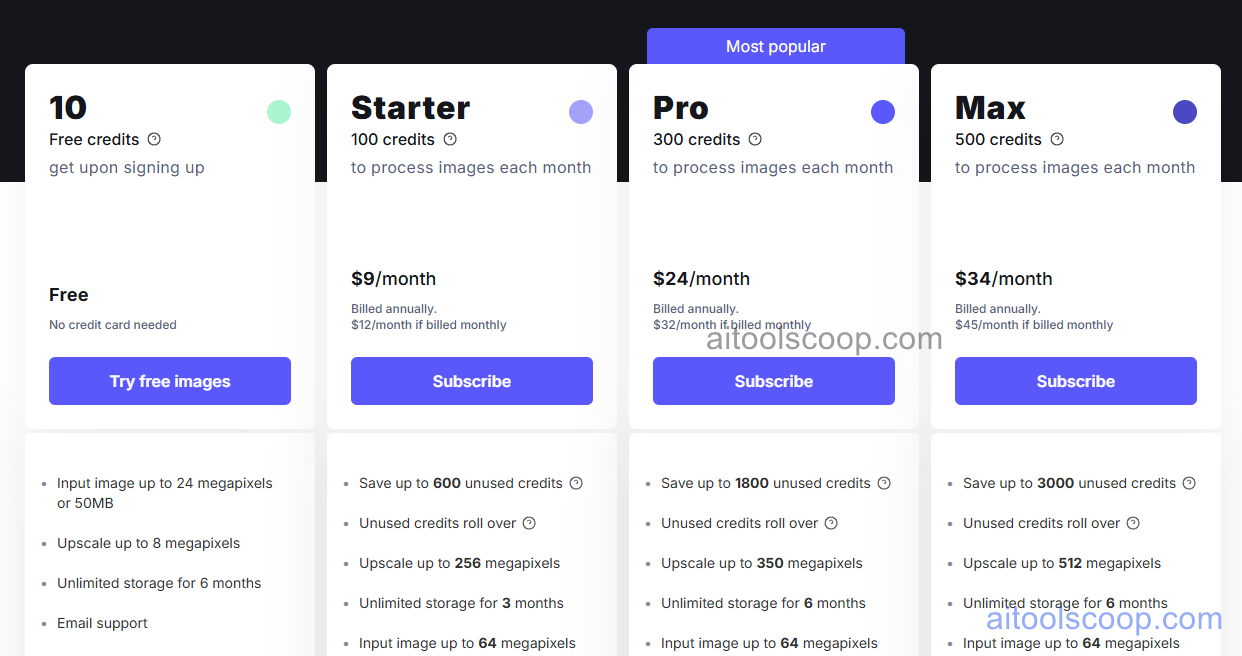
- Free — $0 — 10 free credits to test the service, standard features, limited resolution.
- Starter — $9/month — approximately 100 credits per month, upscale to 256 megapixels on personal plans, batch processing, all AI models.
- Pro — $24/month — approximately 300 credits per month, upscale to 500 megapixels, priority processing, API access.
- Max — $34/month — approximately 500 credits per month, maximum resolution support, dedicated support, commercial licensing.
Always check the latest rates on the official website. For more AI tool reviews, visit aitoolscoop.com.
Who Should Use Let's Enhance?
Let's Enhance is ideal for photographers needing to upscale images for large-format prints, posters, and canvas, e-commerce sellers improving product photo quality for marketplace listings, digital artists enhancing AI-generated art from Midjourney or Stable Diffusion for 4K/8K printing, print-on-demand sellers preparing designs for t-shirts, merchandise, and wallpapers, real estate agents enlarging property photos for marketing materials, and anyone who needs to rescue low-resolution images for professional use. The generative approach makes it particularly effective for recovering detail from compressed JPEGs, old scans, and small images where traditional upscaling would produce blurry results. At $9/month with 100 credits, it's accessible for occasional use while offering the quality needed for professional output.