Biteable (biteable.com) is a cloud-based video creation platform designed for marketing and communications teams that need to produce professional-quality videos quickly without video editing expertise or dedicated design resources. Founded in 2014 and headquartered in Hobart, Australia, Biteable provides a library of animated templates, live-action footage scenes, and brand customisation tools that allow teams to create social media videos, explainer videos, promotional ads, presentation slides, and internal communication videos in minutes.
Biteable's approach is template-first: rather than starting from a blank timeline, users select a template matched to their content goal (product launch, social ad, company announcement, explainer), customise text, colours, and brand assets, swap in their own footage or images, and export a finished video. AI features assist with script generation, scene selection based on content type, and automatic brand colour application across templates. The platform integrates with social media scheduling tools and allows direct publishing to Facebook and YouTube from within the dashboard.
How Biteable Works
Users select a video template from Biteable's library — organised by use case (social ads, explainers, presentations, announcements) — and open it in the web-based editor. Each template is composed of scenes that can be reordered, replaced, or customised. Text overlays are edited directly on-screen. Brand colours and logos are applied globally across all scenes via the brand kit settings. Users can replace stock footage with their own uploaded video clips or images, and choose from a music library for background audio. Finished videos are exported in HD and can be downloaded, shared via link, or published directly to connected social platforms.
Key Features
- AI script and scene suggestions — AI assists with generating video scripts and recommending scene sequences based on the content type and goal
- Template library — hundreds of professionally designed animated and live-action video templates organised by use case and industry
- Brand kit — apply brand colours, fonts, and logo globally across any template with a single brand settings configuration
- Animated scenes — built-in animated graphic scenes covering data visualisation, transitions, text reveals, and motion graphics
- Stock footage library — access to millions of royalty-free stock video clips and images for use in any project
- Custom video upload — import own footage, images, and audio to replace or supplement stock content in templates
- Music library — royalty-free background music tracks categorised by mood and genre for video soundtracks
- Direct social publishing — publish finished videos directly to Facebook and YouTube from the Biteable dashboard
- Team collaboration — share projects with team members for review, feedback, and co-editing on paid plans
- HD video export — download finished videos in high definition for use across digital channels and presentations
Biteable Pricing
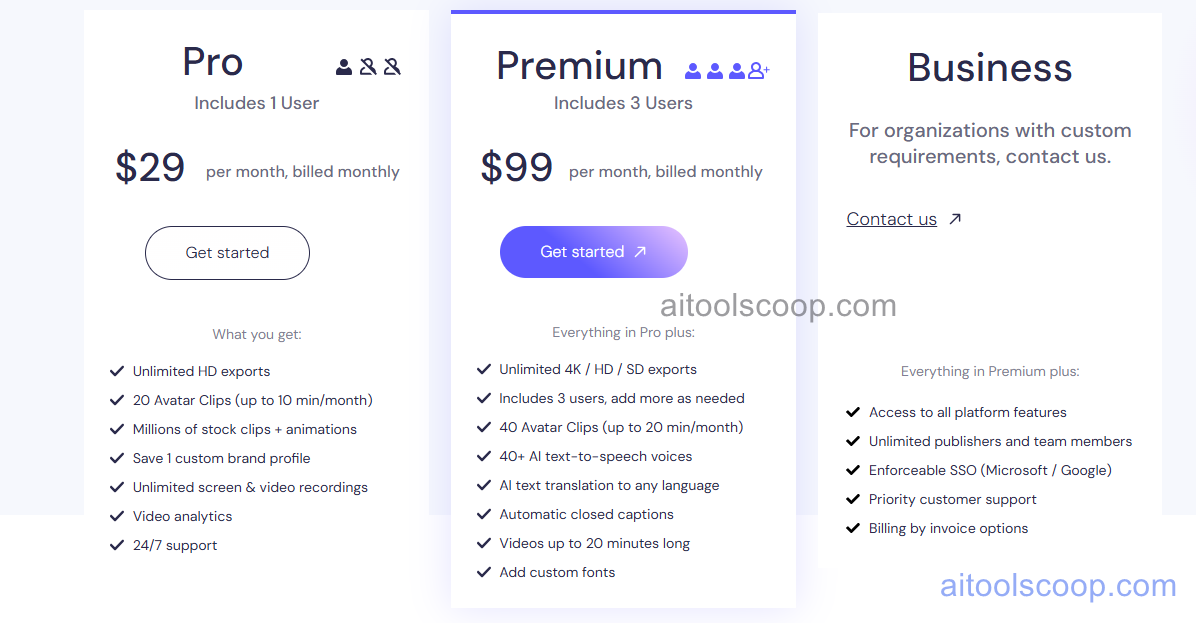
Biteable offers two paid plans with significant savings on annual billing.
- Pro — $29/month (annual: $15/month) — full template library, brand kit, HD export, stock footage access, music library, unlimited video creation, and watermark-free export. Suited to individual marketers and small teams.
- Teams — $99/month (annual: $49/month) — everything in Pro plus team collaboration, multiple user seats, advanced brand controls, priority support, and team workspace features for marketing departments.
Always verify current rates at biteable.com/pricing.
Who Should Use Biteable?
Biteable is best suited to marketing and communications teams, social media managers, and small business owners who need to produce branded video content regularly without a video editing background or dedicated production resources. It is particularly strong for social media ads, short explainer videos, product announcements, and internal communications where speed and brand consistency matter more than bespoke production quality. The annual Pro plan at $15/month is one of the most affordable options for unlimited professional video creation. Biteable is less suited to teams needing advanced video editing capabilities, custom motion graphics beyond templates, or long-form video production — professional editors working on complex projects would be better served by Adobe Premiere Pro or DaVinci Resolve.
Frequently Asked Questions
What is Biteable used for?
Biteable is an online video maker used by marketing teams to create branded social media videos, product explainers, promotional ads, company announcements, and presentation videos quickly using pre-built templates. It is designed for non-video editors who need professional-quality output without learning complex software — users select a template, customise text and brand colours, swap in their own assets, and export a finished video in minutes.
How much does Biteable cost?
Biteable's Pro plan costs $29/month ($15/month billed annually) and the Teams plan costs $99/month ($49/month annually). Annual billing saves approximately 48–50% compared to monthly pricing. There is no permanent free plan, though limited free access may be available for evaluation — check the Biteable website for current trial options.
Does Biteable require video editing experience?
No. Biteable is specifically designed for users without video editing experience. The template-based workflow means all timing, transitions, and motion graphics are pre-built — users only need to customise text, swap images or footage, apply brand colours, and export. The web-based editor requires no software installation and no understanding of timelines, codecs, or rendering settings. Marketing team members with no video background typically produce their first video within 15–30 minutes of starting.
Can I use my own footage in Biteable?
Yes. Biteable allows users to upload their own video clips, images, and audio files to replace or supplement the built-in stock footage within templates. Custom uploads can be used alongside Biteable's stock library within the same project. Supported upload formats include common video (MP4, MOV), image (JPG, PNG), and audio (MP3) formats.
How does Biteable compare to Animaker and Powtoon?
All three are template-based online video creation tools aimed at non-professional video editors. Biteable is strongest for live-action mixed with animated templates and social media ad formats. Animaker specialises in animated character-based videos with a wider library of customisable cartoon characters. Powtoon offers more presentation-style animated video formats suited to business communications and e-learning. The best choice depends on the content type — Biteable for social and marketing videos, Animaker for character animation, and Powtoon for business presentation style content.