

Best AI Shared Inbox for Customer Support Teams
Front (front.com) is an AI-powered customer communication platform that consolidates email, SMS, live chat, social media, and voice channels into a unified shared inbox. Unlike traditional helpdesk tools that depersonalize customer interactions with ticket numbers, Front preserves the individual email feel while giving teams collaborative features — internal comments, assignments, shared drafts, and SLA tracking — built directly into the inbox interface. Over 9,000 companies including Shopify, Airbnb, and Lyft use Front to manage high-volume customer communication with AI-assisted responses and workflow automation.
How Front Works
Connect your team's email accounts, SMS numbers, social profiles, live chat, and other channels to Front. All incoming messages appear in a shared inbox where they can be assigned to team members, tagged, escalated, and tracked against SLA targets. AI features draft reply suggestions based on past conversations, summarize long threads, and flag messages requiring urgent attention. Automated rules route messages to the right team, send acknowledgment replies, and trigger follow-up sequences. CRM integrations pull customer context — order history, account value, previous conversations — directly into the inbox sidebar so agents respond with full context without switching apps.
Key Features
- Unified shared inbox — Email, SMS, chat, social, and voice in one collaborative workspace
- AI reply drafting — AI generates reply suggestions based on conversation history and knowledge base content
- Thread summarization — AI condenses long email threads into key points for faster agent handoffs
- Automated workflows — Rule-based routing, auto-assignment, SLA alerts, and follow-up sequences
- Internal collaboration — Comments, @mentions, and shared drafts visible only to your team within each message
- SLA and analytics — Response time tracking, CSAT measurement, and team performance reporting
- CRM and app integrations — Connects with Salesforce, HubSpot, Jira, Asana, Slack, and 50+ tools
Front Pricing
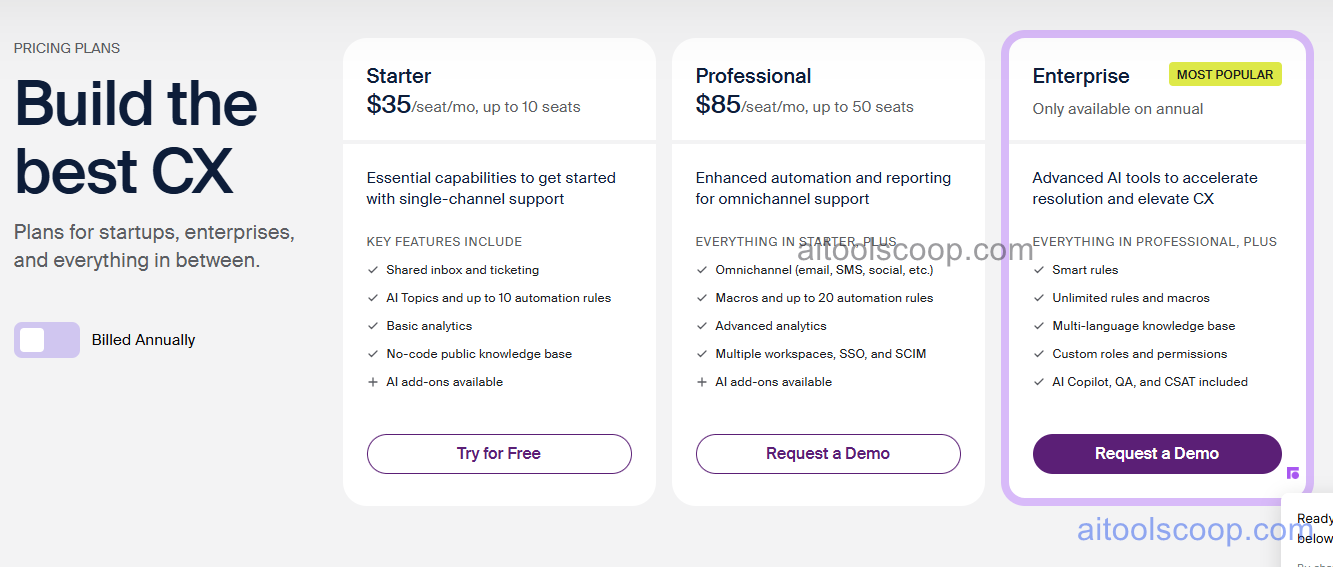
| Plan | Monthly (per user) | Annual (per user/mo) | Key Features |
|---|---|---|---|
| Starter | $35/user | $25/user | Shared inbox, email and chat, basic rules, internal comments, standard integrations |
| Growth | $85/user | $65/user | AI reply drafting, thread summarization, SLA tracking, CSAT surveys, advanced analytics |
| Scale | Custom | $105/user | Salesforce integration, custom roles, audit log, IP restrictions, SSO |
| Premier | Custom | Custom | Dedicated CSM, custom SLA, professional services, enterprise security |
Always verify current rates at front.com. For more AI customer service tool reviews, visit aitoolscoop.com.
Who Should Use Front?
Front is ideal for customer support and operations teams that manage high volumes of external communication across multiple channels and need collaborative inbox features without losing the personal feel of direct email. It is particularly strong for teams that receive complex, relationship-based inquiries — logistics, B2B customer success, financial services — where context and collaboration matter more than ticket volume throughput. Front is less suited for very high-volume transactional support that benefits from AI chatbot deflection — Zendesk or Intercom may be better fits in that scenario.
Frequently Asked Questions
Front is an AI-powered customer communication platform that unifies email, SMS, live chat, social media, and voice into a collaborative shared inbox. It combines the familiar feel of personal email with team collaboration features like internal comments, assignments, and SLA tracking — making it easier for teams to respond to customers faster without losing the personal touch of direct email communication.
Front Starter costs $35 per user per month or $25 per user per month billed annually. Growth costs $85/user/month or $65/user/month annually. Scale is $105/user/month on annual billing. Premier is custom-priced. AI features including reply drafting and thread summarization are available from the Growth plan upward.
Front does not offer a permanently free plan. A free trial is available for teams to evaluate the platform. The Starter plan at $25 per user per month (annual billing) is the lowest-cost entry point for production use.
Front is best used for customer-facing teams managing complex, relationship-based email communication at scale — B2B customer success, logistics coordination, financial services support, and agency client communication. Its collaborative inbox features make it especially strong when multiple team members need visibility into and ownership over the same customer relationship without the conversation feeling like a generic support ticket.
Front and Zendesk serve different customer support philosophies. Zendesk is optimized for high-volume transactional support with ticket-based workflows, strong AI chatbot deflection, and a deep self-service knowledge base. Front is optimized for relationship-based communication where the email feel matters and team collaboration on individual customer threads is essential. Many teams use Zendesk for volume support and Front for key account and B2B communication.
Front integrates with Salesforce, HubSpot, Jira, Asana, Slack, Shopify, Intercom, and 50+ other tools. CRM integrations pull customer context directly into the inbox sidebar. Project management integrations allow agents to create Jira or Asana tasks from conversations without leaving Front.