

Xmind (xmind.app) is one of the longer-standing names in mind mapping, and its free mind mapping tier still holds up as a genuinely usable starting point rather than a stripped-down demo. The tool's reputation was built on solid, no-nonsense outlining before AI features existed at all, which shows in how the interface is organised: structure and readability come first, and AI assistance is layered on top rather than driving the whole experience. That legacy makes Xmind a comfortable choice for people who want dependable mapping fundamentals — themes, structured export, presentation mode — with AI as a convenience rather than a requirement.
The free plan alone covers up to 10 maps with basic themes, version history, and export to a small set of common formats, which is enough for a student or hobbyist to use the tool regularly without ever paying. Paid tiers exist for people who outgrow that ceiling: Pro adds unlimited maps and clean multi-format export, while Premium layers in real project-management features like Gantt charts and task assignment, pushing Xmind from a pure mapping tool toward something closer to lightweight project planning.
How Xmind Works
Maps are built from a central topic outward, with branches, sub-topics, notes, and links added through a drag-and-drop canvas or keyboard shortcuts inherited from Xmind's long history as a desktop-first app. Custom themes and stickers can be applied to visually group related branches, and the built-in Xmind AI assistant can be called on to expand a rough topic into a fuller branch structure or suggest connections a user might have missed. Finished maps export cleanly to image, document, or presentation formats, and on higher tiers, topics can be converted directly into tasks with assignees and deadlines for teams that want to move from brainstorming into execution without switching tools.
Key Features
- Classic and AI-assisted mapping: full manual control over branch structure alongside an AI assistant that can expand a topic or suggest structure on request
- Custom themes and stickers: a visual styling system for distinguishing branches and priorities at a glance, available from the Pro tier upward
- Multi-format export: maps export to PNG, SVG, PDF, Markdown, and Office-compatible formats without a watermark on paid plans
- Pitch presentation mode: converts a finished map directly into a slide-style walkthrough, with a 5-slide cap on the free plan and unlimited slides on paid tiers
- Version history: rolls back accidental changes, ranging from 3 days on the free plan up to 30 days on Premium
- Real-time collaboration: shared editing on Premium, with the ability to follow another collaborator's live view of the map
- Gantt chart conversion: turns a mind map's branch structure into a visual project timeline on Premium, bridging mapping and lightweight project tracking
- Task assignment and export: topics can be turned into assignable tasks and exported to calendar or spreadsheet formats for follow-up outside Xmind
- Unlimited sheets per map (Premium): supports large, multi-section projects within a single map file rather than splitting work across separate documents
Xmind Pricing
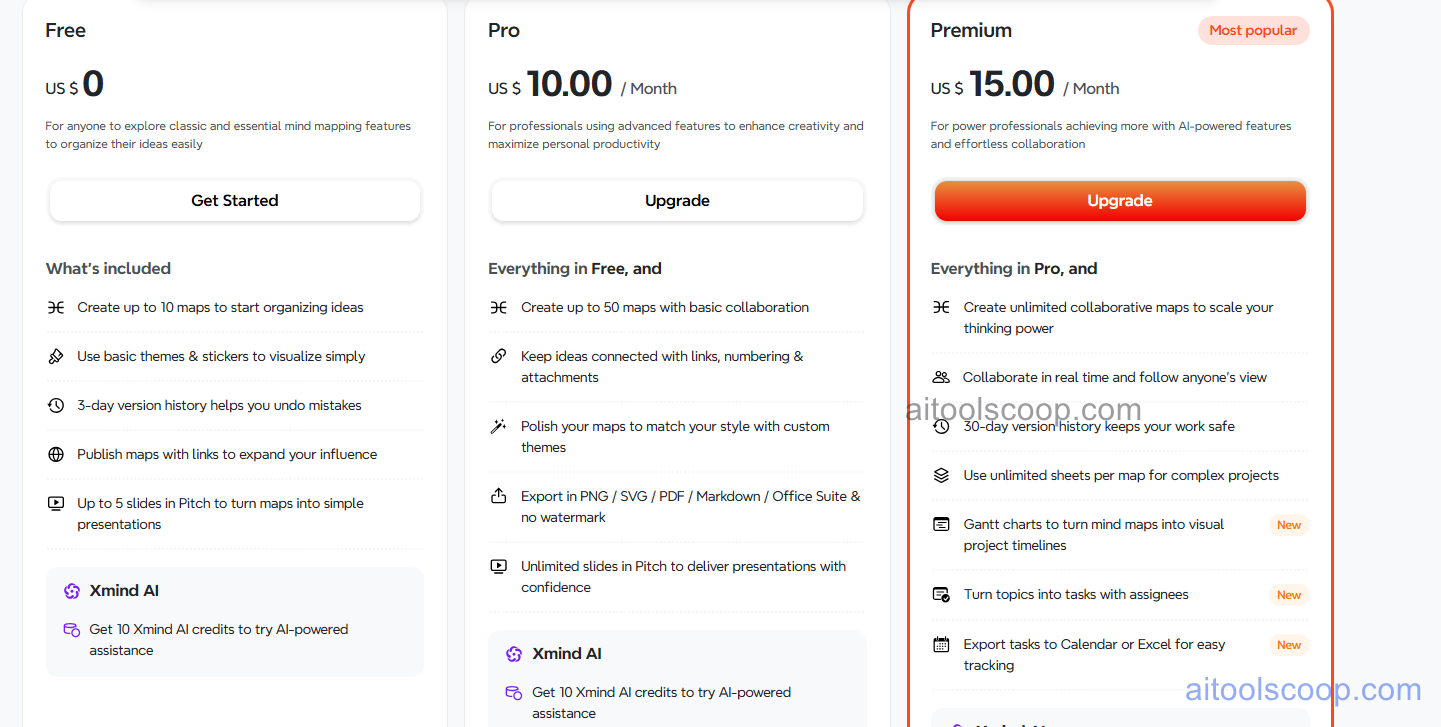
- Free — $0 — up to 10 mind maps, unlimited collaborators, basic themes and stickers, 3-day version history, and up to 5 slides in Pitch presentation mode.
- Pro — $10/month (from $4.92/month billed annually) — everything in Free plus unlimited maps, 2 attachments per map, 7-day version history, private maps, file exports, print, and Microsoft Teams integration.
- Premium — $15/month (from $8.25/month billed annually) — everything in Pro plus unlimited attachments, unlimited version history, multiple admins, Google Workspace integration, MS exports, custom branding, custom colour schemes, and unlimited Pitch slides.
Free plan available. Pro is $10/month (from $4.92/month billed annually) and Premium is $15/month (from $8.25/month billed annually). Pricing verified from xmind.app; rates may change — always confirm current pricing at xmind.app.
Who Should Use Xmind?
Xmind suits people who want dependable, no-frills mind mapping first and AI assistance second — students, writers, and planners who care more about clean outlining and export quality than an AI-driven workflow. The free plan's 10-map cap is generous enough for casual or single-project use, while Pro is worth it once someone is managing more than a handful of maps or needs private, unlimited storage. Premium earns its price mainly for teams that want the Gantt chart and task-assignment features bridging mind mapping into lightweight project tracking — solo users who don't need real-time collaboration or project timelines are unlikely to need to go past Pro.
Frequently Asked Questions
What is Xmind?
Xmind is a free mind mapping application that pairs a mature manual outlining toolkit with an AI assistant, plus export, presentation, and (on higher tiers) project-tracking features like Gantt charts and task assignment.
How much does Xmind cost in 2026?
Xmind offers a free plan alongside two paid tiers: Pro at $10/month billed monthly, or from $4.92/month billed annually, and Premium at $15/month billed monthly, or from $8.25/month billed annually.
What's the difference between Xmind Pro and Premium?
Pro removes the free plan's map cap and adds private maps, file exports, and basic integrations. Premium adds real-time collaboration, Gantt chart conversion, task assignment, custom branding, and unlimited version history — aimed at teams rather than solo users.
Does Xmind have a free plan?
Yes. The free plan allows up to 10 mind maps with unlimited collaborators, basic themes, and a 3-day version history, with no credit card required.
Can Xmind replace a project-management tool?
Not fully. Premium's Gantt charts and task assignment add genuine project-tracking value, but Xmind remains a mapping tool at its core — larger teams with complex workflows will likely still need a dedicated project-management platform alongside it.