
Mojo App (mojo-app.com) is a social video and content creation app designed to help small businesses, marketers, and creators produce professional-looking social media content — animated posts, stories, and short videos — without design experience. The app provides a library of customisable templates, animated text styles, stickers, video effects, and royalty-free media, allowing users to build branded content for platforms like Instagram, TikTok, and Facebook directly from their phone. Mojo's design is intentionally accessible: users can move elements, adjust timing, and swap colours with simple taps, with an interface built for speed rather than a full desktop design suite.
Mojo's standout 2026 capability is its AI video generation, which lets users generate short animated videos from prompts or existing assets, expanding the app beyond template-based editing into AI-assisted content creation. Paid tiers add brand kit functionality — letting users apply their own fonts, logos, and colours consistently across content — along with background removal, auto captions, one-tap resizing for different platform formats, and a Teams feature for businesses and agencies that need multiple users collaborating on shared brand assets and templates.
How Mojo App Works
Users open the Mojo app and browse a library of templates organised by content type — Reels, Stories, posts, and more — each with pre-built animations, text styles, and layouts. After selecting a template, users customise it by editing text, swapping images or video clips, and adjusting colours, fonts, and timing using a simple tap-and-drag interface. For AI-generated content, users can prompt Mojo's AI video tool to create animated visuals, which consume monthly generation credits on paid plans. Finished content can be resized in one tap for different platforms (square, portrait, landscape) and exported directly for posting. On Pro and Premium plans, users can save their brand's fonts, logos, and colour palette as a reusable brand kit, ensuring consistency across all content created in the app.
Key Features
- AI video generation — create short animated videos from prompts, with monthly generation credits included on paid plans
- Customisable template library — hundreds of templates for Reels, Stories, and posts with pre-built animations, text styles, and layouts
- Brand kit — save and apply your own fonts, logos, and brand colours consistently across all created content (Pro and above)
- One-tap resizing — instantly reformat content for different social media platforms and aspect ratios without re-editing
- Background removal — remove image backgrounds directly within the app for cleaner product or portrait shots
- Automatic captions — generate auto-captions for video content to improve accessibility and engagement
- Animated text, stickers, and effects — library of animated text styles, stickers, and video effects (Bokeh, Scratches, VHS, and more) to enhance content
- Royalty-free creative library — built-in stock videos, music tracks, and fonts for use within created content
- Watermark removal and priority rendering — Premium plan removes watermarks and offers shorter rendering wait times for AI video generations
- Teams collaboration — shared brand assets, templates, and centralised billing for multiple users on a business account
Mojo App Pricing
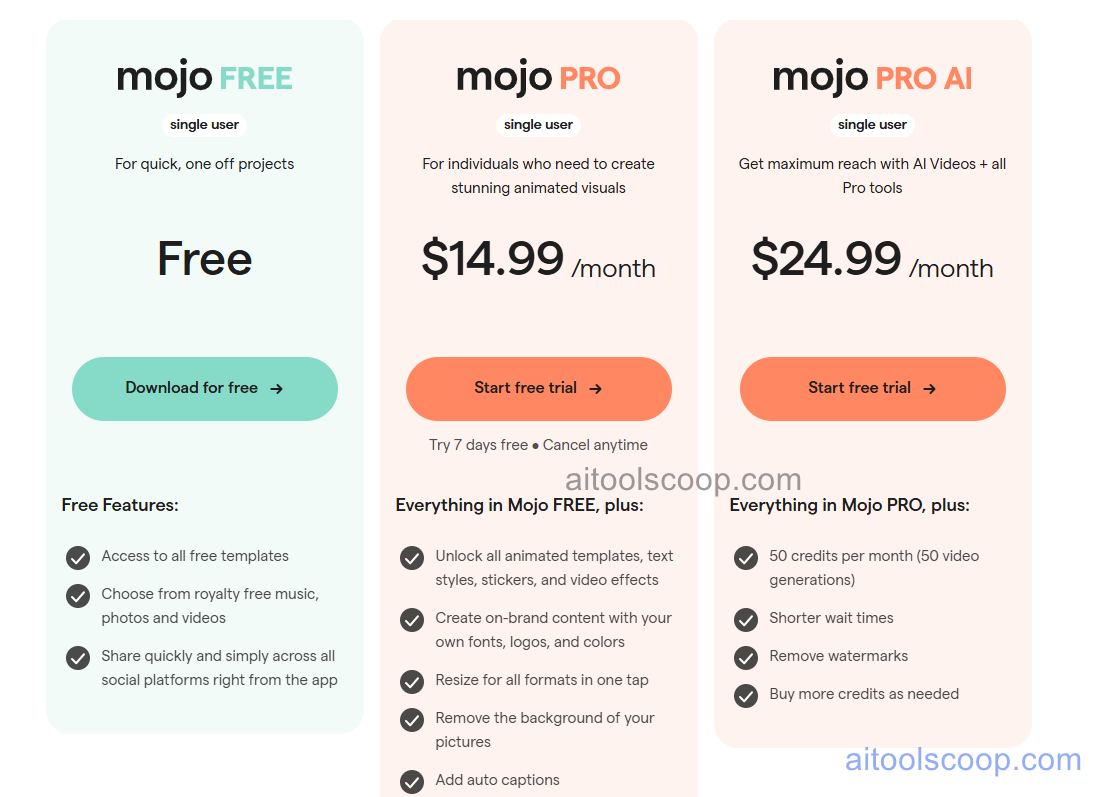
- Free — $0/month — Access to basic templates, text styles, and core editing tools for quick, one-off projects. No subscription required to start creating content.
- Pro — $14.99/month ($4.99/month billed annually) — Everything in Free, plus all animated templates, text styles, stickers, and video effects; custom brand kit (fonts, logos, colours); one-tap resizing for all formats; background removal; and auto captions. 7-day free trial available.
- Premium — $24.99/month ($8.33/month billed annually) — Everything in Pro, plus 50 AI video generations per month, shorter rendering wait times, watermark removal, and the ability to purchase additional credits as needed.
A Teams add-on is available for businesses needing multiple users, shared brand assets, and centralised billing. Always verify current rates at mojo-app.com/pricing.
Who Should Use Mojo App?
Mojo App is best suited to small business owners, solo marketers, and content creators who need to produce a steady stream of branded social media content quickly from a mobile device, without hiring a designer or learning a complex editing tool. Its brand kit and one-tap resizing make it efficient for businesses posting across multiple platforms with consistent branding. The AI video generation on Premium adds value for creators wanting to experiment with animated content beyond static templates. Teams needing advanced desktop-grade design control, multi-layer compositing, or print-ready output will find Mojo's mobile-first, template-driven approach more limited than full design suites — its strength is speed and accessibility for social content, not professional design work.
Frequently Asked Questions
What is Mojo App?
Mojo App is a mobile-first social video and content creation app that helps small businesses and creators produce branded social media posts, Stories, and Reels using customisable templates, animated text, stickers, and AI video generation. It is designed to be accessible to users with no design experience.
Is Mojo App free?
Yes — Mojo App offers a free plan that includes basic templates and core editing tools, suitable for quick, one-off content projects. Paid plans starting at $14.99/month (or $4.99/month billed annually) unlock the full template library, custom brand kits, background removal, auto captions, and one-tap resizing for all formats.
How does AI video generation work in Mojo App?
AI video generation is available on the Premium plan ($24.99/month, or $8.33/month billed annually), which includes 50 AI video generations per month. Users can create short animated videos from prompts or assets, with shorter rendering wait times than lower tiers, and can purchase additional generation credits as needed once the monthly allocation is used.
What is included in Mojo App's brand kit?
The brand kit, available on Pro and Premium plans, lets users save their business's fonts, logos, and brand colours within the app and apply them consistently across all content created from templates. This ensures social media posts maintain on-brand visual consistency without needing to manually re-select brand assets for every new design.
Does Mojo App support team collaboration?
Yes. Mojo App offers a Teams feature that allows multiple users within a business or agency to share brand assets, fonts, colours, and templates, manage team members, and consolidate billing for all subscriptions in one place. This is aimed at small businesses and agencies producing content collaboratively.