
AI Team Workspace for Tasks & Collaboration
Taskade (taskade.com) is an all-in-one productivity platform combining task management, note-taking, mind mapping, and video chat with AI assistance. Designed for remote teams and individual creators, Taskade uses AI to generate project outlines, automate task creation, summarize meetings, and answer questions about workspace content. The platform emphasizes real-time collaboration with multiple users editing documents simultaneously, similar to Google Docs but with integrated AI and task management. With features including customizable workflows, templates for various use cases, and cross-platform sync, Taskade serves teams seeking unified productivity tools enhanced by AI automation.
How Taskade Works
Create a workspace for your team or personal projects. Start a new project and choose a template (task list, kanban board, mind map, or document). Use AI commands to generate project structures — type "/" to access AI features like "generate task list," "summarize notes," or "brainstorm ideas." AI analyzes your input and creates relevant content automatically. Collaborate with team members in real-time — see their cursors and edits as they work. Organize tasks with tags, priorities, and due dates. Use video chat directly within projects for synchronous collaboration. Create automated workflows that trigger actions based on task status changes. Access your workspace from web, mobile, or desktop apps with instant sync. Chat with AI assistant about workspace content to find information or get suggestions.
Key Features
- AI task generation — create project outlines and task lists from natural language
- Real-time collaboration — multiple users edit simultaneously with live cursors
- Flexible views — switch between lists, boards, mind maps, and calendar views
- AI chat assistant — ask questions and get answers about workspace content
- Template library — pre-built structures for common workflows and projects
- Video chat integration — built-in video calls within projects
- Automation workflows — trigger actions based on task status changes
- Cross-platform sync — seamless access across web, iOS, Android, and desktop
- Custom workflows — build personalized productivity systems
- Offline access — work without internet and sync when reconnected
Taskade Pricing
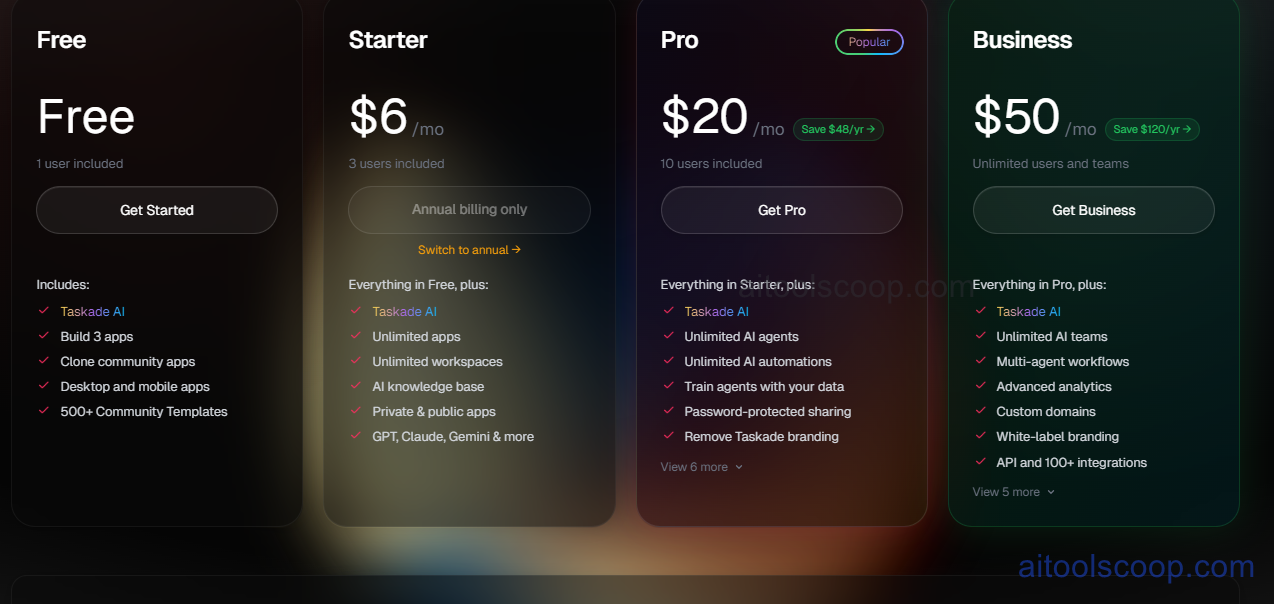
| Plan | Monthly | Annually | Key Features |
|---|---|---|---|
| Free | $0 | $0 | Unlimited tasks, 3 workspaces, basic AI features, 5MB file uploads |
| Starter | $6 | $6 | Unlimited workspaces, advanced AI, 100MB uploads, priority support |
| Plus | $20 | $16 | Team collaboration, 1GB uploads, automation workflows, video chat |
| Pro | $50 | $40 | Unlimited AI, 10GB uploads, advanced integrations, admin controls |
Always check the latest rates on the official website. For more AI tool reviews, visit aitoolscoop.com.
Who Should Use Taskade?
Taskade is ideal for remote teams needing unified collaboration and task management, solopreneurs managing multiple projects and clients, students organizing coursework and study groups, content creators planning and tracking creative projects, startups coordinating work across distributed teammates, and anyone seeking AI-assisted productivity without multiple separate tools. The free plan suits individual users and small teams, while the Starter plan serves active users. The Plus and Pro plans fit larger teams with advanced collaboration needs.