

Home/ AI Tools /Ai Design Tools /Stencil
Stencil Freemium
🤖 Ai Design Tools
#13 in Ai Design Tools

Stencil

Stencil is a fast, simple online graphic design tool for creating social media images, blog headers, and marketing visuals at speed. Free plan available; paid plans from $15/month or $9/month billed annually.

4.1 / 5 Freemium From $15/mo
Quick Info
💰 Pricing$15/mo
⭐ Rating4.1 / 5
🆓 Free Plan✅ Yes
📂 CategoryAi Design Tools
🌐 WebsiteVisit ↗
🕐 Last UpdatedApr 20, 2026
🔀 Alternatives15 tools
Verified Data Updated Apr 20, 2026
Independently Reviewed No paid placements
Detailed Analysis Hands-on testing
Key Features
  • Browser extension for grabbing any web image and opening it instantly in Stencil for editing
  • 4M+ stock photo library providing built-in professional photos for instant background images
  • Pre-sized canvas formats covering exact dimensions for every major social platform and ad format
  • Icon library with over 2 million icons and graphics for adding visual detail to designs
  • Brand kit for saving and applying brand colors, fonts, and logos with a single click
  • Hundreds of pre-designed templates for social media, blog headers, and ad graphic formats
  • Direct social media sharing for publishing finished graphics to connected accounts
  • Buffer integration for scheduling social media posts with graphics from within Stencil
  • JPEG and PNG download for exporting finished graphics in web-optimized formats immediately
  • WordPress plugin for accessing Stencil directly from within the WordPress content editor
4.1
Overall Rating
Ease of Use
4.3
Features
4.1
Value
3.8
Performance
4.2
Support
4.0
Pros & Cons
👍 Pros
  • Annual Pro plan at $9/month the most affordable unlimited graphic design subscription available
  • Browser extension for instant image capture from any webpage is a unique time-saving feature
  • WordPress plugin integration natural for bloggers already working inside WordPress daily
  • 4M+ stock photos eliminate the need for a separate photo subscription for most content needs
  • Streamlined interface fastest path from blank canvas to finished download
  • Free plan 10 images per month more generous than some competitors for casual evaluation
  • Buffer integration creates a frictionless design-to-schedule workflow for social media managers
👎 Cons
  • Design features and creative flexibility noticeably more limited than Canva or Adobe Express
  • No AI-powered design generation or smart assistance features unlike most modern competitors
  • Template library smaller and less updated than Canva providing fewer fresh starting points
  • Free plan 10-image monthly limit insufficient for any active content production schedule
  • Background removal and magic resize features absent unlike competing tools at similar price points
  • No video or animation capabilities limiting use for creators producing motion content
  • Collaboration features basic even on the Unlimited plan compared to full-featured design platforms
📖

About Stencil

Stencil (getstencil.com) is a lightweight, fast online graphic design tool built specifically for bloggers, social media managers, and content marketers who need to create professional-looking images quickly without a steep learning curve. Stencil emphasizes speed above all else — its browser extension allows users to capture any web image and instantly open it in the design editor, and its streamlined interface keeps the most-used tools front and center without the complexity of feature-heavy alternatives. With a substantial stock photo library, icon sets, hundreds of templates, and a brand kit for consistent visual identity, Stencil handles the day-to-day visual content production that keeps creators publishing consistently without spending hours per graphic.

How Stencil Works

Access Stencil through the web app or install the Chrome extension for instant access from any web page. Select a canvas size from the pre-set format list — social media platforms, blog headers, ad sizes, and more — or enter a custom dimension. Choose a template or start with a blank canvas and add a background from the 4M+ photo library, an uploaded image, or a solid color. Add text, drop in icons, and adjust the layout. Apply your saved brand colors and fonts from the brand kit with a single click. Download as JPEG or PNG, share directly to social accounts, or schedule via Buffer. The browser extension lets you grab any image from the web and bring it into Stencil as a starting background instantly.

Key Features

  • Browser extension — grab any web image and open it instantly in Stencil for editing
  • 4M+ stock photo library — built-in professional photo library for instant background images
  • Pre-sized canvas formats — exact dimensions for every major social platform and ad format
  • Icon library — over 2 million icons and graphics for adding visual detail to designs
  • Brand kit — save brand colors, fonts, and logos for consistent one-click application
  • Templates — hundreds of pre-designed layouts for social media, blog, and ad graphics
  • Social media sharing — publish finished graphics directly to connected social accounts
  • Buffer integration — schedule posts with graphics to social queues without leaving Stencil
  • JPEG and PNG download — export finished graphics in web-optimized formats instantly
  • WordPress plugin — access Stencil directly from within the WordPress editor

Stencil Pricing
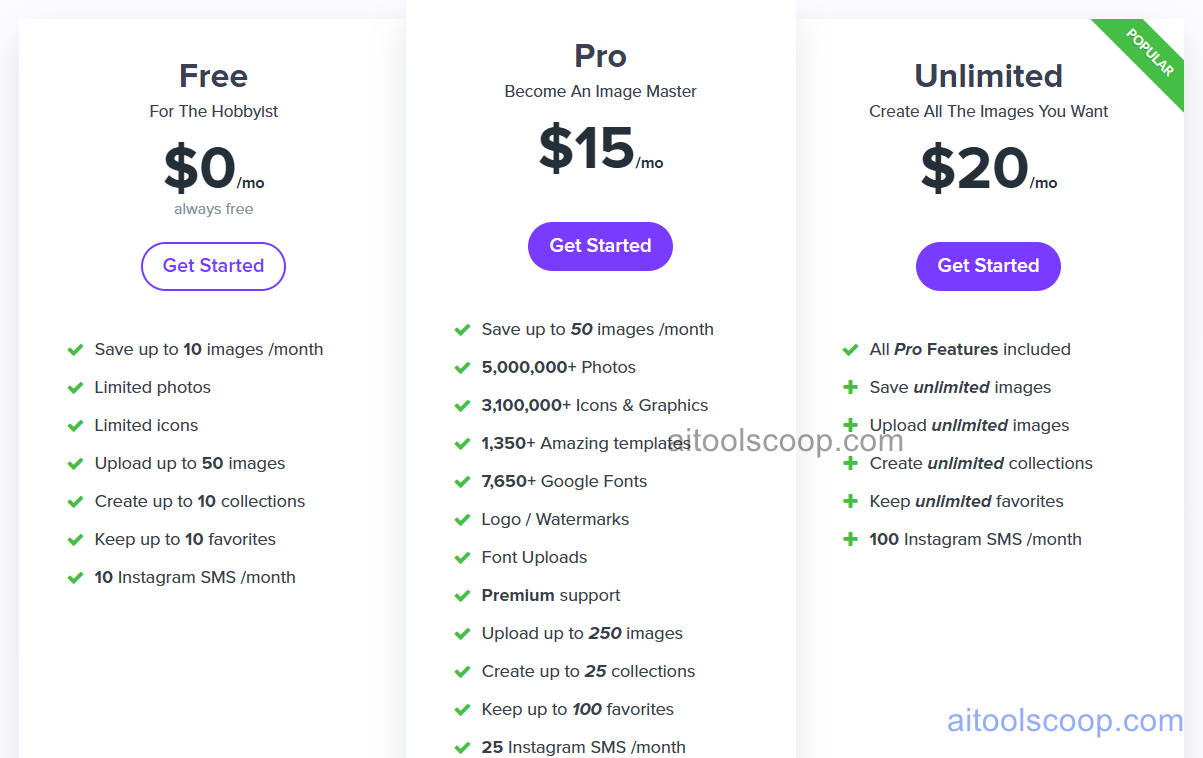
Stencil pricing plans
Stencil pricing — screenshot from getstencil.com
Plan Monthly Annually Key Inclusions
Free $0 $0 10 images per month, limited templates, basic stock photos, standard formats, social sharing
Pro $15/mo $9/mo Unlimited images, full stock library, all templates, brand kit, browser extension, Buffer, WordPress plugin
Unlimited $20/mo $12/mo All Pro features, multiple brand kits, team members, shared asset folders, priority support

Always check the latest rates on the official website. For more AI tool reviews, visit aitoolscoop.com.

Who Should Use Stencil?

Stencil is ideal for bloggers who need a professional featured image for every post without spending more than a few minutes, social media managers posting consistently across multiple platforms who need format-specific images at volume, WordPress content teams who want to design images without leaving the CMS, small business owners managing their own content marketing, and creators who use the browser extension to quickly repurpose interesting web images into branded social graphics. The annual Pro plan at $9/month is one of the most affordable unlimited graphic design subscriptions for individual creators.


💰

Pricing Plans

Plan Price Includes
Pro $15/mo Full access + priority support
Check Current Pricing →
Affiliate Disclosure: This page contains affiliate links. If you click and make a purchase, we may earn a small commission at no extra cost to you. We only recommend tools we genuinely believe in.

🎯 Explore More

Discover other curated resources from our platform

🛠️ AI Tools View All →
Windsurf
Windsurf
★ 4.5
Alli AI
Alli AI
★ 4.3
Munch Studio
Munch Studio
★ 4.0
⚔️ VS Comparisons View All →
ChatGPT vs Grok: 2026 Comparison — Pricing, Features & Verdict
ChatGPT vs Grok: 2026 Comparison —…
ChatGPT vs Grok
Claude vs ChatGPT
Claude vs ChatGPT
Claude 3.7 Sonnet vs ChatGPT GPT-4o
⚔️
ChatGPT vs DeepSeek: Which AI Is…
ChatGPT GPT-4o vs DeepSeek R1
💡 Free Prompts View All →
💡
Gemini for Financial Advisors: Write Portfolio…
🔥 1.5K uses
💡
ChatGPT for Coaches: Write Client Re-Engagement…
🔥 1.9K uses
💡
Intermediate SaaS Online Course Creators: Use…
🔥 7.4K uses
💡 Free Prompts