

Home/ AI Tools /Ai Design Tools /Cleanup.pictures
Cleanup.pictures Freemium
🤖 Ai Design Tools
#1 in Ai Design Tools

Cleanup.pictures

Cleanup.pictures is an AI image editing tool that removes unwanted objects, people, and text from photos instantly. Free plan available; paid plans from $3/month.

4.4 / 5 Freemium From $3/mo
Quick Info
💰 Pricing$3/mo
⭐ Rating4.4 / 5
🆓 Free Plan✅ Yes
📂 CategoryAi Design Tools
🌐 WebsiteVisit ↗
🕐 Last UpdatedApr 20, 2026
🔀 Alternatives15 tools
Verified Data Updated Apr 20, 2026
Independently Reviewed No paid placements
Detailed Analysis Hands-on testing
Key Features
  • AI object removal painting over any element and generating realistic background fill automatically
  • Brush size control for adjusting precision on small areas or speed across large removal zones
  • Text and watermark removal cleanly erasing overlays, stamps, and watermarks from any image
  • Background inpainting generating natural-looking replacement content to fill removed areas
  • Multiple format support for uploading JPEG, PNG, and WebP images in the browser
  • High-resolution export for downloading cleaned images at full original resolution on paid plans
  • Batch processing for handling multiple images in sequence on higher-tier plans
  • Browser-based operation requiring no software download on any device
  • API access for integrating AI object removal into custom applications and workflows
  • Fast AI processing completing most standard image removals in seconds
4.4
Overall Rating
Ease of Use
4.6
Features
4.4
Value
4.1
Performance
4.5
Support
4.3
Pros & Cons
👍 Pros
  • Simplest and fastest object removal workflow available — no Photoshop skills required
  • $3/month Basic plan among the most affordable useful photo editing subscriptions
  • Free plan allows meaningful evaluation with real cleanups before any financial commitment
  • AI inpainting quality impressively natural for most common removal scenarios
  • Browser-based works on any device without installation requirements
  • Pro plan API access enables building object removal into custom content production workflows
  • Handles diverse removal tasks from people and objects to text and watermarks in one tool
👎 Cons
  • AI inpainting quality degrades on complex backgrounds like intricate patterns or dense foliage
  • Free plan daily cleanup limits frustrate users with more than occasional editing needs
  • High-resolution export requires paid plan which is a basic expectation for professional work
  • API access only on the Pro plan limiting automation on the Basic tier
  • Not a replacement for Photoshop for complex multi-layer editing or advanced manipulation
  • Occasional artifacts visible in removed areas requiring manual touch-up in a separate editor
  • Fully browser-dependent which requires stable internet for every session
📖

About Cleanup.pictures

Cleanup.pictures (cleanup.pictures) is a fast, AI-powered image cleanup tool that removes unwanted elements from photos — objects, people, text, watermarks, and blemishes — by simply painting over the area to remove. Unlike complex photo editing software requiring masking and manual cloning skills, Cleanup.pictures processes the removal automatically using AI inpainting technology that intelligently fills the erased area with realistic background content. The result is a clean, natural-looking photo in seconds without any Photoshop experience. Used by photographers, e-commerce sellers, marketers, and content creators, Cleanup.pictures handles the most common photo editing task faster than any traditional workflow.

How Cleanup.pictures Works

Upload an image to cleanup.pictures in your browser — JPEG, PNG, and WebP are supported. Use the brush tool to paint over the element you want to remove: a person in the background, a logo on a product, text overlaid on an image, a power line crossing a landscape, or any unwanted detail. Adjust brush size for precision on small elements or speed on large areas. Click "Erase" and the AI processes the selection, generating realistic background content to fill the area seamlessly. Preview the result and paint additional areas if needed. Download the finished image in full resolution. Higher-resolution exports and batch processing are available on paid plans.

Key Features

  • AI object removal — paint over any element and the AI removes it with realistic background fill
  • Brush size control — adjust brush precision for detailed small-area or fast large-area coverage
  • Text and watermark removal — cleanly erase text overlays, stamps, and watermarks from images
  • Background inpainting — AI generates natural-looking replacement content for removed areas
  • Multiple format support — upload JPEG, PNG, and WebP images for editing
  • High-resolution export — download cleaned images in full original resolution on paid plans
  • Batch processing — process multiple images in sequence on higher-tier plans
  • Browser-based — no software download or installation required, works on any device
  • API access — integrate AI object removal into custom applications and workflows
  • Fast processing — removal completed in seconds for standard image sizes

Cleanup.pictures Pricing
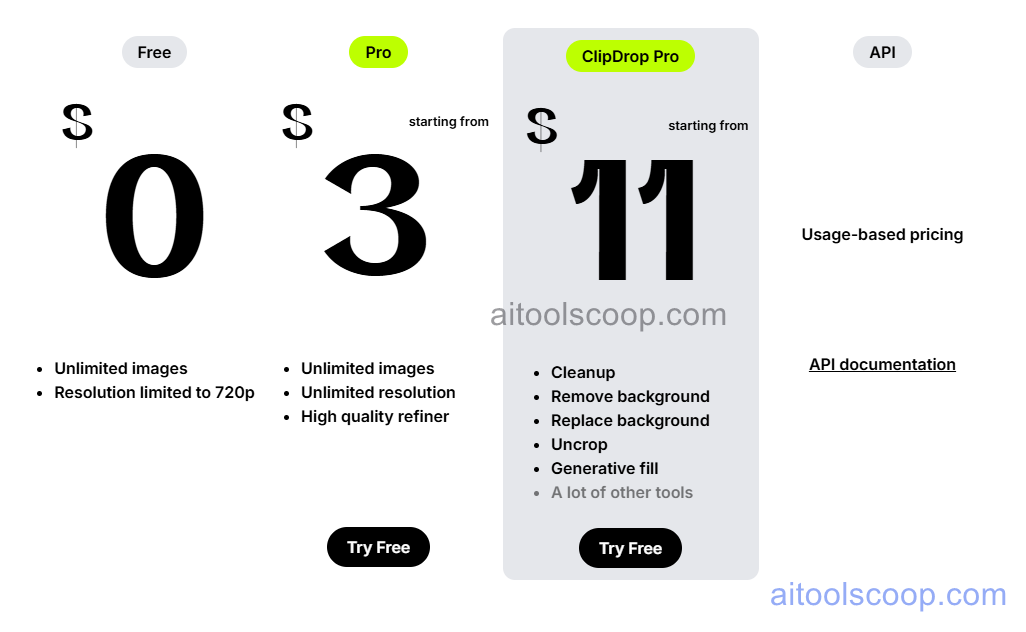
Cleanup.pictures pricing plans
Cleanup.pictures pricing — screenshot from cleanup.pictures
Plan Monthly Key Inclusions
Free $0 Limited cleanups per day, standard resolution export, core brush tool, browser-based
Basic $3/mo Increased cleanups, higher resolution export, faster processing, email support
Pro $11/mo Unlimited cleanups, full HD resolution export, batch processing, API access, priority support

Always check the latest rates on the official website. For more AI tool reviews, visit aitoolscoop.com.

Who Should Use Cleanup.pictures?

Cleanup.pictures is ideal for e-commerce sellers removing distracting backgrounds or objects from product photos, real estate photographers cleaning power lines and people from property images, social media creators polishing photos for brand channels, marketers removing watermarks or text from stock photos for presentations, and travel photographers removing tourists from landscape shots. The Basic plan at $3/month is one of the most affordable professional photo cleanup subscriptions available.


💰

Pricing Plans

Plan Price Includes
Pro $3/mo Full access + priority support
Check Current Pricing →
Affiliate Disclosure: This page contains affiliate links. If you click and make a purchase, we may earn a small commission at no extra cost to you. We only recommend tools we genuinely believe in.

🎯 Explore More

Discover other curated resources from our platform

🛠️ AI Tools View All →
Pabbly Connect
Pabbly Connect
★ 4.2
Canva
Canva
★ 4.5
Narrato
Narrato
★ 4.3
⚔️ VS Comparisons View All →
ChatGPT vs Gemini: 2026 Comparison — Pricing, Features & Verdict
ChatGPT vs Gemini: 2026 Comparison —…
ChatGPT vs Gemini
⚔️
ChatGPT vs Gemini for Writing in…
ChatGPT GPT-4o vs Gemini 1.5 Pro
ChatGPT vs Gemini: Which AI Writing Tool Wins in 2026?
ChatGPT vs Gemini: Which AI Writing…
💡 Free Prompts View All →
💡
Stop Lack of a Design System…
🔥 3.9K uses
💡
Startup Go-to-Market Strategy Planner
🔥 17.6K uses
💡
Why Agency Professionals in Their Thirties…
🔥 5.1K uses
💡 Free Prompts