Figma (figma.com) is a browser-based collaborative design tool launched in 2016 that has become the industry standard for UI/UX design, prototyping, and design systems. Unlike legacy desktop tools, Figma runs entirely in the browser with real-time multiplayer collaboration — multiple designers and stakeholders can edit or comment on the same file simultaneously. It is used by teams at Google, Microsoft, Airbnb, Spotify, and thousands of startups to take products from wireframe to high-fidelity prototype to developer handoff without switching tools.
Figma has accelerated its AI integration with Figma AI, a suite of generative and assistive features embedded directly in the editor. These include AI-powered auto-layout, smart rename for layers, content generation (filling designs with realistic placeholder text and images), design search, and a Make Designs feature that can generate full UI screens from a text prompt. Figma's companion tool FigJam adds collaborative whiteboarding with AI-assisted sticky-note clustering and diagram generation.
How Figma Works
Designers create frames, components, and auto-layout containers in the Figma editor. Files live in the cloud and are accessible via browser or the desktop app, with every change saved automatically and version-controlled. Teams share design files with developers through Figma's Inspect panel, which exposes CSS, iOS, and Android code snippets alongside design tokens. Figma AI features are activated from the editor toolbar — designers can select a frame and ask AI to populate it with content, rename dozens of layers in one click, or generate a full UI layout from a written description. The Dev Mode workspace provides a dedicated developer view with code export and integration with tools like Storybook and GitHub.
Key Features
- Figma AI — AI-powered design generation from text prompts, smart layer rename, content fill, and design search embedded in the editor
- Real-time multiplayer collaboration — multiple users can edit, comment, and cursor-watch in the same file simultaneously
- Component and design system support — shared component libraries with variants, properties, and auto-layout for scalable, consistent design systems
- Interactive prototyping — build clickable, animated prototypes with smart animate transitions without leaving Figma
- Dev Mode — dedicated developer workspace with CSS/iOS/Android code export, design token inspection, and Storybook integration
- FigJam whiteboarding — collaborative online whiteboard with sticky notes, diagrams, AI clustering, and team voting
- Auto Layout — responsive design containers that automatically reflow and resize like CSS flexbox
- Variables and tokens — design tokens for colour, typography, spacing, and boolean values that power multi-mode designs and theme switching
- Plugin ecosystem — 1,000+ community plugins for icon libraries, accessibility checks, content generation, and design-to-code tools
- Version history — full file history with named versions, branching, and merge review
Figma Pricing
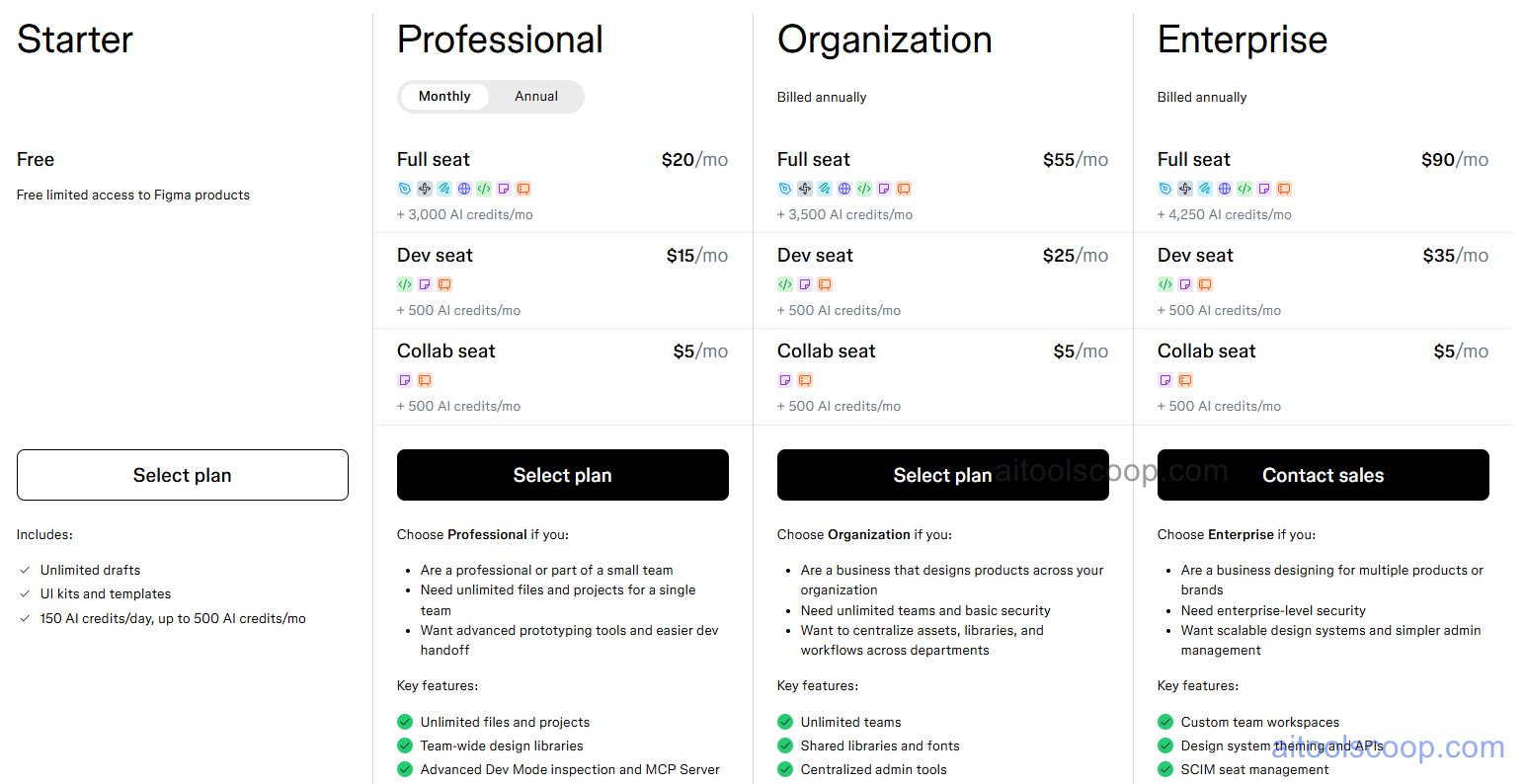
Figma offers four plans. Monthly prices are per editor; annual billing (billed yearly) significantly reduces the per-seat cost.
- Starter — Free — unlimited personal drafts, up to 3 Figma design files and 3 FigJam files, unlimited collaborators (view/comment), community plugins and templates. Ideal for freelancers and individuals exploring Figma.
- Professional — $20/month per editor (annual: $16/month) — unlimited Figma and FigJam files, shared team libraries, version history, private projects, advanced prototyping, and all Figma AI features.
- Organization — $55/month per editor (annual: $45/month) — everything in Professional plus org-wide design systems, centralized team management, analytics, branching and merging, and single sign-on (SSO).
- Enterprise — $90/month per editor (annual: $75/month) — everything in Organization plus advanced security controls (SAML SSO, SCIM provisioning), dedicated workspaces, guest access controls, and priority support.
The Starter plan is permanently free with no credit card required. Always verify current rates at figma.com/pricing.
Who Should Use Figma?
Figma is the go-to tool for UI/UX designers, product designers, and product teams who need to collaborate on digital product design in real time. Its browser-based model makes it ideal for remote and distributed teams. The free Starter plan is generous enough for freelancers and students to build full portfolios. Professional and Organization plans suit growing product teams that need shared libraries and structured design systems. Enterprise is designed for large organizations with security, compliance, and SSO requirements. Figma is less suited to print, marketing, or illustration work — teams doing primarily those tasks may find Adobe Illustrator or Canva more appropriate.
Frequently Asked Questions
Is Figma free to use?
Yes. Figma's Starter plan is permanently free with no credit card required. It includes unlimited personal drafts, up to 3 design files and 3 FigJam files, unlimited collaborators (view and comment only), and access to community plugins and templates. It is sufficient for individuals and freelancers working on personal or small client projects.
How much does Figma cost?
Figma's paid plans are priced per editor seat. The Professional plan costs $20/month per editor (or $16/month billed annually), the Organization plan costs $55/month per editor ($45/month annually), and the Enterprise plan costs $90/month per editor ($75/month annually). Viewer and commenter seats are free on all plans.
What AI features does Figma include?
Figma AI includes text-to-design generation (create full UI screens from a text prompt), smart layer rename that auto-labels layers based on content, AI content fill that populates mockups with realistic placeholder text and images, and design search that finds components and assets using natural language. FigJam also includes AI sticky-note clustering to organise brainstorming sessions automatically. Figma AI features are available on Professional and higher plans.
What is the difference between Figma and FigJam?
Figma is a UI design and prototyping tool for creating high-fidelity screens, components, and interactive prototypes. FigJam is a collaborative online whiteboard for brainstorming, diagramming, and team workshops — think virtual sticky notes, flowcharts, and team retrospectives. Both are included in Figma plans. FigJam can also be purchased as a standalone product.
Does Figma work offline?
Figma is primarily a cloud-based tool and requires an internet connection for full functionality, including real-time collaboration and auto-save. The Figma desktop app (available for Mac and Windows) caches files locally and supports limited offline editing, but changes sync to the cloud only when the connection is restored. For fully offline design work, alternatives like Sketch (Mac only) may be more appropriate.