
Home/ AI Tools /Ai Design Tools /Uizard
Uizard Freemium
🤖 Ai Design Tools
#4 in Ai Design Tools

Uizard

Uizard is an AI-powered UI design tool that turns screenshots and text prompts into interactive wireframes and mockups. Free plan available; paid plans from $19/month or $12/month billed annually.

4.3 / 5 Freemium From $19/mo
Quick Info
💰 Pricing$19/mo
⭐ Rating4.3 / 5
🆓 Free Plan✅ Yes
📂 CategoryAi Design Tools
🌐 WebsiteVisit ↗
🕐 Last UpdatedApr 20, 2026
🔀 Alternatives15 tools
Verified Data Updated Apr 20, 2026
Independently Reviewed No paid placements
Detailed Analysis Hands-on testing
Key Features
  • Autodesigner AI generating complete multi-screen app designs from a plain language description
  • Sketch-to-wireframe conversion uploading hand-drawn sketches and converting to digital wireframes
  • Screenshot scanner importing any app screenshot and converting it into an editable design
  • Pre-built UI component library covering mobile and web elements across multiple themes
  • Clickable prototypes linking screens with interaction triggers to simulate app navigation
  • Real-time collaboration allowing multiple team members to edit and comment simultaneously
  • Themes and branding applying consistent colors, fonts, and styles across all screens
  • Presentation mode for presenting designs full-screen to stakeholders without switching apps
  • Shareable preview links for distributing interactive prototypes without requiring a recipient account
  • PNG and PDF export for design documentation and developer handoff
4.3
Overall Rating
Ease of Use
4.5
Features
4.3
Value
4.0
Performance
4.4
Support
4.2
Pros & Cons
👍 Pros
  • Autodesigner AI eliminates blank-page paralysis for designers and non-designers alike
  • Sketch-to-wireframe bridges physical ideation and digital design workflow uniquely
  • Annual Pro plan at $12/month one of the most affordable AI-powered design tools available
  • Free plan with 2 projects provides meaningful evaluation of core prototyping capabilities
  • Clickable prototypes shareable via link require no design tool knowledge from viewers
  • Screenshot import accelerates competitive analysis workflows significantly
  • Accessible to product managers who cannot use Figma professionally
👎 Cons
  • Business plan monthly and annual price identical at $39/month with no annual discount
  • Design fidelity and component depth still below Figma for high-fidelity UI work
  • Autodesigner output quality varies and usually requires significant manual refinement
  • Limited advanced prototyping interactions compared to ProtoPie or Principle
  • Free plan 2-project limit quickly constraining for anyone on multiple products
  • Export options less comprehensive than Figma for detailed developer handoff
  • Not suitable as a primary production design tool for professional design teams
📖

About Uizard

Uizard (uizard.io) is an AI-powered product design and prototyping platform that dramatically accelerates the wireframing and mockup creation process for product managers, UX designers, and startup founders. Uizard's AI can generate app screens from text descriptions, convert hand-drawn sketches into digital wireframes via photo upload, and transform screenshots of existing apps into editable design templates. The result is a design tool that removes the blank-page barrier from product ideation — users can go from concept description to a clickable prototype in minutes rather than hours. With a built-in component library, collaborative editing, and presentation mode, Uizard bridges the gap between early product thinking and visual communication for cross-functional teams.

How Uizard Works

Create a Uizard account and start a new project by choosing a screen type — mobile app, web app, or desktop. Use Autodesigner to describe your app in plain language and let the AI generate a complete set of themed screens. Alternatively, upload a photo of a hand-drawn sketch and Uizard converts it into a clean digital wireframe automatically. Drag UI components from the built-in library onto the canvas, connect screens with interaction hotspots to create a clickable prototype, and share a preview link for stakeholder review. Export screen assets for developer handoff or download as PNG or PDF.

Key Features

  • Autodesigner AI — generates complete multi-screen app designs from a plain language text description
  • Sketch-to-wireframe — upload a photo of a hand-drawn sketch and convert it to a digital wireframe
  • Screenshot scanner — import any app screenshot and convert it into an editable Uizard design
  • UI component library — pre-built components for mobile and web UI across multiple design themes
  • Clickable prototypes — link screens with interaction triggers to simulate app navigation
  • Real-time collaboration — multiple team members edit and comment on designs simultaneously
  • Themes and branding — apply consistent brand colors, fonts, and component styles across all screens
  • Presentation mode — present designs full-screen to stakeholders without switching tools
  • Shareable preview links — share interactive prototypes via link without requiring a Uizard account
  • Export options — download screens as PNG or PDF for documentation and developer handoff

Uizard Pricing
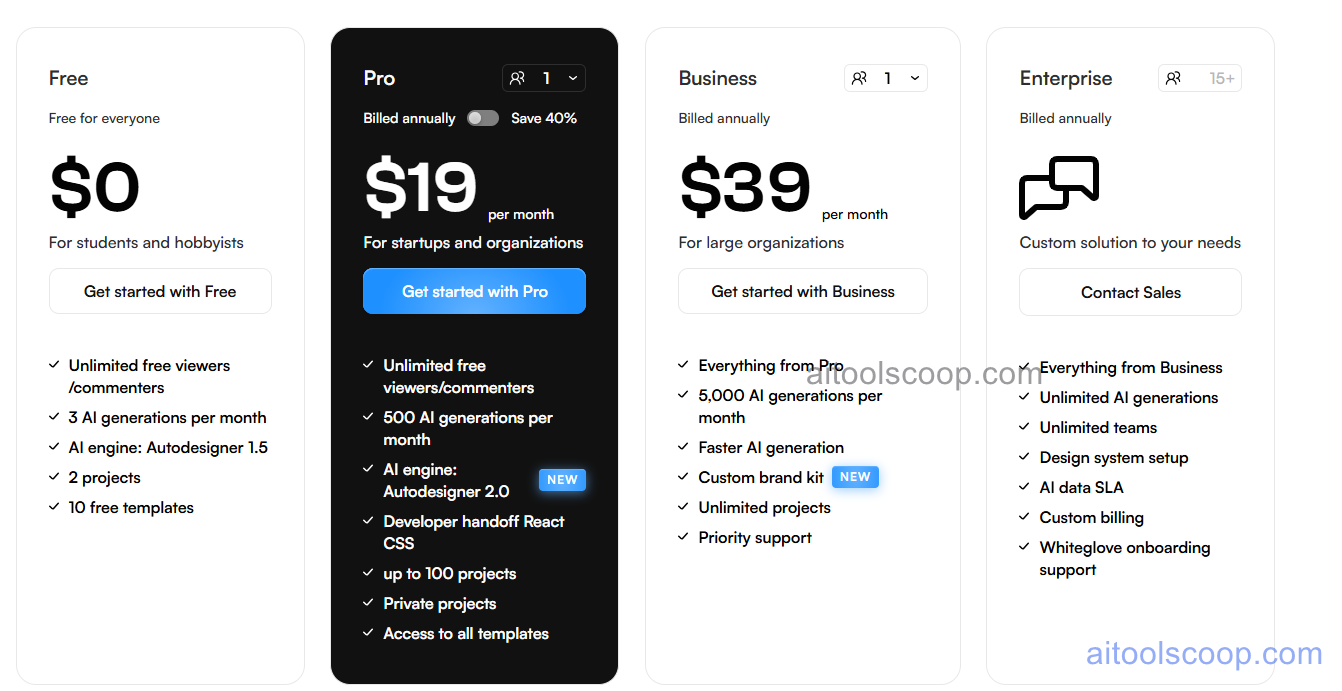
Uizard pricing plans
Uizard pricing — screenshot from uizard.io
Plan Monthly Annually Key Inclusions
Free $0 $0 2 projects, core components, clickable prototypes, shareable links, community support
Pro $19/mo $12/mo Unlimited projects, Autodesigner AI, sketch scanner, screenshot import, themes, collaboration
Business $39/mo $39/mo All Pro features, team workspace, advanced collaboration, admin controls, priority support
Enterprise Custom Custom All Business features, SSO, advanced security, SLA, dedicated support

Always check the latest rates on the official website. For more AI tool reviews, visit aitoolscoop.com.

Who Should Use Uizard?

Uizard is ideal for product managers who need to quickly visualize product ideas without designer availability, startup founders creating app mockups for investor pitches, UX designers accelerating early-stage wireframing with AI, and non-technical co-founders translating product vision into something shareable. The annual Pro plan at $12/month is exceptional value for individuals needing all AI features for regular product design work.


💰

Pricing Plans

Plan Price Includes
Pro $19/mo Full access + priority support
Check Current Pricing →
Affiliate Disclosure: This page contains affiliate links. If you click and make a purchase, we may earn a small commission at no extra cost to you. We only recommend tools we genuinely believe in.

🎯 Explore More

Discover other curated resources from our platform

🛠️ AI Tools View All →
Predis.ai
Predis.ai
★ 4.3
PhantomBuster
PhantomBuster
★ 4.3
NeuronWriter
NeuronWriter
★ 4.4
⚔️ VS Comparisons View All →
⚔️
ChatGPT vs Gemini for Writing in…
ChatGPT GPT-4o vs Gemini 1.5 Pro
ChatGPT vs Kimi: 2026 Comparison — Pricing, Features & Verdict
ChatGPT vs Kimi: 2026 Comparison —…
ChatGPT vs Kimi
ChatGPT vs Claude: 2026 Comparison — Pricing, Features & Verdict
ChatGPT vs Claude: 2026 Comparison —…
ChatGPT vs Claude
💡 Free Prompts View All →
💡
Gemini for HRIS Implementation Leads in…
🔥 5.9K uses
💡
How Healthcare Social Media Consultants Can…
🔥 3.7K uses
💡
The Advanced Privacy Counsel's Guide to…
🔥 3.9K uses
💡 Free Prompts