

Home/ AI Tools /Ai Design Tools /Piktochart
Piktochart Freemium
🤖 Ai Design Tools
#4 in Ai Design Tools

Piktochart

Piktochart is an AI-powered visual content platform for creating infographics, presentations, reports, and social media graphics. Free plan available; paid plans from $29/month or $14/month billed annually.

4.3 / 5 Freemium From $29/mo
Quick Info
💰 Pricing$29/mo
⭐ Rating4.3 / 5
🆓 Free Plan✅ Yes
📂 CategoryAi Design Tools
🌐 WebsiteVisit ↗
🕐 Last UpdatedApr 20, 2026
🔀 Alternatives15 tools
Verified Data Updated Apr 20, 2026
Independently Reviewed No paid placements
Detailed Analysis Hands-on testing
Key Features
  • Piktochart AI generating infographic and presentation layouts from text descriptions or pasted content
  • Purpose-built infographic maker with tools designed specifically for data-driven and editorial visuals
  • Presentation builder creating slide decks with the same intuitive drag-and-drop simplicity
  • 400+ professionally designed templates covering every content type and industry vertical
  • Built-in media library with millions of stock photos, icons, illustrations, and shape elements
  • Data chart tools for creating and styling bar charts, pie charts, line graphs, and maps from data
  • Brand kit for saving and applying consistent colors, fonts, and logos across all team designs
  • Multi-format export including PNG, PDF, PowerPoint, and public shareable link with embed support
  • Team collaboration for sharing projects with teammates for editing and review on paid plans
  • Social media templates pre-sized for Instagram, Facebook, Twitter, and LinkedIn posts
4.3
Overall Rating
Ease of Use
4.5
Features
4.3
Value
4.0
Performance
4.4
Support
4.2
Pros & Cons
👍 Pros
  • Annual Pro plan at $14/month outstanding value for infographic and visual content creation
  • Piktochart AI accelerates production by generating layout drafts from topic descriptions
  • Purpose-built infographic tools go deeper than Canva for data visualization specifically
  • 400+ templates cover virtually every visual content type without starting from scratch
  • Brand kit ensures visual consistency across teams producing high content volumes
  • Free plan functional for occasional infographic creation without financial commitment
  • PowerPoint export bridges Piktochart outputs into existing corporate presentation workflows
👎 Cons
  • Monthly Pro plan at $29/month significantly higher than the annual equivalent
  • Free plan exports include Piktochart watermark making it unsuitable for professional use
  • Team plan monthly at $49/month relatively high for small teams not committing annually
  • AI generation produces draft layouts requiring substantial manual customization
  • Design flexibility less than Canva for general graphic design tasks outside infographics
  • No advanced animation or interactive elements compared to tools like Pitch or Visme
  • Storage limits on lower plans may constrain teams with large asset libraries
📖

About Piktochart

Piktochart (piktochart.com) is a leading visual communication platform that empowers non-designers to create professional-quality infographics, presentations, reports, posters, and social media graphics using an intuitive drag-and-drop editor and a rich library of customizable templates. Piktochart AI can generate complete infographic drafts from a topic description or a block of text, transforming dense written content into visually engaging layouts automatically. With hundreds of professionally designed templates, a built-in image library, icon sets, chart tools, and brand kit support, Piktochart enables marketing teams, educators, communicators, and content creators to produce visually compelling content without design expertise or expensive software.

How Piktochart Works

Create a Piktochart account and select a content type — infographic, presentation, poster, social media graphic, or report. Browse the template library or use Piktochart AI to generate a starting layout from a text description or pasted content. Customize in the drag-and-drop editor: swap text, replace images with your own or from the built-in library, adjust colors to match your brand, and add charts connected to your data. Share the finished design as a public link, embed it on a webpage, or download as PNG, PDF, or PowerPoint. Teams on paid plans can apply brand kits for consistent colors, fonts, and logos across all designs.

Key Features

  • Piktochart AI — generate infographic and presentation layouts from text descriptions or pasted content
  • Infographic maker — purpose-built tools for creating data-driven and editorial infographics
  • Presentation builder — create slide decks with the same drag-and-drop simplicity as infographics
  • 400+ templates — professionally designed layouts for every content type and industry
  • Built-in media library — millions of stock photos, icons, illustrations, and shape elements
  • Data chart tools — create and style bar charts, pie charts, line graphs, and maps from data
  • Brand kit — save brand colors, fonts, and logos for consistent application across all designs
  • Multi-format export — download as PNG, PDF, PowerPoint, or share via public link and embed
  • Team collaboration — share projects with teammates for editing and review on paid plans
  • Social media templates — pre-sized layouts for Instagram, Facebook, Twitter, and LinkedIn

Piktochart Pricing
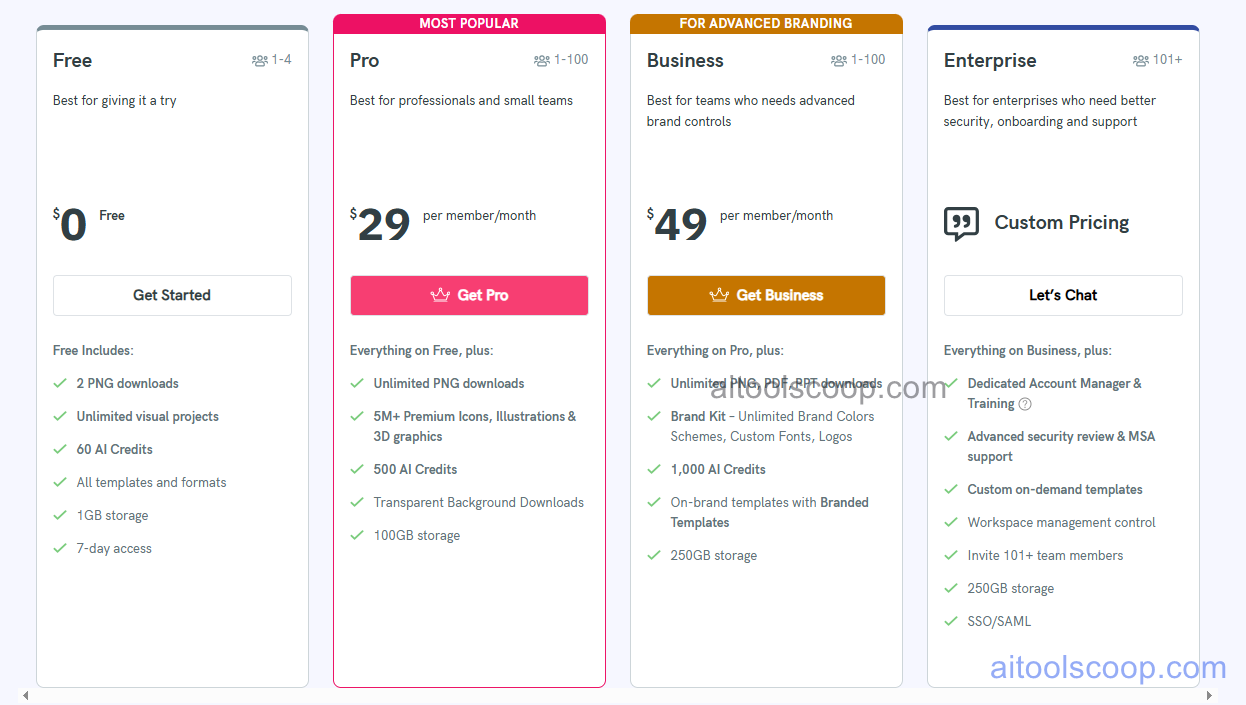
Piktochart pricing plans
Piktochart pricing — screenshot from piktochart.com
Plan Monthly Annually Key Inclusions
Free $0 $0 Limited projects, core templates, basic media library, PNG download, watermarked exports
Pro $29/mo $14/mo Unlimited projects, Piktochart AI, all templates, brand kit, PDF and PowerPoint export, no watermark
Team $49/mo $24/mo All Pro features, team workspace, shared brand kit, collaboration tools, admin controls
Enterprise Custom Custom All Team features, SSO, advanced security, SLA, dedicated support, custom integrations

Always check the latest rates on the official website. For more AI tool reviews, visit aitoolscoop.com.

Who Should Use Piktochart?

Piktochart is ideal for marketing teams producing infographics and reports without a dedicated designer, educators creating visually engaging instructional materials, PR professionals producing data-driven press graphics, content marketers repurposing blog posts into shareable infographic formats, and non-profits communicating impact data visually. The annual Pro plan at $14/month delivers exceptional value for individual creators who need professional infographic and presentation output without design software complexity.


💰

Pricing Plans

Plan Price Includes
Pro $29/mo Full access + priority support
Check Current Pricing →
Affiliate Disclosure: This page contains affiliate links. If you click and make a purchase, we may earn a small commission at no extra cost to you. We only recommend tools we genuinely believe in.

🎯 Explore More

Discover other curated resources from our platform

🛠️ AI Tools View All →
Browse AI
Browse AI
★ 4.3
Apify
Apify
★ 4.4
Axiom
Axiom
★ 4.2
⚔️ VS Comparisons View All →
⚔️
ChatGPT vs Gemini for Writing in…
ChatGPT GPT-4o vs Gemini 1.5 Pro
ChatGPT vs Claude: 2026 Comparison — Pricing, Features & Verdict
ChatGPT vs Claude: 2026 Comparison —…
ChatGPT vs Claude
⚔️
DeepSeek vs Gemini: Which AI Is…
DeepSeek R1 vs Google Gemini 2.0 Pro
💡 Free Prompts View All →
💡
Claude for Enterprise Real Estate Content…
🔥 2.3K uses
💡
Best ChatGPT Prompt for Writing Unit…
🔥 9.4K uses
💡
Best AI Prompt for Overcoming Procrastination…
🔥 23.7K uses
💡 Free Prompts
