

Canva Alternative Worth Switching To
Create (create.vista.com) is an AI-powered visual content creation platform developed by VistaCreate (formerly Crello), offering an accessible alternative to complex design software for marketers, small business owners, and content creators. With a drag-and-drop editor, thousands of professionally designed templates, an extensive asset library of photos, videos, illustrations, and animated elements, and AI-powered design tools, Create enables users to produce branded social media graphics, presentations, flyers, ads, and marketing collateral quickly and consistently. The platform's AI features include background removal, image enhancement, and smart resize tools that adapt designs to different format dimensions automatically, making it straightforward to produce content at scale across multiple platforms from a single starting design.
How Create Works
Sign up for a Create account and choose a format from the template library — social media post, story, presentation slide, flyer, logo, email header, or one of hundreds of other pre-sized options. Select a template that matches your content style and open it in the drag-and-drop editor. Replace placeholder text and images with your own content, apply your brand colors and fonts from the saved brand kit, and adjust layout elements as needed. Use AI background removal to isolate subjects from uploaded photos instantly. Resize the finished design to other platform formats with a single click using the smart resize tool. Download the finished graphic as PNG, JPG, PDF, or MP4 for animated designs, or share directly to connected social accounts.
Key Features
- 50,000+ templates — professionally designed layouts for every format, platform, and industry
- AI background removal — instantly remove image backgrounds for clean product and portrait cutouts
- Smart resize — adapt any design to different platform dimensions automatically without manual redesign
- Animated designs — create animated social media posts and stories with motion elements
- Brand kit — save brand colors, fonts, and logos for consistent one-click application across all designs
- 50M+ asset library — stock photos, videos, vectors, illustrations, and audio for any design need
- Video editor — create and edit short video content for social media within the same platform
- Social media scheduler — publish and schedule content directly to connected social accounts
- Team collaboration — share brand kits and design assets across team members on paid plans
- Multi-format export — download designs as PNG, JPG, PDF, GIF, or MP4
Create Pricing
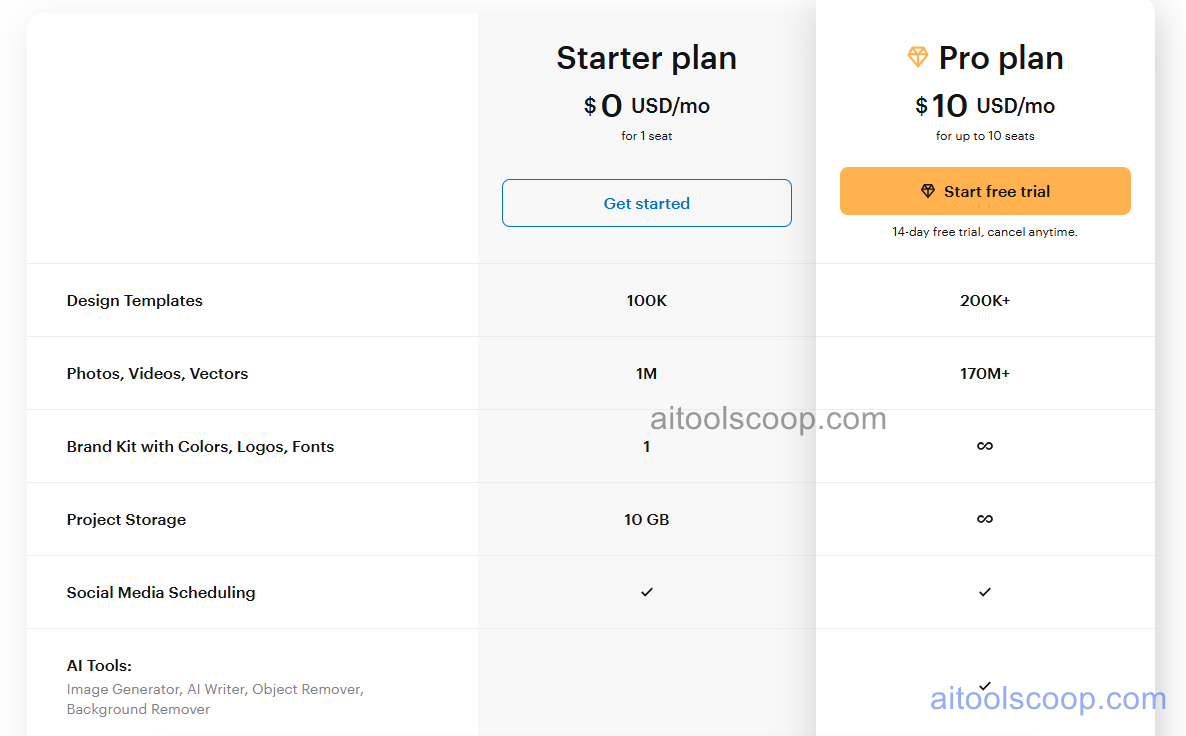
| Plan | Monthly | Key Inclusions |
|---|---|---|
| Free | $0 | 50,000+ templates, core asset library, PNG and JPG download, social sharing, basic brand kit |
| Pro | $10/mo | All Free features, AI background removal, smart resize, full asset library, animated designs, PDF export, team collaboration, priority support |
Always check the latest rates on the official website. For more AI tool reviews, visit aitoolscoop.com.
Who Should Use Create?
Create is ideal for small business owners managing their own social media content without a dedicated designer, content creators and bloggers who produce high volumes of platform-specific graphics regularly, marketing teams at startups needing consistent branded visuals without design software expertise, social media managers producing animated stories and posts across multiple channels, and entrepreneurs who want a Canva alternative with a strong template library and competitive pricing. The free plan provides genuine value for casual creators, and the Pro plan at $10/month is among the most affordable unlimited design subscriptions available.