Evaboot (evaboot.com) is a LinkedIn Sales Navigator scraper and lead enrichment tool designed to help sales teams, recruiters, and growth marketers export clean prospect lists quickly and accurately. It works as a Chrome extension that sits on top of Sales Navigator, allowing users to extract lead and company data from any search, list, or saved lead view with a single click. Unlike generic scrapers that export raw data with noise, Evaboot uses AI to clean and filter results — removing leads that do not actually match the search criteria, correcting name formatting, and flagging data quality issues automatically.
Evaboot's AI filtering layer is its key differentiator: Sales Navigator searches often return results that match some but not all filters, so Evaboot re-validates each exported lead against the original search intent and removes false positives. The platform also integrates with email-finding services to enrich exported contacts with verified business email addresses, making the output ready for direct outreach without additional enrichment steps.
How Evaboot Works
Users install the Evaboot Chrome extension, log into LinkedIn Sales Navigator, and run a search or open a saved lead list. The Evaboot button appears in the Sales Navigator interface; clicking it queues the export and Evaboot processes the results in the background. The AI cleaning layer validates each result against the search filters, removes duplicates and irrelevant contacts, normalises name and company formatting, and optionally finds and verifies business email addresses. The final CSV export is downloaded directly and is ready for import into a CRM, email tool, or outreach platform. Evaboot also supports exporting company account lists and LinkedIn event attendees.
Key Features
- AI lead cleaning — automatically filters out false positives that Sales Navigator returns despite not matching all search criteria
- LinkedIn Sales Navigator export — one-click export of lead lists, account lists, and event attendee lists from any Sales Navigator view
- Email finder integration — enriches exported leads with verified business email addresses without leaving the Evaboot workflow
- Duplicate detection — identifies and removes duplicate contacts across exports to keep lists clean
- Name and company normalisation — AI corrects formatting inconsistencies in names, job titles, and company fields in the exported data
- CSV export — clean, structured CSV output ready for CRM import, email sequencing tools, or manual review
- Account list export — export company-level data from Sales Navigator account searches alongside contact-level lead exports
- Event attendee export — extract attendee lists from LinkedIn events to build targeted outreach lists
- Chrome extension workflow — runs directly inside Sales Navigator with no separate app or data upload required
- CRM-ready output — exported fields map cleanly to standard CRM fields for HubSpot, Salesforce, and Pipedrive imports
Evaboot Pricing
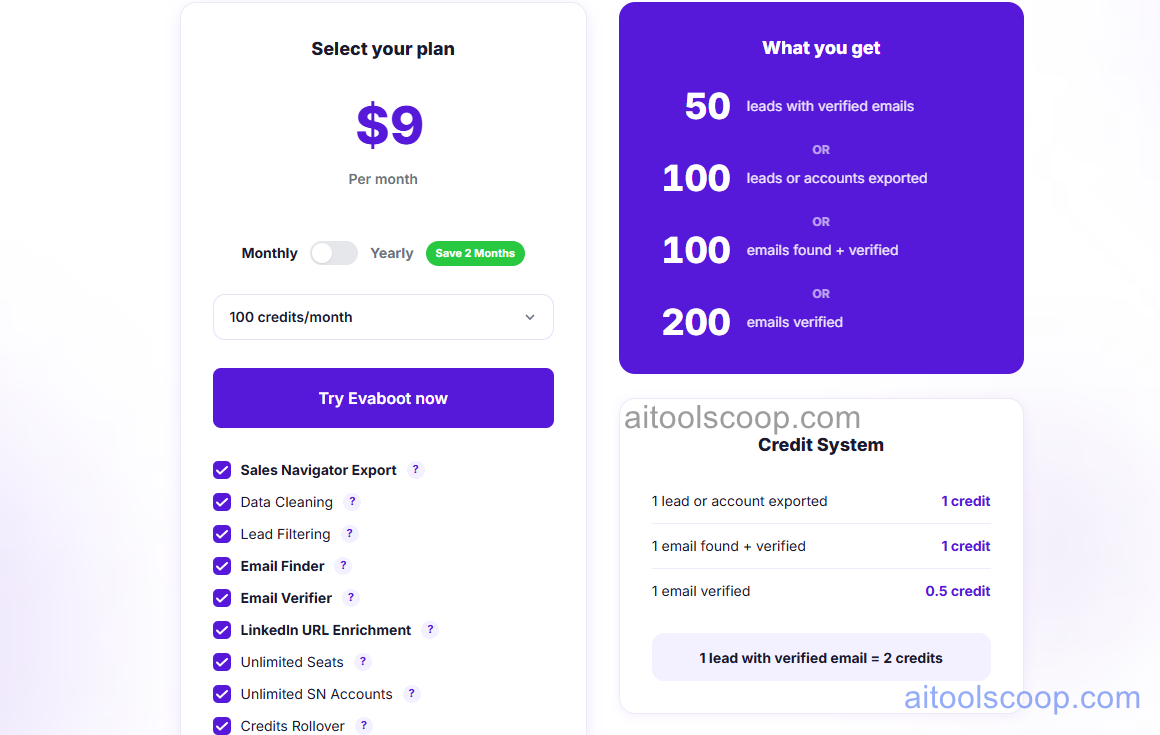
Evaboot offers a single all-inclusive plan with a small discount for annual billing.
- Monthly — $9/month — full access to all Evaboot features including AI lead cleaning, email finder, and unlimited exports (subject to Sales Navigator limits).
- Annual — $8/month (billed yearly) — same full feature set with a modest saving for annual commitment.
A LinkedIn Sales Navigator subscription is required to use Evaboot. Always verify current rates at evaboot.com/pricing.
Who Should Use Evaboot?
Evaboot is purpose-built for B2B sales teams, SDRs, recruiters, and growth marketers who use LinkedIn Sales Navigator regularly for prospecting. At $9/month it is one of the most affordable Sales Navigator companion tools available, making it accessible even for individual sales reps. Its AI cleaning feature is particularly valuable for teams who have experienced the frustration of exporting a Sales Navigator search and finding that a significant portion of the results do not actually match the intended criteria. Evaboot is not useful without a Sales Navigator subscription, and it is not a replacement for a full sales engagement or CRM platform — it covers the data extraction and initial enrichment step only.
Frequently Asked Questions
What is Evaboot used for?
Evaboot is a Chrome extension that exports lead and company data from LinkedIn Sales Navigator into clean, AI-filtered CSV files. It removes false positives from search results, deduplicates contacts, normalises data formatting, and optionally finds verified business email addresses. It is primarily used by B2B sales teams and recruiters to build accurate prospect lists for outreach campaigns without manual data cleaning.
How much does Evaboot cost?
Evaboot costs $9 per month on a monthly plan, or $8 per month when billed annually. It is a single all-inclusive plan with no feature tiers. A LinkedIn Sales Navigator subscription is required separately, as Evaboot is a companion tool that operates within Sales Navigator.
Does Evaboot require LinkedIn Sales Navigator?
Yes. Evaboot is a Chrome extension built specifically for LinkedIn Sales Navigator. It cannot export data from the standard free LinkedIn interface or LinkedIn Premium — it requires an active Sales Navigator subscription. Evaboot adds its AI cleaning and export functionality on top of Sales Navigator searches, lead lists, and account lists.
How does Evaboot's AI cleaning work?
LinkedIn Sales Navigator searches sometimes return leads that match some but not all of the applied filters — a known limitation of the platform. Evaboot's AI cleaning layer re-evaluates each exported lead against the original search intent and removes contacts that do not genuinely match all criteria. It also corrects formatting inconsistencies in name, title, and company fields, and flags data quality issues in the exported CSV so users know which records may need manual review.
Can Evaboot find email addresses?
Yes. Evaboot integrates an email finder that attempts to locate and verify business email addresses for exported leads. This enrichment step runs as part of the export workflow, so the final CSV can include verified emails alongside the LinkedIn profile data. The email finder uses multiple data sources to maximise match rates, though not every contact will have a verified email available.