

Home/ AI Tools /AI Productivity Tools /Heptabase
Heptabase Paid
🤖 AI Productivity Tools
#9 in AI Productivity Tools

Heptabase

Heptabase is a visual knowledge management platform built around infinite whiteboards for making sense of complex topics. Paid plans from $11.99/month or $8.99/month billed annually.

4.5 / 5 Paid From $11.99/mo
Quick Info
💰 Pricing$11.99/mo
⭐ Rating4.5 / 5
🆓 Free Plan❌ No
🌐 WebsiteVisit ↗
🕐 Last UpdatedApr 17, 2026
🔀 Alternatives40 tools
Verified Data Updated Apr 17, 2026
Independently Reviewed No paid placements
Detailed Analysis Hands-on testing
Key Features
  • Visual whiteboards providing an infinite canvas for spatially arranging and connecting notes and ideas
  • Reusable cards allowing the same note to appear on multiple whiteboards without duplication
  • PDF reader and annotation for importing, reading, and marking up research papers inside Heptabase
  • Rich card editor for writing detailed notes in Markdown with full formatting support
  • Daily journal providing a chronological capture workspace connected to all cards and whiteboards
  • Table view for organizing cards with structured properties in a database-style grid layout
  • Tags and full-text search for organizing and retrieving content across the entire knowledge base
  • Bidirectional links connecting cards with references that automatically display backlinks
  • Cross-platform native apps for Mac, Windows, iOS, and Android plus full web access
  • Offline support with full functionality and automatic cloud sync on reconnection
4.5
Overall Rating
Ease of Use
4.7
Features
4.5
Value
4.2
Performance
4.6
Support
4.4
Pros & Cons
👍 Pros
  • Spatial whiteboard approach uniquely suited for researchers and visual thinkers mapping complex ideas
  • Reusable cards eliminate the duplication problem common in other canvas-based knowledge tools
  • Built-in PDF reader with annotation brings research paper processing directly into the knowledge base
  • Cross-platform native apps including Windows and Android cover more devices than most competitors
  • Offline-first architecture provides reliable access in any connectivity environment
  • Annual Personal plan at $8.99/month excellent value for a serious visual knowledge management tool
  • Passionate founding team with consistent product development and active community engagement
👎 Cons
  • No free plan available — must commit payment to evaluate the platform
  • Visual whiteboard approach has a learning curve for users accustomed to linear notes systems
  • Team plan at $71.99/month significantly expensive for small collaborative research groups
  • AI features require the Pro plan upgrade adding cost beyond the base Personal subscription
  • Smaller community and fewer third-party resources compared to Obsidian or Notion ecosystems
  • Very large whiteboards with hundreds of cards can experience performance slowdowns
  • Not well suited for users who prefer simple linear note-taking without spatial organization
📖

About Heptabase

Heptabase (heptabase.com) is a visual-first knowledge management platform that combines a rich card-based note system with infinite canvas whiteboards to help users make sense of complex topics, research, and interconnected ideas. Unlike linear notes apps, Heptabase treats each note as a reusable card that can appear on multiple whiteboards simultaneously — allowing the same idea to live in different conceptual contexts without duplication. Researchers, students, and knowledge workers use Heptabase to map out mental models, synthesize research literature, plan projects visually, and build deep understanding of complex domains. Backed by a committed founding team and a passionate user community, Heptabase is widely regarded as the most serious visual thinking tool available today.

How Heptabase Works

Create a Heptabase account and begin by creating cards — rich text notes written in a clean Markdown editor. Organize your cards into Whiteboards — infinite spatial canvases where you drag and arrange cards visually, draw connections between them with lines and arrows, and cluster related ideas into groups. Because each card exists independently in the card library, the same card can appear on multiple whiteboards in different conceptual arrangements without creating duplicates. Use the Journal for daily chronological capture. Tag cards and use the PDF reader with annotation tools to import and process research papers directly into your knowledge base. Search across all cards and whiteboards and use the Table view to organize cards with structured properties. Heptabase syncs across Mac, Windows, iOS, Android, and web.

Key Features

  • Visual whiteboards — infinite canvas for spatially arranging and connecting notes and ideas
  • Reusable cards — notes that can appear on multiple whiteboards without duplication
  • PDF reader and annotation — import, read, and annotate research papers directly inside Heptabase
  • Rich card editor — write detailed notes in Markdown with full formatting support
  • Daily journal — chronological capture workspace connected to all cards and whiteboards
  • Table view — organize cards with structured properties in a database-style grid
  • Tags and search — tag-based organization with full-text search across all content
  • Bidirectional links — connect cards with references that display backlinks automatically
  • Cross-platform apps — native apps for Mac, Windows, iOS, and Android plus web access
  • Offline support — full functionality without internet with automatic cloud sync on reconnection

Heptabase Pricing
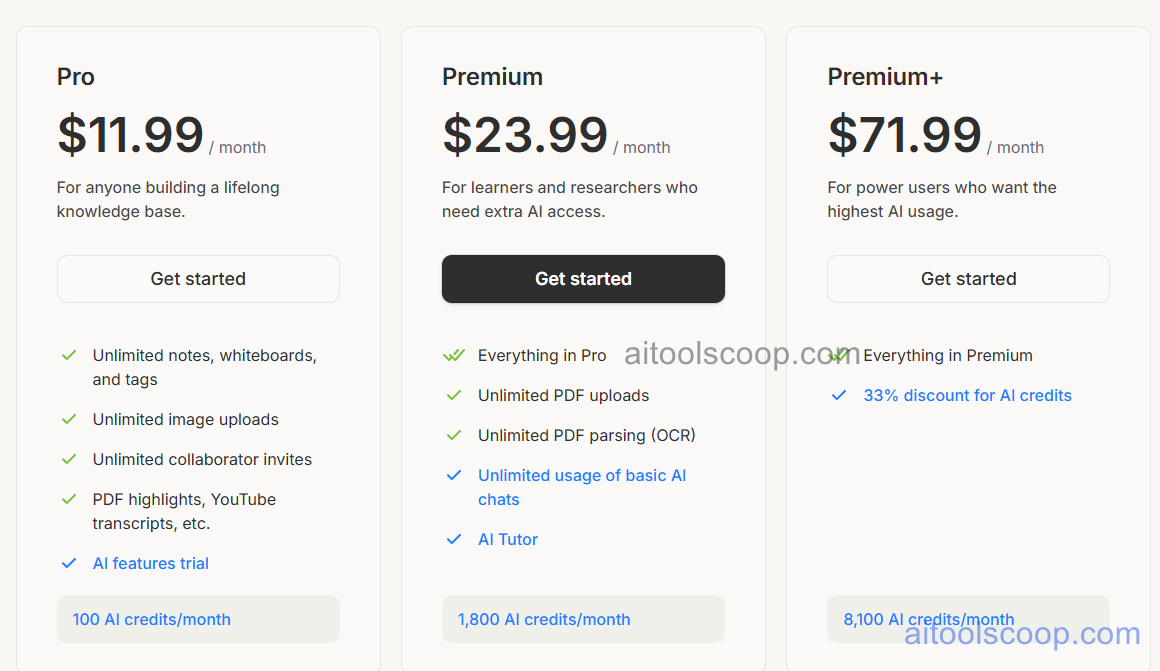
Heptabase pricing plans
Heptabase pricing — screenshot from heptabase.com
Plan Monthly Annually Key Inclusions
Personal $11.99/mo $8.99/mo Unlimited cards and whiteboards, PDF reader, daily journal, cross-platform sync, offline support
Pro $23.99/mo $17.99/mo All Personal features, AI assistant, advanced AI features, priority support
Team $71.99/mo $53.99/mo All Pro features, shared team workspace, collaborative whiteboards, team admin controls

Always check the latest rates on the official website. For more AI tool reviews, visit aitoolscoop.com.

Who Should Use Heptabase?

Heptabase is the ideal tool for academic researchers and PhD students who need to spatially map out and synthesize large bodies of literature, learners studying complex domains who benefit from visual representations of interconnected concepts, product designers and UX researchers who think spatially and want their knowledge base to reflect that, founders and strategists mapping out competitive landscapes and market thinking, and knowledge workers who have tried linear notes apps and consistently found them inadequate for capturing the full structure of their thinking. The Personal plan suits individual researchers and learners, the Pro plan adds AI assistance for synthesis-heavy workflows, and the Team plan covers collaborative research groups.


💰

Pricing Plans

Plan Price Includes
Paid $11.99/mo Full access + priority support
Check Current Pricing →
Affiliate Disclosure: This page contains affiliate links. If you click and make a purchase, we may earn a small commission at no extra cost to you. We only recommend tools we genuinely believe in.

🎯 Explore More

Discover other curated resources from our platform

🛠️ AI Tools View All →
Craiyon
Craiyon
★ 3.8
MuleRun
MuleRun
★ 3.6
Granola AI
Granola AI
★ 4.1
⚔️ VS Comparisons View All →
⚔️
ChatGPT vs Gemini for Writing in…
ChatGPT GPT-4o vs Gemini 1.5 Pro
ChatGPT vs Grok: 2026 Comparison — Pricing, Features & Verdict
ChatGPT vs Grok: 2026 Comparison —…
ChatGPT vs Grok
ChatGPT vs Kimi: 2026 Comparison — Pricing, Features & Verdict
ChatGPT vs Kimi: 2026 Comparison —…
ChatGPT vs Kimi
💡 Free Prompts View All →
💡
Beginner Guide: Fix the No-System Problem…
🔥 9.1K uses
💡
Beginner-Level Claude Prompts for Technical SEO…
🔥 4.4K uses
💡
How Education Content Strategists Can Add…
🔥 7.3K uses
💡 Free Prompts