

Automate Any Browser Task Without Writing Code
Axiom (axiom.ai) is a no-code browser automation platform that enables users to automate any repetitive task performed in a web browser — clicking buttons, filling forms, extracting data, navigating pages, and triggering actions across web applications — without writing code. Operating as a Chrome extension with a visual workflow builder, Axiom allows users to record browser actions or build automation sequences using a drag-and-drop interface, then run them manually, on a schedule, or triggered by external events. From automating CRM data entry and LinkedIn outreach to form submission and data scraping, Axiom handles the repetitive browser work that consumes hours of manual effort each week, making it a practical productivity tool for sales teams, operations professionals, and any knowledge worker managing high-volume browser-based tasks.
How Axiom Works
Install the Axiom Chrome extension and open the builder to create a new bot. Use the visual drag-and-drop interface to build an automation sequence by adding action blocks: navigate to a URL, wait for an element to load, click a button, type text into a field, extract data from a table, or scroll the page. Alternatively, use the record mode to capture a workflow by performing it manually while Axiom records each step. Configure the bot inputs — data lists, Google Sheets, or manual inputs — and run the bot against each item in the list sequentially. Schedule bots to run automatically at specific times or trigger them via webhook from external tools. Results can be saved to a Google Sheet or delivered via webhook to connected applications.
Key Features
- Visual bot builder — drag-and-drop action blocks for building browser automation without code
- Record mode — capture automation by performing a task manually while Axiom records each step
- Data list processing — run bots against a list of URLs, names, or records for bulk automation
- Google Sheets integration — use sheets as input data source and deliver results directly to a spreadsheet
- Scheduling — run bots automatically on a time-based recurring schedule
- Webhook triggers — trigger bots from external tools like Zapier, Make, or any HTTP webhook source
- Data extraction — scrape structured data from web pages and tables into usable formats
- Form automation — fill and submit web forms automatically from a data list
- Conditional logic — add if-then branches to handle different page states within automations
- Bot sharing — export and share bot configurations with teammates or the Axiom community
Axiom Pricing
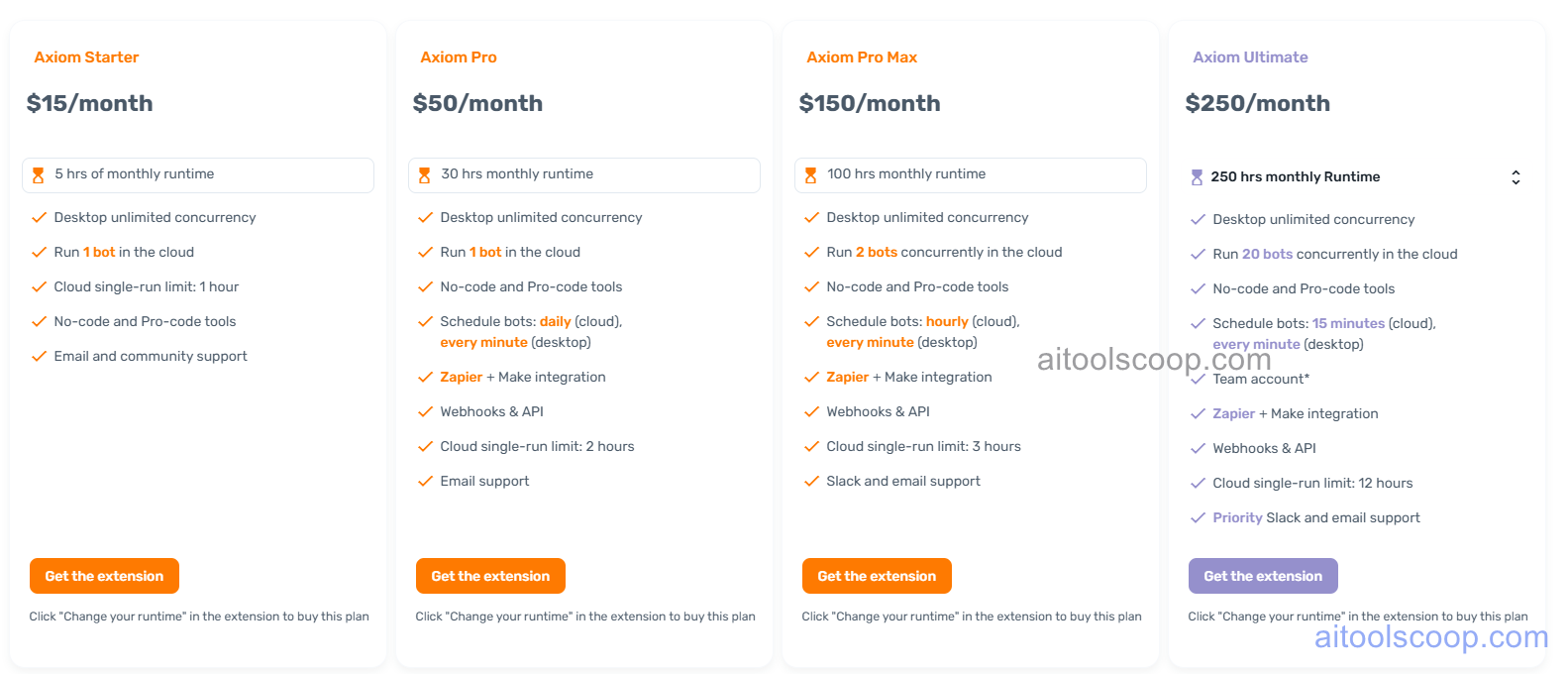
| Plan | Monthly | Key Inclusions |
|---|---|---|
| Starter | $15/mo | Core bot builder, record mode, Google Sheets integration, basic scheduling, community support |
| Professional | $50/mo | All Starter features, higher run limits, webhook triggers, data list processing, priority support |
| Teams | $150/mo | All Professional features, team workspaces, bot sharing, admin controls, shared scheduling |
| Enterprise | $250/mo | All Teams features, maximum run limits, dedicated support, SLA, custom integrations |
Always check the latest rates on the official website. For more AI tool reviews, visit aitoolscoop.com.
Who Should Use Axiom?
Axiom is well suited for sales professionals automating CRM data entry, LinkedIn engagement, and prospect research tasks, operations teams eliminating repetitive form-filling and data migration work across web applications, recruiters managing high-volume candidate outreach and tracking workflows, marketing teams automating social media interactions and content monitoring, and small business owners managing routine administrative browser tasks without technical automation skills. The Starter plan at $15/month makes Axiom one of the most affordable entry points for recurring browser automation, while the Teams plan serves groups needing shared bot libraries and collaborative workflow management.