

No-Code Web Scraping That Anyone Can Use
Browse AI (browse.ai) is a no-code web scraping and website monitoring platform that allows anyone to extract and monitor data from any website without writing a single line of code. Users train robotic agents — called Robots — by demonstrating the extraction task once in a Chrome extension, and Browse AI learns to repeat it automatically on a schedule or trigger. The platform handles dynamic JavaScript-rendered sites, login-gated pages, and pagination automatically, making it accessible to business users who need competitive intelligence, price monitoring, lead data, and other web-extracted information without engineering resources. With pre-built robots for popular sources like Amazon, LinkedIn, Google Maps, and Crunchbase, Browse AI enables immediate data extraction without any training required.
How Browse AI Works
Install the Browse AI Chrome extension and navigate to the website you want to scrape. Click "Record Robot" and demonstrate the extraction by clicking on the data elements you want to capture — product names, prices, contact details, job listings, or any other visible content. Browse AI records the interaction and creates a Robot that can repeat the task automatically. Configure the Robot to run on a schedule — hourly, daily, or weekly — and Browse AI executes it in the cloud and delivers fresh data to a spreadsheet, webhook, or connected tool. Set up change monitoring to receive an alert whenever specified page content changes. Access the pre-built Robot marketplace for hundreds of ready-to-use extractors targeting popular websites and data sources.
Key Features
- No-code robot training — demonstrate an extraction once and Browse AI automates it permanently
- Pre-built robot marketplace — hundreds of ready-to-use extractors for popular sites and data sources
- Scheduled extraction — run robots automatically on hourly, daily, or weekly schedules
- Change monitoring — receive alerts when specified website content changes
- JavaScript rendering — handles dynamic, JavaScript-heavy pages that basic scrapers cannot access
- Login handling — navigate authenticated pages behind login walls automatically
- Pagination support — automatically navigate multiple pages to collect complete datasets
- Bulk extraction — process lists of URLs in a single robot run for high-volume data collection
- Webhook and API delivery — send extracted data to any tool automatically after each run
- Google Sheets integration — deliver extraction results directly to a connected spreadsheet
Browse AI Pricing
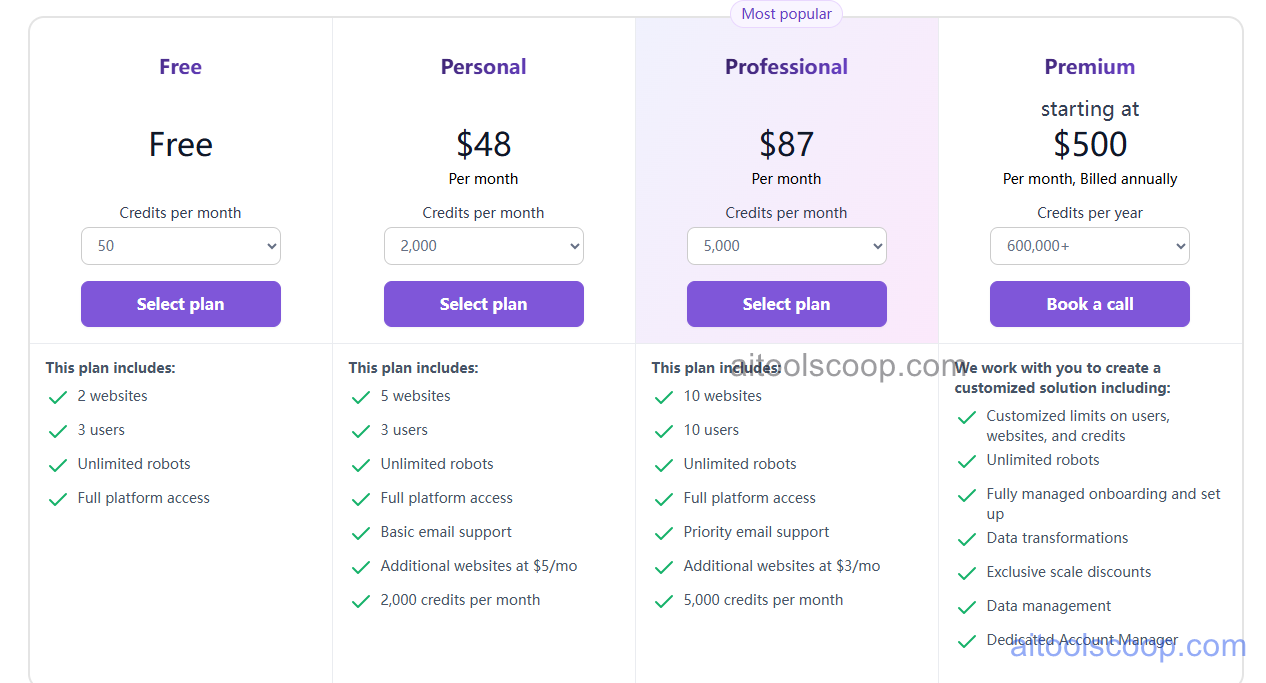
| Plan | Monthly | Annually | Key Inclusions |
|---|---|---|---|
| Free | $0 | $0 | Limited monthly credits, robot training, pre-built marketplace, community support |
| Starter | $48/mo | $19/mo | Increased credits, scheduled runs, change monitoring, Google Sheets, webhook delivery |
| Professional | $87/mo | $69/mo | All Starter features, higher credits, bulk extraction, login handling, priority support |
| Team | $500/mo | $500/mo | All Professional features, maximum credits, team workspaces, dedicated support, SLA |
Always check the latest rates on the official website. For more AI tool reviews, visit aitoolscoop.com.
Who Should Use Browse AI?
Browse AI is ideal for sales and marketing teams monitoring competitor pricing, product inventory, and job listings without engineering support, business development professionals extracting structured lead data from directories and LinkedIn, e-commerce sellers tracking competitor pricing changes for dynamic repricing, market research teams collecting data from industry sources on automated schedules, and any business user who needs reliable web data regularly but lacks the technical skills to build custom scrapers. The annual Starter plan at $19/month makes Browse AI one of the most affordable entry points for scheduled, automated web data extraction.